A brief introduction to q and KDB-X
Welcome! This page introduces the basics of q and KDB-X. Through practical examples, you'll learn how to create data, run queries, and understand the core principles of q's concise syntax and high-performance design. No prior knowledge is required. You'll pick up the essentials as you work through the exercises.
KDB-X is an ecosystem built on top of q. The q language is a concise, expressive, dynamically typed, interpreted programming language with a built-in database engine optimized for streaming, real-time, and historical data. By bringing the application logic and data together, KDB-X eliminates the overhead associated with complex multi-layer architectures.
If you don't have KDB-X installed yet, follow this quick install KDB-X guide.
Start q
In your terminal, enter q to start an interactive session. When the q) prompt appears, the interpreter is ready.
q
KDB-X 5.0 2026.07.23 Copyright (C) 1993-2026 Kx Systems
...

q)
Note
The code examples below are cumulative. Each section assumes the variables and state defined in all preceding sections are still in your active q session.
Prefer Jupyter notebooks? Use q first mode
If you feel more comfortable in a Jupyter notebook than in a console, you can run q code there too. In q first mode of KDB-X Python, every notebook cell runs as q code by default. Enable it with:
import pykx as kx
kx.util.jupyter_qfirst_enable()
Unlike the console, a q first cell supports multiline q expressions.
Standard constructs
Like most languages, q allows you to create atoms (single values), lists, and dictionaries, and assign them to variables (using the colon :). Below are some common q commands and their Python equivalents:
q
q)n:8       / Assign an integer
q)n
8
q)show PI: 3.14
3.14

q)b:0b      / A boolean (0b for false, 1b for true)
/ Create a list 0-4 and reverse it
q)show l:reverse til 5
4 3 2 1 0

q)(8; 3.14; ("Alice"; "Bob"; "Mike")) / A nested list
8
3.14
("Alice";"Bob";"Mike")
/ Assign several variables at once
q)(n; friends; (ONE; ; THREE)): (8; ("Alice"; "Bob"; "Mike"); 1 2 3) / pattern matching

q)show contacts:([Alice: "555-0101"; Bob: "555-0723"; Mike: "555-6666"])
Alice| "555-0101"
Bob  | "555-0723"
Mike | "555-6666"
Python
>>> n = 8
>>> n
8
>>> PI = 3.14
>>> PI
3.14
>>> b = False

>>> l = list(reversed(range(5)))
>>> l
[4, 3, 2, 1, 0]
>>> [8, 3.14, ["Alice", "Bob", "Mike"]]
[8, 3.14, ['Alice', 'Bob', 'Mike']]


>>> n, friends, (ONE, _, THREE) = [8, ["Alice", "Bob", "Mike"], [1,2,3]] # unpacking

>>> contacts = {"Alice": "555-0101", "Bob": "555-0723", "Mike": "555-6666"}
>>> contacts
{'Alice': '555-0101', 'Bob': '555-0723', 'Mike': '555-6666'}
You can define functions, use execution controls (like if-then-else), and call built-in operators and functions.
q
q)callRandomFriend:{f: rand key contacts; "Calling ", string[f], " at ", contacts f}


q)callRandomFriend[]
"Calling Bob at 555-0723"
q)area:{[r] PI*r*r}
q)if[n<14; "I'm a child!"] / if statement
"I'm a child!"
Python
>>> import random
>>> def callRandomFriend():
...     key, value = random.choice(list(contacts.items()))
...     return f"Calling {key} at {value}"
...
>>> callRandomFriend()
'Calling Mike at 555-6666'
>>> area = lambda r: PI * r * r
>>> if n < 14:
...     "I'm a child!"
...
"I'm a child!"
Use exit 0, \\, or Ctrl+D (that is, end of file) to exit a q session.
You can put your q commands into a text file and run it:
q myscript.q
or load it into your q session:
q)\l myscript.q
The beauty of q
The following sections highlight what makes q distinctive.
Minimalist syntax (no noise)
q descends from APL (A Programming Language), a language rooted in mathematical notation. In q, lists, dictionaries, and functions are all mappings — a unified concept that means the same square-bracket notation works for all three.
q
q)l[2]              / Indexing a list
2
q)contacts[`Alice]  / Looking up a dictionary by a key
"555-0101"
q)area[5]           / Applying a function
78.5
Python
>>> l[2]
2
>>> contacts["Alice"]
'555-0101'
>>> area(5)
78.5
This is polymorphism at its most fundamental level. To further reduce noise, q allows you to omit brackets and use whitespace to separate list items.
q)l 2    / Equivalent to l[2]
2
q)4 1 7  / A list of integers (no commas or parentheses needed)
4 1 7
It is common in mathematics to use function parameters x, y, or z. You can omit parameter declaration and q understands that you mean x, y, and z in that order:
q)manhattan:{sum abs x-y}
q)manhattan[1 2 3; 3 2 1]
4
Reducing boilerplate code is a basic principle in q.
Right-to-left evaluation
Unlike most languages, q has no operator precedence. q evaluates expressions strictly from right to left.
q)2*1+3 / 1+3 is 4, then 2*4
8
q)3+2>1 / True is converted to 1
4
You can use parentheses to override this order, but to keep the code clean, q developers often rearrange the expression:
q)3+2*1     / Instead of (2*1)+3
5
q)1<3+2     / Instead of (3+2)>1
1b
This encourages linear thinking: you chain operations together, much like a Linux pipe, except that data is processed from right to left.
Vector operations
q is a vector programming language. Most operators work on entire lists automatically without the need for explicit loops (like for or list comprehension in Python).
q
q)show l:reverse til 5
4 3 2 1 0


q)2*l     / Scalar multiplication across a list
8 6 4 2 0
q)l 3 0   / Indexing by a list
1 4
/ Adding two lists element-wise, recursively
q)(1; 2; 3 4) + (10; 20; 30 40)
11
22
33 44
Python
>>> l = list(reversed(range(5)))
>>> l
[4, 3, 2, 1, 0]

>>> [2 * x for x in l]
[8, 6, 4, 2, 0]
>>> [l[i] for i in [3, 0]]
[1, 4]

>>> def add_lists_recursive(list1, list2):
...    result = []
...    for a, b in zip(list1, list2):
...        if isinstance(a, list) and isinstance(b, list):
...            result.append(add_lists_recursive(a, b))
...        else:
...            result.append(a + b)
...    return result
>>> add_lists_recursive([1, 2, [3, 4]], [10, 20, [30, 40]])
[11, 22, [33, 44]]
Numpy
>>> import numpy as np
>>> l = np.arange(5)[::-1]
>>> l
array([4, 3, 2, 1, 0])
>>> 2 * l
array([8, 6, 4, 2, 0])
>>> l[[3, 0]]
array([1, 4])

>>> np.array([1, 2, np.array([3, 4])], dtype=object) + np.array([10, 20, np.array([30, 40])], dtype=object)
array([11, 22, array([33, 44])], dtype=object)
Functional programming
The q language also treats functions as first-class citizens. You can pass and return functions like any other data type.
q
q)manhattan:{sum abs x-y}
q)euclidean:{sqrt sum (x-y)*x-y}

q)logDistance:{[x;y;distance] "The distance is: ", string distance[x;y]}
q)logDistance[1 2 3; 4 2 -1; euclidean]
"The distance is: 5"
Python
>>> import math
>>> manhattan = lambda x, y: sum(abs(xi - yi) for xi, yi in zip(x, y))
>>> euclidean = lambda x, y: math.sqrt(sum((xi - yi) ** 2 for xi, yi in zip(x, y)))
>>> log_distance = lambda x, y, distance: f"The distance is: {distance(x, y)}"
>>> log_distance([1, 2, 3], [4, 2, -1], euclidean)
'The distance is: 5.0'
q's higher-order operators, called iterators, make complex data manipulation concise.
q
q)count each (1 2; 5 4 3; til 20)   / Apply 'count' to each sub-list
2 3 20
q)add: {x+y}
q)/ Cumulative sum, `(+) scan 1 2 3` also works:
q)add scan 1 2 3            / or use `sums 1 2 3`
1 3 6
Python
>>> list(map(len, [[1, 2], [5, 4, 3], range(20)]))
[2, 3, 20]
>>> add = lambda x, y: x+y
>>> from itertools import accumulate
>>> list(accumulate([1, 2, 3], add))
[1, 3, 6]
Interned strings: symbols
Symbols are atomic entities preceded by a backtick (for example, `AAPL). Internally, q stores each distinct symbol once in a lookup table and holds only a reference to it (a process called interning). This makes comparing two symbols — like checking if a ticker in a billion-row table matches `AAPL — fast, because the computer compares two references rather than checking every letter in a word.
q)friends:`Alice`Bob`Mike   / List of symbols
q)friends?`Mike             / Find: the index of Mike
2
Note
Symbols work best for low-cardinality data (tickers, exchange codes, and status flags). For high-cardinality data with values that rarely repeat, use strings instead. Each unique symbol is permanently added to the intern table for the lifetime of the q process.
Extreme terseness
q's brevity comes at a price. q developers value minimal keystrokes, which does lead to heavy overloading of symbols. For example, the ? symbol can perform 10 different operations depending on the number and type of its arguments. In the previous section, you saw it used as Find to look up an index; the following examples show three other usages (called roll, deal, and permute) related to random number generation:
q
q)rand 10
9

q)4?10          / Four random integers
4 5 4 2
q)show l:-4?10  / Four random integers without duplicates
6 0 8 5

q)0N?l          / Permutation
8 6 0 5
Python
>>> import random
>>> random.randint(0,9)
9
>>> [random.randint(0, 9) for _ in range(4)]
[4, 5, 4, 2]
>>> l=random.sample(range(0, 10), 4)
>>> l
[6, 0, 8, 5]
>>> random.sample(l, len(l))
[8, 6, 0, 5]
Tables
q treats tables as first-class citizens, which means they are a primary data type just like integers or lists. You can think of a table from two different perspectives:
- A list of rows, where all rows are dictionaries of the same keys.
- A list of columns, where each column is a named list with values of the same length.
While you can interact with a table as a list of rows, q stores them internally as a list of columns. This columnar layout is why q performs well in data analysis.
Each q snippet shows the Pandas equivalent.
Creating tables
In q, a dictionary is a mapping formed by two equal-length lists. A list of dictionaries forms a table when all dictionaries share the same keys:
q
q)(([name: `Alice; phone: "555-0101"; age: 23]); ([name: `Bob; phone: "555-0723"; age: 32]); ([name: `Mike; phone: "555-6666"; age: 22]))
name  phone      age
--------------------
Alice "555-0101" 23
Bob   "555-0723" 32
Mike  "555-6666" 22
Pandas
>>> pd.DataFrame(data = [
...     {"name": "Alice", "phone": "555-0101", "age": 23},
...     {"name": "Bob",   "phone": "555-0723", "age": 32},
...     {"name": "Mike",  "phone": "555-6666", "age": 22}
...     ])
    name     phone  age
0  Alice  555-0101   23
1    Bob  555-0723   32
2   Mike  555-6666   22
You can create a table by defining its columns directly using the ([] ...) syntax:
q
q)show t:([] name: `Alice`Bob`Mike; phone: ("555-0101"; "555-0723"; "555-6666"); age: 23 32 22)
name  phone      age
--------------------
Alice "555-0101" 23
Bob   "555-0723" 32
Mike  "555-6666" 22
Pandas
>>> t = pd.DataFrame({
...     "name": ["Alice", "Bob", "Mike"],
...     "phone": ["555-0101", "555-0723", "555-6666"],
...     "age": [23, 32, 22]
... })
>>> t
    name     phone  age
0  Alice  555-0101   23
1    Bob  555-0723   32
2   Mike  555-6666   22
Because tables are integrated into the language, you can manipulate them with standard list and dictionary syntax:
q
q)t 1           / Get the second row
name | `Bob
phone| "555-0723"
age  | 32

q)avg t`age     / Get the average of the age column
25.66667
Pandas
>>> t.iloc[1]
name          Bob
phone    555-0723
age            32
Name: 1, dtype: object
>>> t["age"].mean()
np.float64(25.666666666666668)
Tables can be keyed by one or more columns. A keyed table is a dictionary mapping key records to value records. You can look up rows by key values:
q)kt: `name xkey t
q)kt `Bob
phone| "555-0723"
age  | 32
q-sql
Alongside its functional programming model, q includes a built-in query language called q-sql. It looks similar to SQL but is more expressive and follows q's right-to-left evaluation rules.
The following examples use synthetic capital markets data generated by the KDB-X datagen module:
Modules
KDB-X also supports modules — a new feature that provides a native packaging and encapsulation mechanism for q code. You load modules directly into your q session using the use keyword.
q)([getInMemoryTables]): use `kx.datagen.capmkts    / Load the module
q)(trade; quote; ; master; exnames): getInMemoryTables[]
q)trade
sym  time                 price  size stop cond ex
--------------------------------------------------
AMD  0D09:30:00.168798738 165.58 43   0    N    Z
CUZ  0D09:30:00.716161893 29.06  18   0    L    I
AMTM 0D09:30:02.001530017 24.99  77   0    E    V
TZOO 0D09:30:02.254410524 9.88   63   0    F    S
BSBK 0D09:30:03.105385778 9.11   28   0         X
DOW  0D09:30:03.593301454 23.1   83   0    H    Z
..
q)count quote / number of rows
25446
Note
For brevity, this document displays only a limited number of rows. You can set the console size by using \c.
In q-sql, you don't need SELECT *. If you don't specify columns, q assumes you want all of them.
q)select from trade where size > 90
sym  time                 price  size stop cond ex
--------------------------------------------------
XBIT 0D09:30:04.772153451 2.64   91   0    N    Q
GOGO 0D09:30:31.349112463 8.49   97   0    B    M
CAMP 0D09:30:59.999553827 2.91   98   0    4    X
XPEV 0D09:31:54.732330096 24.25  97   0    R    B
AGEN 0D09:31:59.113079784 4      95   0         A
PRU  0D09:32:22.783722098 103.09 99   0    8    W
SBUX 0D09:33:02.110714879 84.51  94   0    7    T
SBUX 0D09:33:27.096185462 84.54  91   0    O    J
..
q-sql is most effective when you combine it with q's vector capabilities. For example, you can calculate total volume by exchange:
q
q)select sum size by ex from trade
ex| size
--| -----
A | 7398
B | 5977
C | 5853
D | 3931
I | 10746
J | 6456
..
Pandas
>>> trade.groupby('ex')[['size']].sum()
     size
ex
A    7398
B    5977
C    5853
D    3931
I   10746
J    6456
..
Because q handles dictionaries and vectors natively, you can perform joins inline without complex syntax. In this example, the exnames dictionary maps exchange IDs to their full names directly:
q
q)exnames `A`B  / Indexing a dictionary by a list
"NYSE American"
"NASDAQ OMX BX"
q)select sum size by exnames ex from trade
ex                              | size
--------------------------------| -----
"Cboe BYX Exchange"             | 4817
"Cboe BZX Exchange"             | 15442
"Cboe EDGA Exchange"            | 6456
"Cboe EDGX Exchange"            | 4904
"Chicago Broad Options Exchange"| 6658
"Chicago Stock Exchange"        | 10284
"Consolidated Tape System"      | 6052
..
Pandas
>>> [exnames[k] for k in ["A", "B"]]
[b'NYSE American', b'NASDAQ OMX BX']

>>> trade.groupby(trade['ex'].map(exnames))[['size']].sum()
                                    size
ex
b'Cboe BYX Exchange'                4817
b'Cboe BZX Exchange'               15442
b'Cboe EDGA Exchange'               6456
b'Cboe EDGX Exchange'               4904
b'Chicago Broad Options Exchange'   6658
b'Chicago Stock Exchange'          10284
b'Consolidated Tape System'         6052
This demonstrates q's zero-noise principle. In SQL, this would require a formal JOIN statement; in q, it is a simple dictionary lookup applied across a vector.
In practice, business logic can be highly complex. q-sql lets you leverage the full expressiveness of q to implement sophisticated analyses concisely. The following statement creates a new column, pricegroup, that assigns price-group identifiers within each symbol. Consecutive rows with the same price belong to the same price group.
q)update pricegroup: sums differ price by sym from select from trade where sym in `SNAP`SOFI
sym  time                 price size stop cond ex pricegroup
------------------------------------------------------------
SNAP 0D09:31:07.770054744 7.71  23   0    M    Z  1
SOFI 0D09:31:18.100497392 26.13 29   0    X    I  1
SNAP 0D09:32:02.949276886 7.71  69   0    K    P  1
SOFI 0D09:35:14.701357902 26.12 87   0    E    M  2
SNAP 0D09:35:55.824278992 7.74  98   0    T    Z  2
SNAP 0D09:40:33.600945751 7.75  91   0    5    A  3
..
Price group query explanation
differ returns a boolean list flagging each position where the value changes from its predecessor (the first item has no predecessor, so it is always flagged):
q)differ 9 9 9.01 9.01 9 9.02
101011b
sums accumulates these flags — booleans are treated as 0/1 in arithmetic operations — yielding a running group counter that increments at each transition:
q)sums differ 9 9 9.01 9.01 9 9.02
1 1 2 2 3 4i
The update ... by sym clause ensures each symbol is grouped and processed independently.
The expressiveness of q-sql makes complex calculations both readable and manageable.
Interfaces
For anyone coming from a traditional database background, KDB-X also provides a standard SQL interface:
q).s.init[]         / initialize SQL interface
q)/ prefix a query with 's)' to run it as SQL; no trailing q comment is allowed
q)s)SELECT * FROM trade WHERE size > 90
sym  time                 price  size stop cond ex
--------------------------------------------------
XBIT 0D09:30:04.772153451 2.64   91   0    N    Q
GOGO 0D09:30:31.349112463 8.49   97   0    B    M
CAMP 0D09:30:59.999553827 2.91   98   0    4    X
XPEV 0D09:31:54.732330096 24.25  97   0    R    B
AGEN 0D09:31:59.113079784 4      95   0         A
PRU  0D09:32:22.783722098 103.09 99   0    8    W
SBUX 0D09:33:02.110714879 84.51  94   0    7    T
SBUX 0D09:33:27.096185462 84.54  91   0    O    J
..
If you're familiar with Python, KDB-X Python is a great place to start. You can run a q process inside a Python process and use familiar syntax.
>>> import pykx as kx
>>> # load the data
>>> trade.select(columns=kx.Column("size").sum(), by="ex")
pykx.KeyedTable(pykx.q('
ex| size
--| -----
A | 7398
B | 5977
C | 5853
D | 3931
I | 10746
J | 6456
..
Time-series support
q was built for time-series data. It treats temporal types (times, dates, timestamps, and timespans) natively. You can cast data types on the fly, or use dot notation. For instance, using `time.minute to group data by the minute and using within to restrict to a time interval:
q
/ Average mid-price for TSLA between 1 PM and 2 PM, grouped by minute
q)select avgMid: avg (bid + ask)%2 by time.minute from quote where sym=`TSLA, time within 13:00 14:00
minute| avgMid
------| --------
13:00 | 477.5025
13:01 | 477.5983
13:02 | 477.6717
13:04 | 477.7717
13:05 | 478.22
13:06 | 478.39
..
Pandas
>>> quote.loc[
...     (quote['sym'] == 'TSLA') &
...     (quote['time'].between(pd.to_timedelta('13:00:00'), pd.to_timedelta('14:00:00')))] \
...     .assign(avgMid=(quote['bid'] + quote['ask']) / 2) \
...     .groupby(quote['time'].dt.floor('min'))[['avgMid']].mean()
                     avgMid
time
0 days 13:00:00  477.502500
0 days 13:01:00  477.598333
0 days 13:02:00  477.671667
0 days 13:04:00  477.771667
0 days 13:05:00  478.220000
0 days 13:06:00  478.390000
Joins
q supports standard relational joins like left join (lj) and inner join (ij) but is most famous for its specialized temporal joins.
To join metadata (like company descriptions) from master to trade, the following example uses sym, the key column of the master table. master carries several metadata columns, including an ex column (the listing exchange) that lj would overwrite on trade, so the query selects just the columns of interest:
q
q)select sym, price, description, issueprice from trade lj master
sym  price  description                           issueprice
------------------------------------------------------------
AMD  165.58 "Advanced Micro Devices"              165.58
CUZ  29.06  "Cousins Properties Inc."             29.06
AMTM 24.99  "Amentum Holdings, Inc."              24.99
TZOO 9.88   "Travelzoo Common Stock"              9.88
BSBK 9.11   "Bogota Financial Corp. Common Stock" 9.11
..
Pandas
>>> trade.join(master[["description", "issueprice"]], on="sym") \
...      [["sym", "price", "description", "issueprice"]].head()
    sym   price                             description  issueprice
0   AMD  165.58               b'Advanced Micro Devices'      165.58
1   CUZ   29.06              b'Cousins Properties Inc.'       29.06
2  AMTM   24.99               b'Amentum Holdings, Inc.'       24.99
3  TZOO    9.88               b'Travelzoo Common Stock'        9.88
4  BSBK    9.11  b'Bogota Financial Corp. Common Stock'        9.11
You can run queries on the joined table:
q
q)select open: first price, close: last price by description from trade lj master
description                          | open   close
-------------------------------------| -------------
"AT&T Inc."                          | 27.6   28.42
"Advanced Micro Devices"             | 165.58 171.86
"Agenus Inc."                        | 3.99   4.35
"Alphabet Inc. Class C Capital Stock"| 245.52 258.78
"Amazon.Com Inc"                     | 221.98 229.88
..
Pandas
>>> trade.join(master[["description"]], on="sym") \
...      .groupby("description")["price"].agg(open='first', close='last').head()
                                          open   close
description
b'AT&T Inc.'                             27.60   28.42
b'Advanced Micro Devices'               165.58  171.86
b'Agenus Inc.'                            3.99    4.35
b'Alphabet Inc. Class C Capital Stock'  245.52  258.78
b'Amazon.Com Inc'                       221.98  229.88
In financial data, trades and quotes rarely happen at the exact same time (q supports nanosecond precision). An as-of join aligns two tables by finding the prevailing value. For every trade, aj finds the most recent quote that occurred at or before that trade's time:
q
/ Matches each trade with the symbol's quote valid at that moment
q)aj[`sym`time; trade; quote]
sym  time                 price  size stop cond ex bid    ask    bsize asize mode
---------------------------------------------------------------------------------
AMD  0D09:30:00.168798738 165.58 43   0    N    Z  164.81 166.38 58    21    X
CUZ  0D09:30:00.716161893 29.06  18   0    L    I  28.81  29.92  51    86    M
AMTM 0D09:30:02.001530017 24.99  77   0    E    S  24.56  25.62  46    30    6
TZOO 0D09:30:02.254410524 9.88   63   0    F    L  9.26   10.27  68    94    T
BSBK 0D09:30:03.105385778 9.11   28   0         Z  8.57   9.35   14    15    Z
..
Pandas
>>> pd.merge_asof(trade, quote, on='time', by='sym')
       sym                      time   price  size  ...  bsize asize  mode  ex_y
0      AMD 0 days 09:30:00.168798738  165.58    43  ...   58.0  21.0  b'X'     Z
1      CUZ 0 days 09:30:00.716161893   29.06    18  ...   51.0  86.0  b'M'     I
2     AMTM 0 days 09:30:02.001530017   24.99    77  ...   46.0  30.0  b'6'     S
3     TZOO 0 days 09:30:02.254410524    9.88    63  ...   68.0  94.0  b'T'     L
4     BSBK 0 days 09:30:03.105385778    9.11    28  ...   14.0  15.0  b'Z'     Z
...    ...                       ...     ...   ...  ...    ...   ...   ...   ...
2532   IBM 0 days 15:59:56.913125806  305.17    34  ...   23.0  31.0  b'T'     I
2533  TZOO 0 days 15:59:57.739192265   10.29    73  ...   74.0  39.0  b'E'     X
2534   CUZ 0 days 15:59:59.091232039   30.74    71  ...   88.0  49.0  b'C'     I
2535   HPQ 0 days 15:59:59.117758815   28.00    71  ...   98.0  35.0  b'C'     V
2536  IONS 0 days 15:59:59.185508692   68.40    48  ...   24.0  28.0  b'7'     T

[2537 rows x 13 columns]
A window join is a broader form of the as-of join. Instead of taking just the last value, it looks at a window of time around each record and performs an aggregation (like an average or max).
Example: calculate the volume-weighted average price (VWAP) for quotes in a window starting 1 minute before and ending 5 seconds after each trade:
q)wj[-00:01 00:00:05+\:trade.time; `sym`time; trade; (quote; (wavg;`asize;`ask); (wavg;`bsize;`bid))]
sym  time                 price size stop cond ex ask      bid
-------------------------------------------------------------------
SOFI 0D09:30:01.180477706 214   36   0    K       66.43636 65.54799
AMZN 0D09:30:01.490170061 92.11 90   1    T    A  65.21634 51.99918
SNAP 0D09:30:02.534750053 9     74   0    T       57.21473 52.7337
SNAP 0D09:30:05.617603533 9     84   0    L       50.89472 52.93455
..
Each Left
\: is the Each Left iterator. It applies the function to each element on the left, holding the right argument fixed. When the right argument is a list, the result is a nested list — one row per left element:
q)1 2 +\: 100 200 300
101 201 301
102 202 302
Each Left's counterpart /: is Each Right. A handy mnemonic: the stroke in \: leans left, and the stroke in /: leans right.
Foreign keys
You can link tables dynamically in a query using join operators, or define the relationship statically. In q, this static relationship is called a foreign key, which functions similarly to foreign keys in traditional relational databases.
In the previous left join example, you linked the trade and master tables on the fly using the sym column. You can make this relationship permanent by casting the sym column in the trade table to the master table (which is keyed on sym):
q)update `master$sym from `trade
`trade
Note
The backtick before the table name (`trade) indicates that the update happens in place, modifying the actual table rather than returning a new copy.
Once a foreign key is established, you no longer need to perform explicit joins to access information from the parent table. You can use dot notation to "reach through" the link.
In the query below, notice how you access description of the master table through sym.description:
q
q)select o: first price, c: last price by sym.description from trade
description                          | o      c
-------------------------------------| -------------
"AT&T Inc."                          | 27.6   28.42
"Advanced Micro Devices"             | 165.58 171.86
"Agenus Inc."                        | 3.99   4.35
"Alphabet Inc. Class C Capital Stock"| 245.52 258.78
"Amazon.Com Inc"                     | 221.98 229.88
..
SQL
/ run before the foreign key is applied: the SQL interface cannot join an
/ enumerated column against a plain symbol column
q)s)SELECT description, FIRST(trade.price) AS o, LAST(trade.price) AS c FROM trade JOIN master ON trade.sym = master.sym GROUP BY description
description                           o      c
---------------------------------------------------
"AT&T Inc."                           27.6   28.42
"Advanced Micro Devices"              165.58 171.86
"Agenus Inc."                         3.99   4.35
"Alphabet Inc. Class C Capital Stock" 245.52 258.78
"Amazon.Com Inc"                      221.98 229.88
..
Beyond cleaner syntax, foreign keys offer two major advantages. Queries are faster because the mapping between the two tables is resolved once, when the foreign key is created, instead of being recalculated on every join; and they have a smaller memory footprint because no intermediate joined table has to be materialized.
Persistence
This tutorial has worked exclusively with in-memory objects so far. If you close your q session, these objects vanish. To keep your data, use the set function to persist it to disk.
Save objects to disk
q represents file paths as symbols prefixed with a colon (e.g. `:kdbdata). You can save any q object — variables, dictionaries, or even functions — directly to a file.
q)contacts:([Alice: "555-0101"; Bob: "555-0723"; Mike: "555-6666"])
q)`:kdbdata/contacts set contacts   / Save a dictionary
q)`:kdbdata/callRandomFriend set {f: rand key contacts; "Calling ", string[f], " at ", contacts f}
q)t: ([] name: `Alice`Bob`Mike; phone: ("555-0101"; "555-0723"; "555-6666"); age: 23 32 22)
q)`:kdbdata/t set t                 / Save a table
q saves these objects in a binary format. From a new q session, you can bring them back using get:
q)get `:kdbdata/contacts
Alice| "555-0101"
Bob  | "555-0723"
Mike | "555-6666"
q)get `:kdbdata/t
name  phone      age
--------------------
Alice "555-0101" 23
Bob   "555-0723" 32
Mike  "555-6666" 22
If a directory contains multiple kdb+ files, you can load the entire directory at once using the \l command. This automatically assigns the file names as variable names in your session:
q)\l kdbdata    / Load everything in the 'kdbdata' folder
q)contacts      / 'contacts' is now available in the workspace
Alice| "555-0101"
Bob  | "555-0723"
Mike | "555-6666"
q)callRandomFriend[]
"Calling Alice at 555-0101"
q)t
name  phone      age
--------------------
Alice "555-0101" 23
Bob   "555-0723" 32
Mike  "555-6666" 22
Scaling up: splaying and partitioning
While the approach above is fine for small objects, it has an important limitation: it copies the entire file into your RAM (with the exception of homogeneous list files). For analysts working with gigabytes or terabytes of data, this isn't feasible.
For better performance, you splay a table — meaning q saves each column as its own individual file. This allows q to perform columnar I/O: if you only want to calculate the average price, q only reads the price file and ignores size, time, and ex.
To handle massive datasets, you divide tables into partitions, typically by date.
This example uses the datagen module to build a multi-day, partitioned database on disk. The module generates market data for business days only, so choose a range of trading days:
q)([getInMemoryTables; buildPersistedDB]): use `kx.datagen.capmkts  / Load the module
q)buildPersistedDB["/tmp/kdbdb"; ([tradesPerDay: 10000; start: 2026.02.02; end: 2026.02.03])]
The file system shows a hierarchical structure:
$ tree /tmp/kdbdb
/tmp/kdbdb
├── 2026.02.02
│   ├── nbbo
│   │   ├── asize
│   │   ├── ask
│   │   ├── bid
│   │   ├── bsize
│   │   ├── sym
│   │   └── time
│   ├── quote
│   │   ├── asize
│   │   ├── ask
│   │   ├── bid
│   │   ├── bsize
│   │   ├── ex
│   │   ├── mode
│   │   ├── sym
│   │   └── time
│   └── trade
│       ├── cond
│       ├── ex
│       ├── price
│       ├── size
│       ├── stop
│       ├── sym
│       └── time
├── 2026.02.03
│   ├── nbbo
│   │   ├── asize
│   │   ├── ask
│   │   ├── bid
│   │   ├── bsize
│   │   ├── sym
│   │   └── time
│   ├── quote
│   │   ├── asize
│   │   ├── ask
│   │   ├── bid
│   │   ├── bsize
│   │   ├── ex
│   │   ├── mode
│   │   ├── sym
│   │   └── time
│   └── trade
│       ├── cond
│       ├── ex
│       ├── price
│       ├── size
│       ├── stop
│       ├── sym
│       └── time
├── daily
│   ├── close
│   ├── date
│   ├── high
│   ├── low
│   ├── open
│   ├── price
│   ├── size
│   └── sym
├── exnames
├── master
└── sym

10 directories, 53 files
When you load a partitioned database with \l, KDB-X does not load the data — instead, it memory-maps it.
Memory mapping
Memory mapping is a technique that maps on-disk files directly into a process's address space, bypassing the usual copy from disk into process memory buffers. This eliminates copying overhead and lets the OS manage data access efficiently through its virtual memory subsystem. For a deeper dive, see the KX blog on memory mapping, or memory mapping and the heap for how it differs from data on the heap.
q)\l /tmp/kdbdb
You can run q-sql and SQL queries on the mapped KDB-X database. KDB-X reads only the data your query needs.
q)select sum size by 0D00:10 xbar time from trade where date=last date
time                | size
--------------------| -------
0D09:30:00.000000000| 1936273
0D09:40:00.000000000| 1066173
0D09:50:00.000000000| 896620
0D10:00:00.000000000| 802629
0D10:10:00.000000000| 737780
0D10:20:00.000000000| 712917
..
In the above query:
- q only looks inside the 2026.02.03 folder (ignoring all other days)
- q only reads the
sizeandtimefiles (ignoringprice,ex, etc.)
This technique lets you analyze datasets much larger than your physical memory. For example, you can query a 10 TB database on a laptop with 16 GB of RAM if you aggregate the data or request only a subset of columns or dates at a time.
Open formats
KDB-X is not limited to its native, highly optimized binary format. It supports a range of open and industry-standard data formats to enable interoperability with the broader data ecosystem.
KDB-X natively supports Parquet, one of the most widely adopted open columnar formats. You can run q-sql queries directly against Parquet files without any conversion step. Furthermore, virtual tables allow you to mix Parquet and kdb+ data in the same query, providing a unified q-sql interface regardless of the underlying storage format.
For broader ecosystem integration, the KX Fusion libraries provide connectors to other open formats, including Apache Arrow, Avro, and HDF5, among others.
Performance
KDB-X isn't just a database; it is fundamentally a vector processing engine. Its performance comes from its ability to treat data as contiguous blocks of memory, allowing it to leverage modern CPU features and massive parallelization.
Hardware acceleration (single instruction, multiple data)
At its core, q is optimized for SIMD. This allows the CPU to perform the same operation (like addition or multiplication) on multiple data points with a single instruction. When you add two columns in q, you aren't just looping; you are engaging the hardware's vector lanes.
Parallel processing
KDB-X can distribute workloads across multiple CPU cores. By starting your q process with the -s flag, you enable secondary threads:
q /tmp/kdbdb -s 4 # Enable 4 secondary threads for parallel execution
When you run an aggregation like sum or avg on a long vector, q automatically splits the vector into chunks, processes them in parallel across your cores, and combines the result (a map-reduce pattern). This also applies to partitioned data: KDB-X can scan multiple days of data simultaneously.
For even larger scales, you can use segmented databases to spread data across multiple physical disks. This enables parallel I/O, allowing you to read terabytes of data at the speed of your hardware's combined throughput — all without changing a single line of your q-sql code.
Attributes
In traditional databases, you create indexes. In q, you apply attributes. These are metadata labels that tell the q engine about the structure of your data, allowing it to choose the fastest possible algorithm for a query, as these two examples show:
- Sorted (
s#): Applied to an ordered column liketime. It enables binary search, \(O(\log n)\) rather than a scan of the whole column. - Parted (
p#): Typically used for the main identifier column likesymin on-disk databases. It tells q that all identical symbols are stored in contiguous blocks. This allows q to jump straight to the start of a symbol's data and read it in one burst.
You can check the attributes of a table using the meta keyword. The a column below shows the parted attribute for sym:
q)meta trade
c    | t f a
-----| -----
date | d
sym  | s   p
time | n
price| f
size | j
stop | b
cond | c
ex   | s
By using the parted (p) attribute on sym, a query for specific tickers like select from trade where sym in `AAPL`GOOG doesn't need to scan the whole sym vector; it knows exactly where AAPL and GOOG data start and end on the disk. Less I/O means faster queries.
KX Benchmarking
Performance claims are only useful if you can check them. KX therefore publishes its benchmarks and open sources the code, so you can reproduce the results on your own hardware. The NYSE TAQ benchmark compares kdb+ with Polars, DuckDB, and Pandas on real capital-markets data: a full day of NYSE trades and quotes, with over two billion quote rows. Its queries go beyond simple filter-and-aggregate, covering as-of joins, pivots, and window-style logic, so the benchmark tests expressiveness as well as speed. Browse the results at benchmark.kx.com.
kdb+ has also long been recognized by the capital markets industry for its results in the STAC-M3 benchmark, which was specified with the participation of financial institutions. For time-series workloads outside finance, KX also publishes its solution for the TSBS benchmark, and the results are reproducible.
Benchmarks can also help you tune your own system. KX Nano measures storage and CPU performance from kdb+'s perspective. Use it together with the hardware comparison and thread scaling pages of benchmark.kx.com to see how your machine stacks up before you size a deployment.
Acting as a database
While this guide so far has used q primarily as a standalone analysis tool, it can also act as a high-performance database server. By specifying a port with the -p parameter, you can enable network connectivity:
q /tmp/kdbdb -s 4 -p 5100
Once the process is listening, anyone with network access can connect to your session and query your data. Common ways to connect include:
- Another q process
- A web browser (via built-in HTTP support)
- VS Code (using the KDB-X extension)
- Jupyter Notebooks (using pykx)
- KX Developer or KX Analyst
- KX Dashboard
- Third-party IDEs (like Kdb Studio)
The following sections begin exploring the first two options (but only scratch the surface of what is possible).
Connect from another q process
In a separate terminal, start a second q session. Use the hopen function to create a connection handle to the server:
q)h: hopen 5100 / Opens a connection to localhost:5100. 'h' is the handle.
You can send commands through that handle. The simplest way is to pass a query as a string:
q)h "select nr: count i by sym from trade"
sym | nr
----| -----
AAPL| 20107
AGEN| 19790
AIG | 19785
AMD | 19548
AMTM| 19964
..
q)
Sending strings is concise, but can be inconvenient, especially when you pass parameters. q also lets you send the call as a list: the function name followed by its arguments. You define the function on the server, and the client invokes it by name.
On the Server:
/ Define a "Stored Procedure" to get basic stats for a specific symbol
q)getTradeStatOf: {[x] select nr: count i, sum size, avgprice: avg price from trade where sym=x}
On the Client:
q)h (`getTradeStatOf; `TSLA)    / Simpler and safer than string manipulation
nr    size    avgprice
----------------------
19587 1068211 469.5217
Connect from a web browser
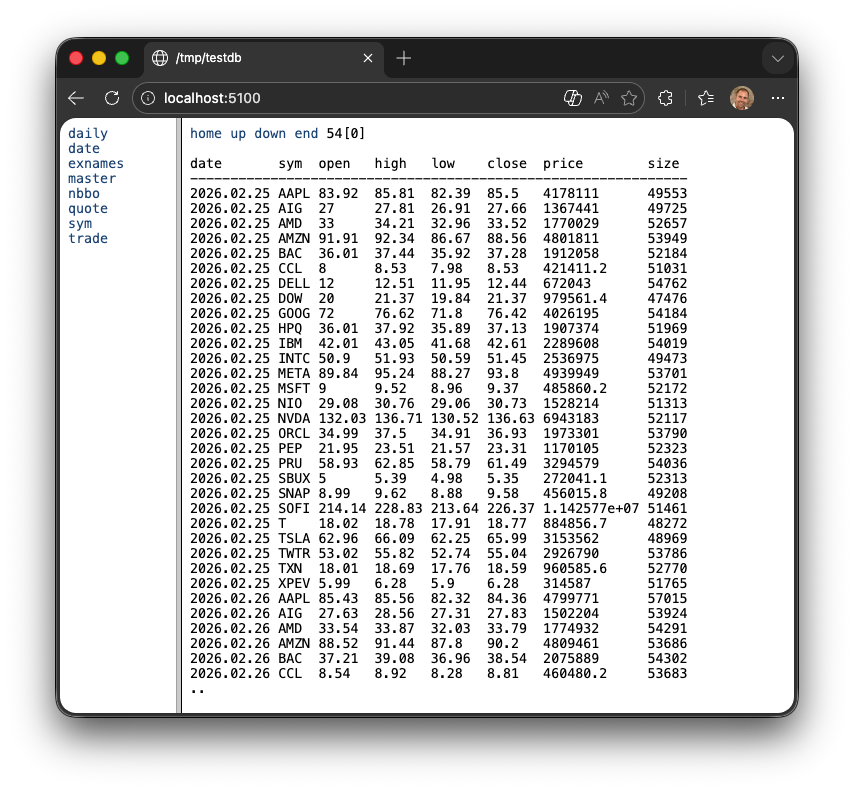
Every q process started with -p is also a lightweight web server. This is useful for quick inspections. If you navigate to http://localhost:5100 in your browser, you can see all the variables in memory. Select a variable to see its content.
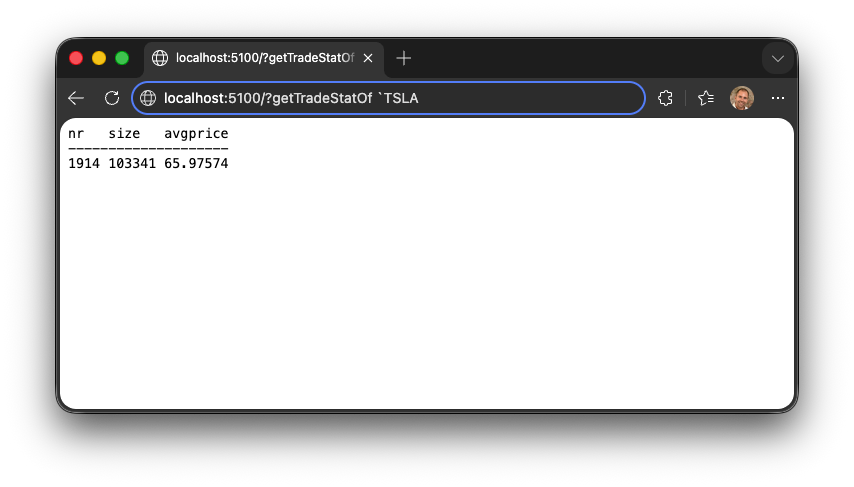
You can even run queries directly from the URL bar by appending a ? followed by your q code:
The advantage of a unified architecture
Traditional enterprise architectures suffer from impedance mismatch. In these systems, a relational database holds the data while a separate application layer holds the business logic, written in a language like Java, Rust, or Python.
That separation creates friction in two ways:
- Translation costs. A substantial amount of engineering effort goes into Object-Relational Mapping (ORM) and data serialization, which converts database rows into programming objects and back.
- Split logic. To improve performance, developers often divide logic between the two layers using brittle stored procedures. The result is a fragile environment that is hard to synchronize, test, and maintain.
KDB-X eliminates this overhead by providing a unified framework. In the q ecosystem, there is no distinction between the database and the programming language; the table is a native data structure.
Business logic lives directly alongside the data, so q runs complex calculations where the data resides rather than moving massive datasets across a network to an application server. That proximity minimizes data traversal, which is where the performance gains over a multi-tier architecture come from.
This architectural simplicity translates into a lower Total Cost of Ownership (TCO). Collapsing the stack into a single layer reduces the hardware footprint and simplifies deployment pipelines, and maintenance is more straightforward because data and logic share one environment.
Ultimately, this allows smaller teams of dev-analysts to build and support systems that typically require large, specialized departments in a traditional software stack.
From language to architecture: kdb+ tick
Everything described so far — the vector engine, columnar tables, q-sql, memory-mapped partitions, and the database server — forms the q programming language and its runtime. But q is not just a tool for analysts; it is a platform for building production-grade systems. The canonical example is kdb+ tick, the most widely used architecture ever implemented in q.
Released in the early 2000s, kdb+ tick is a complete, production-grade streaming data architecture for capturing, storing, and querying high-frequency time-series data in real time.
Its most remarkable feature is its size: the tickerplant at its heart, tick.q, is roughly 34 lines of q code, plus the small u.q publish-subscribe library it loads. There is no boilerplate and no scaffolding — only the essential logic required to ingest and publish real-time data.
Despite its brevity, kdb+ tick has been deployed at many of the world's leading investment banks and financial institutions for over two decades. It processes billions of financial events — trades, quotes, order book updates — every single trading day, making it one of the most heavily used real-time data systems built for electronic trading.
Three processes, one architecture
kdb+ tick separates responsibility across three specialized q processes, each optimized for a specific function.
- The Tickerplant (TP) is a low-latency, high-volume publish-subscribe hub that decouples data publishers from their subscribers.
- The Real-Time Database (RDB) subscribes to the tickerplant and collects today's data entirely in memory. New records become queryable within milliseconds, and the columnar in-memory layout enables complex analytical queries over millions of intraday rows to run in milliseconds.
- The Historical Database (HDB) stores all previous days' data using the splayed, partitioned layout described earlier in the persistence section. It memory-maps this data rather than loading it into RAM, allowing the system to address petabytes of historical time series while reading only the columns and partitions required for a query.
The architecture addresses failure scenarios. For example, if the RDB process exits unexpectedly — because of hardware faults, operating-system signals, or unbounded queries — it automatically recovers on restart.
The HDB scales horizontally to support hundreds of concurrent users through TCP socket sharding, a technique built into the q runtime: several HDB processes listen on the same port and the kernel load-balances incoming connections across them. Because q's memory-mapped data is inherently read-only and shared between those processes by the operating system, the system requires no locking and performs no data copying. Increasing capacity is purely a configuration change, not a code change.
kdb+ tick is the clearest demonstration of what the q ecosystem was designed to enable. The language is not just a query tool bolted onto a database; it is a substrate from which entire systems can be composed. Those few dozen lines of code have processed an extraordinary volume of the world's financial data, precisely because q eliminates everything that does not directly contribute to solving the problem at hand.
DB Service, the next generation of kdb+ tick
kdb+ tick is deliberately minimal, which means production concerns such as recovery, scaling, and table management are left for you to build. The DB Service packages the tick architecture into a ready-to-deploy database that handles them for you. It runs the same tiers (RDB, intraday, and historical) behind a query gateway, and a storage manager moves data between them while keeping it queryable. Reliable Transport logs every ingest message, so the service can replay data that hadn't reached disk when a failure occurred, and slow subscriber protection stops one lagging consumer from blocking ingest.
Writes in q such as set and upsert are not atomic, so a crash or full disk can leave a table or partition half-written. The storage manager closes this gap. It builds new data in versioned directories that readers can't see, and publishes it with a single symlink swap. A process or host crash, or a full disk, therefore never leaves the database in a corrupt state, and the service recovers without manual repair. Tier boundaries stay correct, so queries see no gaps or duplicates, and late-arriving data still lands in the right partition.
Run it on a single node with Docker Compose, or on Kubernetes as a cluster with replication and sharding, where tables, tiers, and services are all set in YAML assembly files that are easy to review and version-control. Try it with the quickstart guide.
Visualization
Tables are great for ad-hoc data analysis, but often you need a visualization that tells a story rather than just presenting numbers. Below are two popular visualization solutions: code-driven charts for analysts working in a terminal or notebook, and interactive dashboards for sharing live data with a wider audience.
Charts in the terminal, Grammar of Graphics
The Grammar of Graphics module (qp) lets you build charts in q by declaring how table columns map to positions and aesthetics, such as colour and size, instead of drawing step by step. You combine geometries like points, bars, lines, and segments into layers, stack or split them, and render the result with qp.go.
The example generates 20,000 random price movements, aggregates them into daily open-high-low-close values with q-sql, and draws a candlestick chart from two stacked layers: one for the open-to-close body and one for the high-to-low range:
([gg;qp]): use`kx.ax.graphics
...
qp.go[700;300]
    qp.theme[.gg.theme.clean]
    qp.title["Candlestick chart"]
    candlestick ohlc
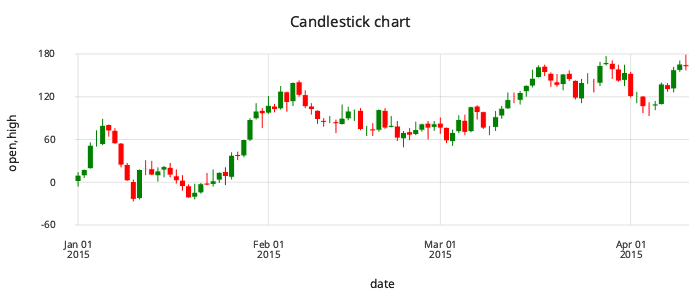
Because charts are ordinary q expressions over tables, you can wrap them in functions, reuse them, and layer them with other charts, for example adding moving averages or a second y axis.
KX Dashboard
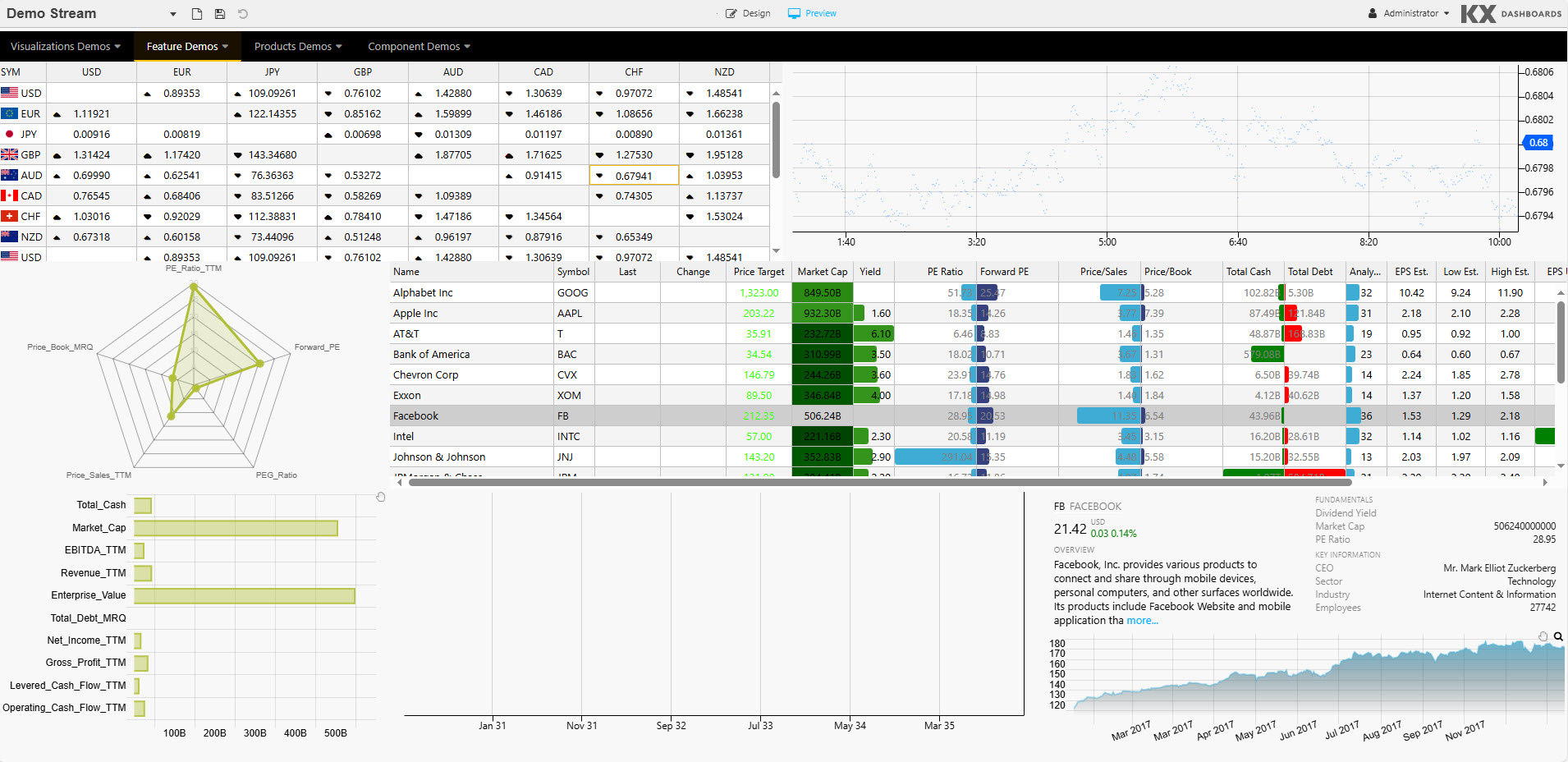
KX Dashboards is a web-based tool for building interactive, real-time visualizations on top of kdb+. Data is pushed to the browser as it arrives, so charts and grids update live without polling. You can build views by drag and drop, or write your own queries in q, SQL, or Python, and access controls let you share them securely. It is widely used wherever teams need to watch high-volume data streams, such as trading and risk in capital markets, energy, manufacturing, and IoT.
The following demo dashboard combines a live FX rates grid, a streaming scatter chart, a fundamentals table with in-cell bars, a radar chart, and a price chart in a single view:
Next steps
- Explore q data structures to continue your learning journey.
- Read Q for Mortals if you prefer a book-style introduction with more detail.