Introduction to KDB.AI in KDB-X
This introduction covers the key concepts, architecture, supported operations, and limitations of the KDB.AI service in KDB-X.
KDB.AI is a high-performance vector database service built on top of KDB-X. It extends KDB-X's real-time time-series engine with semantic and similarity search capabilities, enabling you to build retrieval-augmented generation (RAG) pipelines, recommendation systems, and anomaly detection workflows – all within a single unified data platform.
Key concepts
- Embedding – A fixed-length array of floating-point numbers that encodes the semantic meaning of a data object (text, image, time-series, and so on), produced by a machine learning model. Objects with similar meaning produce embeddings that are close together in the vector space.
- Vector – The numerical array that stores an embedding in KDB.AI. Each vector's dimensionality is fixed at table creation and must match the embedding model used to produce it.
- Index – A data structure that organizes vectors to accelerate search queries. KDB.AI supports multiple index types suited to different accuracy, memory, and throughput trade-offs:
Flat,qFlat,IVF,IVFPQ,HNSW, andqHNSW. In-memory indexes offer the lowest latency; on-disk variants (qFlat,qHNSW) remove the memory size ceiling. - Table – The primary unit of storage in KDB.AI. Each table holds vector columns alongside structured metadata columns, enabling filtered similarity search over mixed data.
- Database – A logical namespace containing one or more tables, providing isolation between workloads and environments.
- Similarity search – A query that finds the nearest vectors to a given query vector using a chosen distance metric (Euclidean, cosine similarity, or inner product).
- Hybrid search – A combined dense (semantic) and sparse (keyword) vector search that improves retrieval relevance for text workloads.
- Temporal Similarity Search (TSS) – A specialized search mode for time-series data. Transformed TSS uses compressed embeddings for faster search; Non-Transformed TSS requires no pre-embedding. Refer to Performance considerations for a comparison.
- Dynamic Time Warping (DTW) – A distance metric for comparing time-series sequences of different lengths or with temporal shifts.
- Reranking – A post-retrieval step that re-scores candidate results using a cross-encoder model to improve result precision.
- Partitioning – Horizontal sharding of a table across disk segments, keyed on a metadata column, to support larger-than-memory datasets and improve query performance.
Architecture
The KDB-X KDBAI Service is composed of three layers — REST Services, a Gateway, and Workers — deployed as configurable, multi-instance processes and accessed by external clients over REST or IPC.
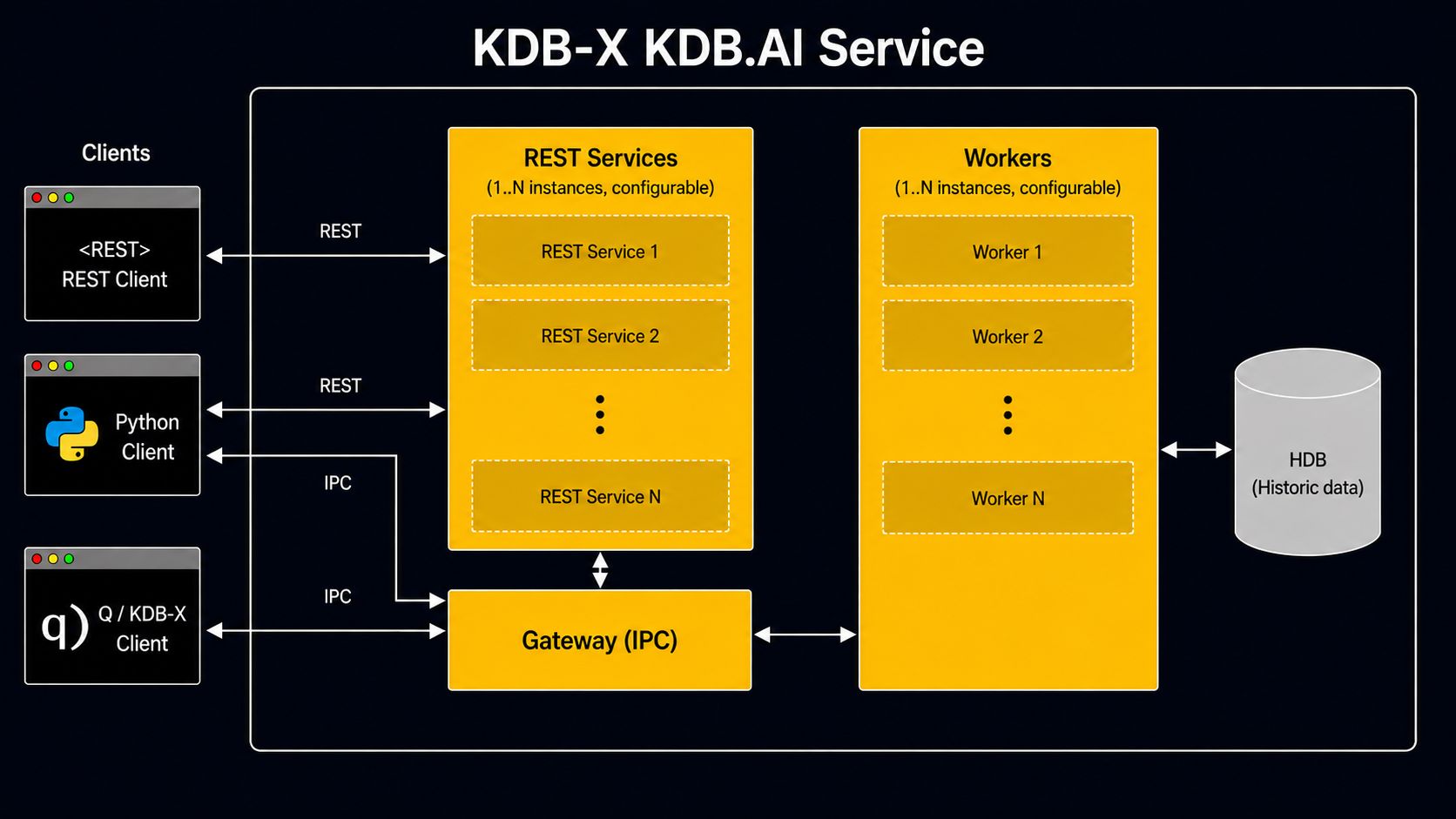
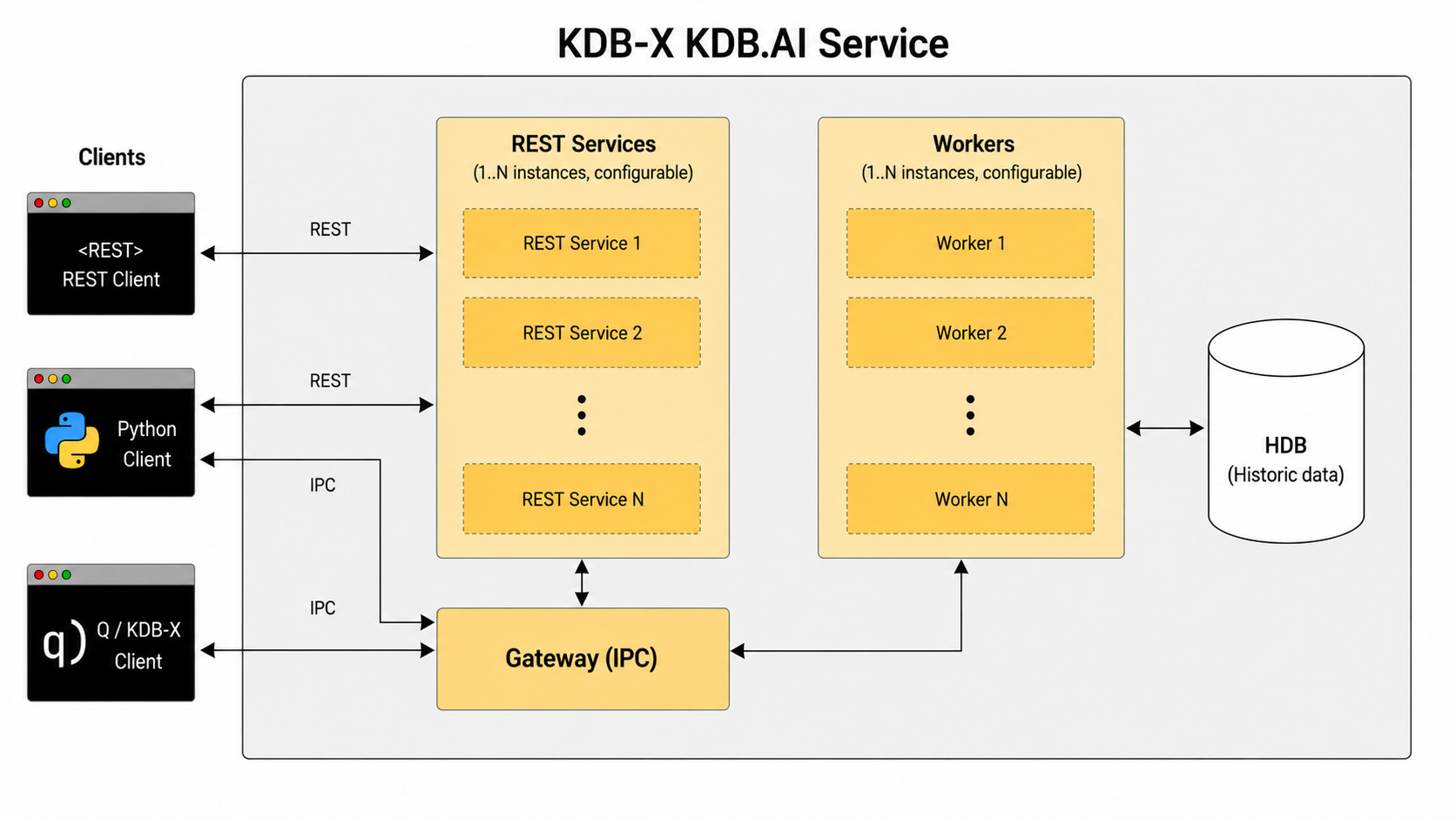
Clients connect using two protocols: REST and IPC. The REST Services tier runs 1–N parallel instances to handle incoming HTTP requests. The Gateway is the central routing layer over IPC: it coordinates with the REST Services tier and dispatches work to the Workers tier. The kdbai-client Python package supports both protocols, with the connection mode configured at runtime.
Workers (1–N instances, configurable) execute queries and vector operations against the historical database (HDB), reading and writing persisted historical data. Results are returned to the originating client through the Gateway and REST Services. The REST Services and Worker tiers scale independently, decoupling client-facing I/O from query execution load.
Supported language interfaces
- Python – The
kdbai-clientpackage, installable withpip, provides methods for creating tables, inserting vectors, and performing searches. - REST API – An HTTP interface compatible with any language or environment, covering insertion, search, and retrieval.
- q API – Enables IPC communication from q processes within KDB-X, supporting vector search alongside KDB-X time-series queries.
Supported operations
Database and table management
- Create, list, and drop databases
- Query table metadata and schema
- Create and drop tables with mixed vector and metadata schemas
- Insert, update, and delete rows (CRUD supported on
Flat,qFlat,HNSW, andqHNSWindexes; refer to Limitations forIVF/IVFPQ)
Indexing
- On-disk indexes:
qFlat,qHNSW - In-memory indexes:
Flat,IVF,IVFPQ,HNSW - GPU-memory index: cagra
- GPU-accelerated indexing through NVIDIA cuVS (requires compatible GPU)
- Configurable index parameters:
efConstruction,M,mmapLevel,nsplits,nclusters
Search
- Dense vector similarity search (Euclidean, cosine similarity, inner product)
- Hybrid (dense + sparse) search with configurable per-index weighting
- Metadata filtering with equality, range, and fuzzy match predicates
- Transformed and Non-Transformed Temporal Similarity Search (TSS)
- Dynamic Time Warping (DTW) search
- Multi-index search across multiple vector columns
- Range-based similarity search within a distance threshold
- Reranking by using Cohere, Jina AI, or Voyage AI cross-encoder models
Integration
- LangChain and LlamaIndex vector store integrations
- Unstructured.io and Vector IO connectors
- Direct KDB-X table access from KDB.AI queries
- OpenAI, Azure AI, and Hugging Face embedding model support
- MCP Server for natural language querying through AI assistants
Authentication
- Static API key authentication
- OAuth 2.0 with role-based access control (RBAC), including Microsoft Entra ID
Limitations
- No cross-table joins in vector search – Similarity search queries target a single table. Combine results from multiple tables in application code or through KDB-X post-processing.
- Vector dimensionality is fixed per table – Dimensionality is set at table creation and must match the embedding model. Changing it requires dropping and recreating the table. There is no enforced upper limit, but higher dimensionality increases memory and compute requirements significantly.
- CRUD on IVF/IVFPQ indexes –
IVFandIVFPQdo not support row-level modification after training. UseFlat,qFlat,HNSW, orqHNSWfor workloads that require updates or deletes. - IVF/IVFPQ training requirement – These indexes require a training step before serving queries and are not suitable for real-time ingest without periodic re-indexing.
- GPU support requires cuVS – GPU-accelerated search requires the NVIDIA cuVS integration and a compatible GPU. CPU fallback is automatic.
- Partitioning key type – Tables can be partitioned on a single metadata column. Multi-column partitioning is not currently supported.
- kdbai-client compatibility – The server defines the supported client version range. Check the
/api/v2/versionendpoint forclientMinVersionandclientMaxVersionbefore upgrading.
Performance considerations
Index selection – The choice of index has the largest impact on query latency and memory use. Use Flat or qFlat for exact search or small datasets; HNSW or qHNSW for high-accuracy approximate nearest-neighbor (ANN) search at scale; IVF or IVFPQ for very large datasets where moderate recall is acceptable. qHNSW has been benchmarked as 3.16× faster than FAISS HNSW.
On-disk indexes – qFlat and qHNSW offload the index to disk, removing the in-memory size ceiling. Tune mmapLevel (0–2): 0 gives the fastest performance; 2 conserves memory at the cost of latency.
Transformed TSS vs Non-Transformed TSS – Transformed TSS compresses time-series windows to 1% of the original embedding size, yielding 10× faster search and up to 100× storage reduction; prefer it when query latency matters most. Non-Transformed TSS requires no pre-embedding and uses 6000× less memory than HNSW; prefer it for real-time ingest where data availability is the priority.
GPU acceleration – NVIDIA cuVS CAGRA indexes provide significant throughput gains for large-scale ANN workloads. Enable cuVS when batch size or query rate is the bottleneck on GPU-equipped infrastructure.
Partitioning – Partition large tables on a high-cardinality metadata column (for example, date or region) to reduce the search space per query and improve parallelism. Similarity-based partitioning groups vectors by proximity, reducing cross-shard search overhead.
Multithreading and memory – KDB.AI supports parallel query execution; configure the thread count at server startup to match available CPU cores. Post-query memory clean-up reduces peak consumption during high-throughput workloads. Monitor memory usage through the system API (/api/v2/system).
Client batching – For bulk ingest, prefer large batches over many small inserts, particularly for indexed tables that require background index updates.
Next steps
Use the following pages to continue exploring KDB.AI in KDB-X:
- Follow the Server Setup guide to deploy and configure KDB.AI Server.
- Run your first similarity search using the Quickstart.
- Review practical scenarios in Examples, including RAG pipelines, anomaly detection, and recommendation systems.
- Consult the Python API Reference, q API Reference, or REST API Reference for detailed API documentation.
- Explore available Integrations for LangChain, LlamaIndex, OpenAI, and more.