Developing with KDB-X Workloads (Beta)
This page outlines the end‑to‑end process for building a local KDB‑X workflow and preparing it for deployment as a KDB‑X Workload on kdb Insights Enterprise.
KDB‑X Workloads are currently available as a Beta feature.
Functionality, APIs, and configuration options may change before general availability. Beta features may contain limitations, unexpected behaviour, or reduced stability. Refer to the official Beta Feature Standard Terms page for full details.
KDB‑X Workloads allows users to develop and test source code locally through KDB-X module management before deploying it to kdb Insights Enterprise using the kxi CLI and kdb Insights packages.
Refer to the Overview of KDB-X Workloads before following this guide.
Important
KDB-X Workloads support q-based source files only. Python/PyKX workloads are not available.
The following sections describe the core workflow for developing, deploying, and modifying KDB‑X Workloads. The Advanced section at the end of this guide covers configuration topics that affect storage, metrics, and workload‑level infrastructure.
How to develop KDB-X Workloads
This section describes how to:
- Use KDB-X to build a workflow locally for development purposes
- Deploy that same workflow to a kdb Insights Enterprise environment while retaining the local source code and dependencies.
The example used in this guide illustrates the key components of KDB‑X workloads and how they map from a local setup to a kdb Insights Enterprise deployment. The workflow includes:
- An HDB directory containing capital markets data
- hydrated using sample data provided by the Datagen KDB-X module
- An HDB process
- loads the HDB directory
- provides a simple REST API to query data
- A client q-process for querying the HDB
Modules used
This guide uses the following modules:
-
Installed with KDB‑X: REST and Kurl.
-
Available publicly on GitHub: Datagen
Local development
A typical local application consists of a directory that contains the source code and business logic. For this example, the following cap-marks folder exists in the local filesystem:
├── cap-mrkts
│   ├── api.q
│   ├── hdb.q
│   ├── hydrate.q
It contains various source code files which use the modules listed above. The following sections describe each of them in more detail.
Datagen Module
To generate the HDB with sample data, use the Datagen module. This module is not included in the KDB-X installer, so you must download it from the public GitHub repository:
git clone https://github.com/KxSystems/datagen.git
Generate HDB (hydrate.q)
- Generates a HDB using the
Datagenmodule and writes it to the chosen directory specified by theSHARED_DIRenvironment variable. - Writes a
statefile toSHARED_DIRdirectory when the hydration step is complete.
// cap-mrkts/hydrate.q

// https://github.com/KxSystems/datagen/blob/main/docs/references/capmkts.md#date-range-start-and-end
if[not `state in key hsym`$getenv[`SHARED_DIR];
    ([getInMemoryTables; buildPersistedDB]): use `datagen.capmkts;
    hdbDir:getenv[`SHARED_DIR],"/hdb";
    -1"persisting hdb...";
    buildPersistedDB[hdbDir; 10000; ([start: 2025.01.01; end: 2025.01.07])];
    -1"finished hdb";
    (hsym`$getenv[`SHARED_DIR],"/state") set ([state:1b]);
    ]
To create the database, set SHARED_DIR to the target HDB directory, add the downloaded Datagen module to QPATH, and run the hydration script:
SHARED_DIR=<path_to_hdb> QPATH=<path_to_downloaded_module> q hydrate.q
This command populates the following hdb directory in SHARED_DIR:
hdb/
├── 2025.01.02
│   ├── nbbo
│   ├── quote
│   └── trade
├── 2025.01.03
│   ├── nbbo
│   ├── quote
│   └── trade
├── 2025.01.06
│   ├── nbbo
│   ├── quote
│   └── trade
├── 2025.01.07
│   ├── nbbo
│   ├── quote
│   └── trade
├── daily
├── exnames
├── master
└── sym
HDB process (hdb.q)
- Starts a q process which loads an HDB at
SHARED_DIR/hdb. - Provides a REST endpoint for queries using
api.q(refer to the REST APIs section). - Checks for the presence of a
statefile on startup and retries every1000msuntil the HDB has been hydrated (as described in the Generate HDB (hydrate.q) section above).// cap-mrkts/hdb.q //https://code.kx.com/kdb-x/learn/q4m/13_Commands_and_System_Variables.html#13120-t-timer \l api.q \t 1000 .z.ts:{ $[`state in key hsym`$getenv[`SHARED_DIR]; [-1"HDB ready";system"t 0";.Q.lo[hsym`$getenv[`SHARED_DIR],"/hdb";0b;0b]]; -1"Waiting for HDB to be ready" ]; }
Start the HDB listening on port 5000 with 6 threads:
SHARED_DIR=<path_to_hdb> q hdb.q -p 5000 -s 6
Note
Refer to the s system command for more details on secondary threads.
If the HDB is not ready, the process prints the following messages until the hydration step completes:
...
Waiting for HDB to be ready
Waiting for HDB to be ready
Waiting for HDB to be ready
...
HDB ready
REST APIs (api.q)
The process listens on localhost and provides a REST endpoint with the following dynamic URL pattern:
/{table}/{date}/{nrows}`,
| Path parameter | Description |
|---|---|
table |
Name of the table to query (string). |
date |
Date to query, formatted as YYYY.MM.DD. |
nrows |
Number of rows to return (positive for the first rows, negative for the last rows). |
Behavior
- Returns the specified table for the given date and row count.
- Returns 400 if the table does not exist (
table error). - Returns 400 if any of the (
{table},{date},{nrows}) formats in the URL are invalid (invalid arguments).
Note
In this basic workflow, the API does not query the master or exnames tables.
// cap-mrkts/api.q
//https://code.kx.com/kdb-x/modules/rest-server/quickstart.html
.rest:use`kx.rest;
.rest.init enlist[`autoBind]!enlist[0b]; / Initialize
.z.ph:{[x] .rest.process[`GET;x]}
.rest.register[`get;"/{table}/{date}/{nrows}";"get table for a given date (returns all rows for flat tables)";{restGetData[x]};::]

// https://code.kx.com/kdb-x/learn/q4m/9_Queries_q-sql.html#93-the-select-template
restGetData:{[args]
    if[any null args:"SDI"$args`rawArg;:.rest.util.response["400";`txt;"invalid arguments"]];
    if[not args[`table] in tables[] except `exnames`master;:.rest.util.response["400";`txt;"table error"]];
    res:args[`nrows] sublist select from args[`table] where date=args[`date];
    .rest.util.response["200";`txt;-8!update host:.z.h from res]
    }
Note
The REST module is included with the KDB‑X installer.
Query client
You can call the REST APIs from any local KDB-X REST client:
.kurl:use`kx.kurl
res:.kurl.sync ("http://localhost:5000/trade/2025.01.07/100";`GET;()!())

// deserialize response payload
-9!"x"$last res
This returns the first 100 rows of the trade table for 2025.01.07.
Note
The Kurl module is included with the KDB‑X installer.
Deploy KDB-X Workloads to kdb Insights Enterprise
After developing and testing a workflow locally, you can deploy it to a kdb Insights Enterprise environment and leverage the following features:
- Secure Authenticated REST Endpoint
- Multiple HDB replicas with query load balancing
- Encryption in transit
Create a KDB-X workload and dependencies
The same source code used for the local workflow is deployed to kdb Insights Enterprise using the packaging framework. This example uses two packages:
cap-mrktspackage - uses existingcap-mrktsdirectory on the local filesystemdatagenpackage - uses the module directory downloaded earlier
Datagen package
Use the kxi CLI to initialize a package from an existing module folder:
kxi package init <path_to_downloaded_module>
This command creates a manifest.yaml file in the module folder, containing the package name and version. You can then push the package to the Package Manager and reference it as a workload dependency:
kxi pm push <path_to_downloaded_module>
Cap-mrkts package
Initialize (init) the existing cap-mrkts folder to create its manifest.yaml file:
kxi package init cap-mrkts
Use this package to add and deploy the workload. Use the kxi CLI to add each workload instance to the package, as shown in the Hydrate workload instance section.
Hydrate workload instance
When configuring the hydrate workload instance, you have the following options:
| Option | Description |
|---|---|
deps |
Adds a dependency on the datagen package (available in the Package Manager). Accepts a comma-separated list. |
name |
Specifies the instance name (used with the package name for external REST APIs). |
entrypoint |
Defines the source code loaded from this package on startup (similar to starting the process locally). |
storage |
Configures a Persistent Volume for each workload instance replica. |
port |
Specifies the container port to expose for the q instance. |
group-storage |
Defines shared storage for all workload instances. |
env |
Sets the path to group storage (used to write and load the HDB to shared storage). |
group-metrics |
Defines the serviceMonitor, sets the interval and polled endpoint to enable metric scraping. |
expose |
Exposes the service externally via ingress. When true, --port and --service are also required. |
replicas |
Specifies the number of replicas to create. |
Refer to Storage Configuration for further details.
# package name
PKG_NAME=cap-mrkts

# create hdb hydration workload instance
kxi package add --to $PKG_NAME workload \
  --deps datagen \
  --env SHARED_DIR=/opt/kdbx/data \
  --group-storage 'type=rook-cephfs,dst=/opt/kdbx/data,size=1Gi,accessModes=ReadWriteMany' \
  --name hydrate \
  --entrypoint hydrate.q
Note
The access mode key is accessModes. You can also use a shorthand such as rwx in place of accessModes=ReadWriteMany, and the key name may be omitted. An unrecognized key is ignored without error, which silently leaves the access mode unset.
HDB instance(s)
In addition to the options described above, you can configure the HDB workload instance using the following options:
| Option | Description |
|---|---|
port |
Specifies the port the instance listens on. If not set, it defaults to 5000. |
service |
Sets the Kubernetes service type. Using ClusterIP exposes the instance workload to cluster. |
expose |
Exposes the instance through the API-GW API gateway, which is required for external queries. |
replicas |
Defines the number of HDB instances to run. The local workflow used a single HDB process, but on kdb Insights Enterprise we are going to use x3 instances to handle concurrent queries. |
This instance starts with 6 secondary threads using the -s 6 argument (matching the local workflow). Place -- after all CLI options to separate them from the arguments passed to the q process:
# create HDB workload instances
kxi package add --to $PKG_NAME workload \
  --env SHARED_DIR=/opt/kdbx/data \
  --port 5000 \
  --service ClusterIP \
  --replicas 3 \
  --expose \
  --name hdb \
  --entrypoint hdb.q -- -s 6
Note
Arguments intended for the q process must appear after -- and keep their leading dash. Omitting the dash records the argument as s, so the process starts without the extra secondary threads. Refer to the s system command for more details on secondary threads.
This command adds the workload.yaml file to the directory:
├── cap-mrkts
│   ├── api.q
│   ├── hdb.q
│   ├── hydrate.q
│   ├── manifest.yaml  (required for packaging)
│   └── workload.yaml  (required for workloads)
Push the package to the Package Manager and deploy it:
kxi pm push cap-mrkts
kxi pm deploy cap-mrkts
Check the deployment status:
kxi pm list
╭──────────────────┬─────────┬───────────────────┬─────────┬──────┬────────┬────────────────────────────────┬──────────────────────────────────────╮
│ name             │ version │ deployment.status │ status  │ data │ access │ owner.name                     │ id                                   │
├──────────────────┼─────────┼───────────────────┼─────────┼──────┼────────┼────────────────────────────────┼──────────────────────────────────────┤
│ cap-mrkts        │ 0.0.1   │ RUNNING           │ RUNNING │ yes  │ ARWX   │ kdbx-uat                       │ 9a13fdbf-ebc3-4b5c-8a31-b30b5d681019 │
│ datagen          │ 0.0.1   │                   │         │      │ ARWX   │ kdbx-uat                       │ dbbfb863-48f7-421a-b8e9-743847b0b3d5 │
╰──────────────────┴─────────┴───────────────────┴─────────┴──────┴────────┴────────────────────────────────┴──────────────────────────────────────╯
Once the package is deployed, you can query any exposed endpoints using REST.
Query the HDB process
You can use any local KDB‑X process to query the kdb Insights Enterprise environment. All requests go through the API‑GW API gateway, which requires an authentication token obtained from the kxi CLI. Each request uses the kdb Insights Enterprise hostname, the package name, and the specific workload instance endpoint. Refer to Querying KDB-X workloads for more details.
# auth and set token
kxi auth login && export TKN=$(kxi auth print-token) && q
Query the tables:
.kurl:use`kx.kurl
opts:([::;headers:([authorization:("Bearer ",getenv`TKN)])])
res:.kurl.sync ("https://<insights_hostname>/kdbxgroup/cap-mrkts/hdb/trade/2025.01.07/100";`GET;opts)
-9!"x"$last res
Because the deployment uses multiple replicas, the API Gateway load‑balances requests across them. You can see this in the host column of the results:
# query
date       sym  time                 price size stop cond ex host
----------------------------------------------------------------------------
2025.01.07 AAPL 0D09:30:00.000889754 86.37 35   0    C    D  cap-mrkts-hdb-0
2025.01.07 AAPL 0D09:30:00.025697591 86.28 99   0    R    D  cap-mrkts-hdb-0
2025.01.07 AAPL 0D09:30:00.037732822 86.29 98   0    T    D  cap-mrkts-hdb-0
....

# another query
date       sym  time                 price size stop cond ex host
----------------------------------------------------------------------------
2025.01.07 AAPL 0D09:30:00.000889754 86.37 35   0    C    D  cap-mrkts-hdb-1
2025.01.07 AAPL 0D09:30:00.025697591 86.28 99   0    R    D  cap-mrkts-hdb-1
2025.01.07 AAPL 0D09:30:00.037732822 86.29 98   0    T    D  cap-mrkts-hdb-1
...
Teardown
To tear down the package and remove all data:
kxi pm teardown cap-mrkts --rm-data
Note
Removing data also removes the shared storage. If you do not specify --rm-data, the HDB persists and is available on redeployment, so it does not need to be re-hydrated.
Confirm that the workload is no longer running:
kxi pm list
╭──────────────────┬─────────┬───────────────────┬──────────┬──────┬────────┬────────────────────┬──────────────────────────────────────╮
│ name             │ version │ deployment.status │ status   │ data │ access │ owner.name         │ id                                   │
├──────────────────┼─────────┼───────────────────┼──────────┼──────┼────────┼────────────────────┼──────────────────────────────────────┤
│ cap-mrkts        │ 0.0.1   │                   │          │      │ ARWX   │ kdbx-uat           │ 9a13fdbf-ebc3-4b5c-8a31-b30b5d681019 │
│ datagen          │ 0.0.1   │                   │          │      │ ARWX   │ kdbx-uat           │ dbbfb863-48f7-421a-b8e9-743847b0b3d5 │
╰──────────────────┴─────────┴───────────────────┴──────────┴──────┴────────┴────────────────────┴──────────────────────────────────────╯
Remove from Package Manager
You can remove or modify the package using the CLI. Refer to the CLI reference documentation for details.
Modify workloads
You may need to modify existing workloads:
- To remove a workload, use the
kxi package rm workloadcommand. - To add a workload, use the
kxi package add workloadcommand.
The following example shows how you can add a workload instance to a deployed package.
Add a new instance
The previous example used multiple HDBs to query shared storage across instances. This example adds another workload instance to show how to add an Object-Storage-backed HDB with persistent cache (local to the workload instance).
The Object Storage workload instance (s3.q)
This example uses the publicly available s3 bucket kxs-prd-cxt-twg-roinsightsdemo/kxinsights-marketplace-data. To use this bucket, add the following to the existing cap-mrkts package:
- the
s3.qsource code - the
dbfolder with apar.txtfile that maps the bucket to the HDB database
├── cap-mrkts
│   ├── api.q
│   ├── db
│   │   └── par.txt     (added)
│   ├── hdb.q
│   ├── hydrate.q
│   ├── manifest.yaml
│   ├── s3.q            (added)
│   └── workload.yaml   (modified)
The s3.q file contains the following code and reuses the same api as the original example:
\l api.q
.objstor:use`kx.objstor
.objstor.init`aws
sym:get`$":s3://kxs-prd-cxt-twg-roinsightsdemo/kxinsights-marketplace-data/sym"
\l db
The par.txt file contains the s3 mapping, which the process loads on startup:
s3://kxs-prd-cxt-twg-roinsightsdemo/kxinsights-marketplace-data/db
Note
The Object Storage module is included with the KDB‑X installer.
Teardown the existing workload and add a workload instance with the following options:
storage– defines storage that is local to this instance. Unlikegroup-storage, other workload instances cannot access this storage.env– sets the required environment variables:- `AWS_REGION` – bucket region - `KX_OBJSTR_CACHE_PATH` – path used to cache and persist query results for better performance - `KX_KURL_DISABLE_AUTO_REGISTER` – disables automatic `kurl` CSP detection on the deployed environment
kxi package add --to $PKG_NAME workload \
  --env AWS_REGION=eu-west-1 \
  --env KX_OBJSTR_CACHE_PATH=/opt/kdbx/s3 \
  --env KX_KURL_DISABLE_AUTO_REGISTER=1 \
  --storage type="",dst=/opt/kdbx/s3,size=5Gi \
  --service ClusterIP \
  --expose \
  --name s3 \
  --entrypoint s3.q -- -s 6
This command modifies the existing workload.yaml file.
Use kxi package add workload-storage to add shared storage to a package, without adding a new workload.
kxi package add --to $PKG_NAME workload-storage \
  'type=rook-cephfs,dst=/opt/kdbx/data,rwx,size=1Gi'
Redeploy
Redeploy the updated package by pushing it to the Package Manager (overwriting the previous version) and then deploying it:
kxi pm push cap-mrkts --force
kxi pm deploy cap-mrkts
Query object storage using the API
Again using a local KDB-X process:
res:.kurl.sync ("https://<insights_hostname>/kdbxgroup/cap-mrkts/s3/trade/2020.01.01/10";`GET;opts)
-9!"x"$last res
The s3 object storage instance returns the following result:
date       sym  time         price    size stop cond ex host
----------------------------------------------------------------------
2020.01.01 HAAA 09:32:37.334 18.54794 496  1    G    E  cap-mrkts-s3-0
2020.01.01 HAAA 09:36:09.052 19.20235 360  1    D    H  cap-mrkts-s3-0
2020.01.01 HAAA 09:38:12.338 13.56027 142  0    B    J  cap-mrkts-s3-0
...
Advanced
This section covers more advanced configuration topics for KDB‑X Workloads. These settings affect how workloads interact with underlying cluster storage and infrastructure and are not required for the basic local development and deployment workflow described earlier.
Storage
KDB‑X Workloads let you configure persistent storage at an instance or group level. Use these settings when you want to persist state across restarts, share data between instances, or tune storage performance for production workloads.
Instance
When you enable instance‑level storage, the system creates a Persistent Volume Claim (PVC) for each replica of that instance.
instances:
  rdb:
    replicas: 3
    storage:
      enabled: true
In this example, each of the three rdb replicas receives its own persistent storage. The system mounts each volume to a single replica, and no other replica or instance can modify it.
The storage lets you configure options that depend on your cluster and use case. If you leave it empty, the system applies the default configuration.
When you set enabled: true, the system provisions a 20Gi volume and mounts it to the instance at /app/data. Your application can read from and write to this volume.
To override these defaults, set fields such as:
    storage:
      enabled: true
      mountPath: /my/mount
      size: 50Gi
By default, the storage object uses persist: true, which keeps the volume after instance teardown so you can reattach it later.
If you set persist: false, the system still provisions the configured volume when the instance starts, but it automatically deletes the volume when the instance is torn down.
    storage:
      enabled: true
      persist: false
By default, the system creates the volume using the cluster’s default storage class (storageClass: ""). You can change this if your use case requires a different class, such as one that offers higher performance. Choose any available storage class supported by your cluster.
For Access modes, instance‑level storage typically uses ReadWriteOnce. Your chosen mode must match the modes permitted by the selected storage class.
    storage:
      enabled: true
      storageClass: "gp3"
      accessModes:
      - ReadWriteOnce
Group
When you enable group‑level storage, the system creates a Persistent Volume Claim (PVC) that all replicas of every instance in the group share.
If you use shared storage, your chosen storage class must support ReadWriteMany.
instances: {}
storage:
  enabled: true
  storageClass: "nfs"
  accessModes:
  - ReadWriteMany
The storage object lets you configure shared storage based on your cluster and use case. If you leave the object empty, the system applies the default settings.
When you set enabled: true, the system provisions a 20Gi shared volume and mounts it to each instance at /app/shared. Your applications can read from and write to this shared location.
To override the defaults, set fields such as:
   mountPath: /my/mount
   size: 50Gi
By default, the system creates a PVC and volume using a generated name. You can specify a custom name or reference an existing PVC:
name: "existing-shared-pvc"
Storage Classes
Persistent Volumes use Storage Classes to define the type of storage the cluster provides. A storage class specifies characteristics such as performance, provisioning mode, and the storage system backing the volume. Classes may vary based on the cluster's hardware and performance.
To list the storage classes available on your cluster, run the following kubectl command:
kubectl get storageclass
NAME            PROVISIONER                     RECLAIMPOLICY   VOLUMEBINDINGMODE      ALLOWVOLUMEEXPANSION   AGE
gp2             kubernetes.io/aws-ebs           Delete          WaitForFirstConsumer   false                  5d22h
gp3 (default)   ebs.csi.aws.com                 Delete          WaitForFirstConsumer   true                   5d22h
io2             ebs.csi.aws.com                 Delete          WaitForFirstConsumer   true                   5d22h
rook-cephfs     rook-ceph.cephfs.csi.ceph.com   Delete          Immediate              true                   5d22h
Default
A StorageClass may be marked as default. This lets users create Persistent Volume Claims (PVCs) without specifying a StorageClass.
If you leave the template field unset, the system automatically applies the default StorageClass.
Access Modes
Access Modes define how many nodes can mount a volume of a given StorageClass. The provisioner sets which access modes each class supports.
To understand the limitations for a specific class, review the documentation for the Provisioner it uses.
| Access Mode | Abbreviation | Description |
|---|---|---|
ReadWriteOnce |
RWO |
Mounted as read-write by a single node. |
ReadOnlyMany |
ROX |
Mounted as read-only by many nodes. |
ReadWriteMany |
RWX |
Mounted as read-write by many nodes. |
ReadWriteOncePod |
RWOP |
Mounted as read-write by a single pod. |
Metrics
KDB‑X workloads can expose metrics that kdb Insights Enterprise collects using Prometheus ServiceMonitor resources. Prometheus can scrape workload metrics only when you configure both the cluster and the workloads correctly:
-
Cluster configuration (kdb Insights Enterprise):
- Enable scraping for Prometheus ServiceMonitor resources on the cluster.
- Scraping is disabled by default. Refer to configuration for instructions on deploying Prometheus and enabling scraping.
-
Workload configuration (KDB‑X)
- Add
ServiceMonitorresources to the KDB‑X workload group so they poll workload instances. - Instrument the workload instance source code to expose metrics when polled.
- Add
Refer to the following section explains how to add ServiceMonitor resources and configure workloads to expose metrics.
Expose workload metrics
You can instrument workload source code with the Prometheus module to collect metrics and expose them on an HTTP endpoint. The module provides APIs that gather metrics from your instrumented workload and publish them when the endpoint is polled. Specify the endpoint using the environment variable:
METRICS_ENDPOINT(default is/metrics)- Refer to the module documentation for examples on how to instrument source code
To deploy ServiceMonitor resources that scrape workload metrics, either:
-
Use the
--group-metricsflag when you add a workload:kxi package add --to $PKG_NAME workload \ ... --env METRICS_ENDPOINT=/mymetrics \ --group-metrics /mymetrics:10s \ ... -
Or, use the
workload-metricssub command to add metrics to a package, without adding a new workload:kxi package add --to $PKG_NAME workload-metrics /mymetrics:10s
Note
Service operate at the group level. When you enable them, the system creates a ServiceMonitor for every KDB‑X workload instance in the group, even if an instance does not expose metrics.
This configuration adds the following annotation to the workload.yaml file:
...
  annotations:
    kdbx.kx.com/metrics: '{"enabled": true, "endpoint": "/mymetrics", "interval": "10s"}'
...
The example above:
- Publishes instrumented metrics to
/mymetricson the workload instance when polled. - Adds a
ServiceMonitorwhich polls/mymetricson workload instance(s) at a10sinterval.
Note
The default ServiceMonitor configuration is /metrics:10s. If you specify a different polling endpoint – such as /mymetrics in this example – you must set the environment variable METRICS_ENDPOINT=/mymetrics on each workload instance so it exposes metrics at the same endpoint.
ServiceMonitors and Prometheus metrics
When you enable metrics on a workload, the system creates a ServiceMonitor for each instance in the group with the following naming pattern:
serviceMonitor/<namespace>/<packagename-instancename>/<replicanum>
ServiceMonitor connections appear in the kdb Insights Enterprise Prometheus service. You can query and monitor any instrumented metrics across all deployed pods by using the metric name and filtering with the appropriate labels.
For example, if you instrument a histogram metric named kdb_http_get_histogram_seconds:
-
To filter for the
0.25bucket across all pods in a specific namespace:kdb_http_get_histogram_seconds{namespace="mynamespace", le="0.25"} -
To filter for all buckets for a specific pod:
kdb_http_get_histogram_seconds{pod="cap-mrkts-hdb-1"}
Pod Policy
KDB‑X Workloads let you configure Kubernetes‑specific pod settings for each workload instance using the k8sPolicy field. Use these settings when you need to control scheduling, security, or resource allocation for the pods backing a KDB‑X instance.
instances:
  hdb:
    k8sPolicy: {}
The k8sPolicy object lets you configure pod‑level settings based on your cluster and use case. If you leave it empty, the system applies the default pod configuration for the namespace.
Service Account
Specifies the ServiceAccount that the instance's pods use. Use this when your workload requires specific RBAC permissions, for example to call the Kubernetes API or read a Secret in another namespace.
kind: KdbXGroup
metadata:
  name: tick
spec:
  instances:
    hdb:
      k8sPolicy:
        serviceAccount: kdbx-hdb-sa
If you leave this field unset, the pod uses the default service account $group-$instance, e.g. tick-hdb.
Pod Security Context
Defines pod‑level security attributes and container settings that are common to every container in the pod, such as the user and group the containers run as, or the group ownership applied to mounted volumes.
instances:
  hdb:
    k8sPolicy:
      podSecurityContext:
        runAsUser: 1000
        runAsGroup: 1000
        fsGroup: 2000
Within insights, if unset these values are defaulted from the namespace defaults ASR resource.
instances:
  hdb:
    k8sPolicy:
      podSecurityContext:
        runAsUser: 65534
        fsGroup: 65534
Note
Field values set in securityContext take precedence over equivalent field values set in podSecurityContext.
Security Context
Defines security settings scoped to the KDB‑X container itself, such as whether it can run as root, escalate privileges, or write to its root filesystem.
instances:
  hdb:
    k8sPolicy:
      securityContext:
       allowPrivilegeEscalation: false
       capabilities:
         drop:
         - ALL
       readOnlyRootFilesystem: true
       runAsUser: 65534
In this example, the container must run as a non‑root user, cannot escalate its privileges, and cannot write to its root filesystem.
Within insights, if unset these values are defaulted from the namespace defaults ASR resource.
instances:
  hdb:
    k8sPolicy:
      securityContext:
        runAsNonRoot: true
        readOnlyRootFilesystem: true
        allowPrivilegeEscalation: false
Resources
Specifies the compute resource requests and limits for the instance's containers. requests reserves a guaranteed minimum of CPU and memory for the pod, and limits caps the maximum it can consume.
instances:
  hdb:
    k8sPolicy:
      resources:
        requests:
          cpu: "1"
          memory: 2Gi
        limits:
          cpu: "2"
          memory: 4Gi
If you leave this field unset, the pod has no reserved or capped resources and is scheduled on any node with available capacity.
Node Selector
Constrains the instance's pods to run only on nodes that carry matching labels. A node must have every key‑value pair listed, but it may also have other labels.
instances:
  hdb:
    k8sPolicy:
      nodeSelector:
        disktype: ssd
In this example, the system schedules the pod only on nodes labeled disktype: ssd.
Affinity
Affinity rules provide more expressive control over pod placement than nodeSelector. nodeAffinity constrains scheduling based on node labels, while podAffinity and podAntiAffinity constrain scheduling based on the labels of other pods already running on a node. Each rule can be a hard requirement (requiredDuringSchedulingIgnoredDuringExecution) or a soft preference (preferredDuringSchedulingIgnoredDuringExecution).
Node Affinity
Constrains which nodes the pod can be scheduled on, based on labels on the node. This behaves similarly to nodeSelector, but supports more complex expressions and lets you mark a rule as preferred rather than required.
instances:
  hdb:
    k8sPolicy:
      affinity:
        nodeAffinity:
          requiredDuringSchedulingIgnoredDuringExecution:
            nodeSelectorTerms:
            - matchExpressions:
              - key: disktype
                operator: In
                values:
                - ssd
In this example, the system requires that the pod schedule only on nodes labeled disktype: ssd.
Pod Affinity
Constrains which nodes the pod can be scheduled on, based on the labels of pods already running on those nodes. Use this to co‑locate related pods, for example scheduling an HDB instance on the same node as a process it depends on, to reduce network latency.
instances:
  hdb:
    k8sPolicy:
      affinity:
        podAffinity:
          requiredDuringSchedulingIgnoredDuringExecution:
          - labelSelector:
              matchExpressions:
              - key: app
                operator: In
                values:
                - cache
            topologyKey: "kubernetes.io/hostname"
In this example, the system schedules the pod only on a node that already runs a pod labeled app: cache.
Pod Anti Affinity
Prevents the pod from being scheduled on a node alongside pods that match given labels. Use this to spread replicas of an instance across different nodes, improving resilience if a node becomes unavailable.
instances:
  hdb:
    k8sPolicy:
      affinity:
        podAntiAffinity:
          requiredDuringSchedulingIgnoredDuringExecution:
          - labelSelector:
              matchExpressions:
              - key: app
                operator: In
                values:
                - hdb
            topologyKey: "kubernetes.io/hostname"
In this example, the system prevents two hdb pods from being scheduled on the same node.
Tolerations
Tolerations allow (but do not require) the instance's pods to be scheduled onto nodes with matching taints. Use this to let a workload run on nodes that would otherwise repel it, such as nodes reserved for a specific purpose.
instances:
  hdb:
    k8sPolicy:
      tolerations:
      - key: "dedicated"
        operator: "Equal"
        value: "kdbx"
        effect: "NoSchedule"
In this example, the pod tolerates the dedicated=kdbx:NoSchedule taint, allowing the system to schedule it on nodes reserved for KDB‑X workloads.
Query KDB-X workloads
KDB‑X workloads can expose HTTP endpoints that allow you to query an instance directly. This lets you build custom APIs within your workload and make them accessible through kdb Insights Enterprise, taking advantage of authentication, encryption/SSL, security, and scalability.
KDB‑X workloads do not expose HTTP access by default. To enable it, set the exposeAPIs field in the KDB‑X instance definition workload.yaml:
    ...
    exposeAPIs: true
    serviceType: ClusterIP
    ...
Note
You must also set a serviceType to a value other than None to expose APIs on the KDB‑X instance.
Once you enable API exposure, the KDB‑X workload instance can provide HTTP endpoints using the .z kdb+ HTTP hooks: .z.ph, .z.pm, and .z.pp.
The KDB-X REST server module also supports structured REST endpoint registration and parameterization in an OpenAPI-conformant format.The How to develop KDB-X Workloads section describes how to implement this, with further details available in the module documentation.
Once endpoints are exposed on a running KDB-X workload instance, they can be queried via authenticated requests based on
- The kdb Insights Enterprise endpoint
- The naming of the workload
- The query handling within the KDB-X process
For example:
KDBX_ENDPOINT=${INSIGHTS_HOSTNAME}/kdbxgroup/${PACKAGE_NAME}/${KDBX_INSTANCE_NAME}/${API_ENDPOINT}?${API_PARAMS}"
The KDBX_ENDPOINT value consists of two parts:
- Routing segment: Everything up to and including
${KDBX_INSTANCE_NAME}routes the request to the correct KDB‑X workload instance. - Process‑level segment: Everything from
${API_ENDPOINT}onward (including any parameters) is passed to the KDB‑X process for handling within the workload.
| URL component | Used for/by | Example | Description |
|---|---|---|---|
| INSIGHTS_HOSTNAME | IE Routing | http://insights.domain.com |
The base URL where kdb Insights Enterprise is exposed. |
| PACKAGE_NAME | IE Routing | kdbx-workload | The name of the package that contains the KDB-X instance. |
| KDBX_INSTANCE_NAME | IE Routing | kdbx-rest-server | The name of the KDB-X instance within the KDB-X workload package. It appears as a list item under instances in the workload.yaml file. |
| API_ENDPOINT | KDBX Instance | getData | Passed to the KDB-X instance and handled within the process. |
| API_PARAMS | KDBX Instance | ?startRow=10&endRow=20 | GET-based parameters (such as API_ENDPOINT) that the KDB‑X process receives exactly as provided. |
Any POST data, request body, or header information included in the request is also passed to the KDB‑X instance and used as part of request handling.
Note
You must include authentication details when issuing requests. kdb Insights Enterprise supports OAuth2 through Keycloak, and you can obtain tokens using kxi. Refer to the kxi auth guide for details.
The following example shows how to retrieve an OAuth token using kxi, construct a request endpoint, and issue an authenticated GET request to a KDB‑X workload instance:
# Require `kxi auth login` to retrieve a token through oauth
# kxi auth login

TKN=$(kxi auth print-token)
INSIGHTS_HOSTNAME="http://insights.domain.com"
PACKAGE_NAME="kdbx-workload"
KDBX_INSTANCE_NAME="kdbx-rest-server"
API_ENDPOINT="getData"

REST_ENDPOINT=${INSIGHTS_HOSTNAME}/kdbxgroup/${PACKAGE_NAME}/${KDBX_INSTANCE_NAME}/${API_ENDPOINT}"

curl -X GET --header "Content-Type: application/json"\
        --header "Accept: application/json"\
        --header "Authorization: Bearer $TKN"\
        "${REST_ENDPOINT}"
Build Grafana dashboards
KDB‑X workloads, like core kdb Insights Enterprise workloads, integrate with Grafana through the REST interface described in the Query KDB-X workloads section and by integrating with the Infinity plugin available in Grafana.
-
Add a kdb Insights Enterprise data source
The first step is to add an Infinity DataSource and configure it to point to your kdb Insights Enterprise deployment. Because kdb Insights Enterprise uses OAuth2 for secure authentication, you must configure the DataSource with the required authentication details:
Field Example value Description Name insights-dsUnique name for the data source. Auth type OAuth2 Authentication type supported by kdb Insights Enterprise Grant type Client Credentials OAuth flow used by Grafana. Client ID. grafana-clientName of the client account. Must be created with correct permissions and roles to query data. Client secret XXXXXXXXXXXX Secret generated when the client is created. Token URL https://insights.domain.com/realms/insights/protocol/openid-connect/token The token URL for the deployment. Allowed hosts https://insights.domain.com/ A list of allowed host names. Should include base URL for the kdb Insights Enterprise deployment. All other fields should remain at the default values.
Note
kdb Insights Enterprise provides a fully featured, Keycloak‑based OAuth2 interface that supports advanced configuration for experienced users.
-
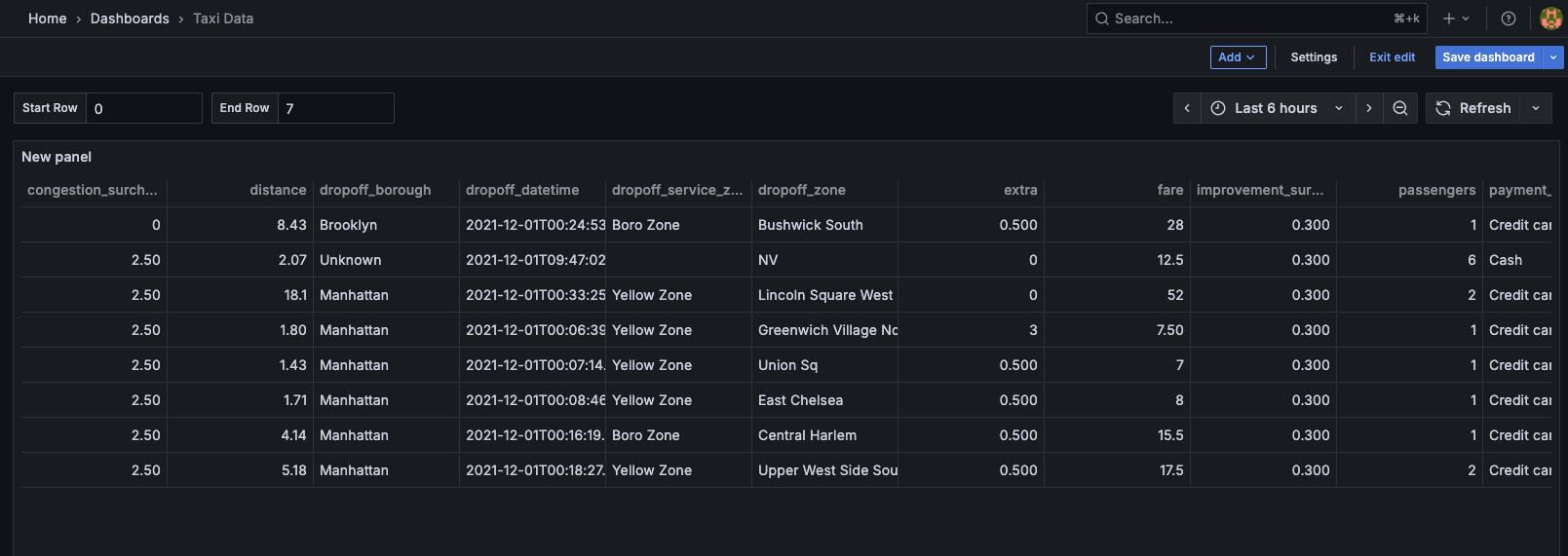
Create a new visualization in Grafana
Create a dashboard and panel in Grafana to visualize data from your KDB‑X workload. Configure the panel to issue a REST query against the data source you set up earlier.
The data source performs the request and returns JSON, and Grafana uses the Infinity plugin’s tooling to parse the response.
- Set the URL to:
https://<INSIGHTS_HOSTNAME>/kdbxgroup/<PACKAGE_NAME>/<KDBX_INSTANCE_NAME>/<API_ENDPOINT>?<API_PARAMS>. Replace the placeholders with the values described in the Query KDB‑X workloads section. - Set the HTTP headers for the REST server module:
Content-Type: application/jsonAccept: application/json
- The Method, Body Type and other API specific data depend on the APIs available on the HTTP Server.
When configured correctly, Grafana renders data returned from your KDB‑X workload and integrates it into your dashboard visualizations.
- Set the URL to:
KDB-X workload observability
KDB‑X workload deployment is CLI‑driven, and the kdb Insights Enterprise web interface does not currently show the deployment status or diagnostics. If you deploy a monitoring/logging stack, you can view logs from these workloads through that system. You can also use the CLI to check recent status information and retrieve logs directly from running KDB‑X workload instances.
Deployment status
Run the following command to view the list of deployed packages:
kxi pm list
This command prints all running packages, including any KDB‑X workload packages currently deployed:
╭──────────────────────┬─────────┬─────────┬──────┬────────┬─────────────────────────────────────┬──────────────────────────────────────┬──────────╮
│ name                 │ version │ status  │ data │ access │ owner                               │ id                                   │ size     │
├──────────────────────┼─────────┼─────────┼──────┼────────┼─────────────────────────────────────┼──────────────────────────────────────┼──────────┤
│ kdbx-workload        │ 0.0.1   │ RUNNING │      │ ARWX   │ service-account-kxi-package-manager │ 39f2c72f-fc1d-4af2-9704-b2f749e939f5 │  25 KiB  │
...
You can inspect a specific workload by running the following command:
kxi pm list deployment
This command returns detailed information about each running KDB‑X workload instance, including any deployment errors:
╭──────────────────┬─────────┬────────────────┬──────┬────────┬───────┬────────────────────────────────────────╮
│ name             │ version │ status         │ data │ access │ owner │ components                             │
├──────────────────┼─────────┼────────────────┼──────┼────────┼───────┼────────────────────────────────────────┤
│ kdbx-workload    │ 0.0.1   │                │      │ ARWX   │ <usr> │ ╭──────────┬───────────┬────────╮      │
│                  │         │                │      │        │       │ │ type     │ name      │ status │      │
│                  │         │                │      │        │       │ ├──────────┼───────────┼────────┤      │
│                  │         │                │      │        │       │ │ workload │ taxi-rest │ OK     │      │
│                  │         │                │      │        │       │ ╰──────────┴───────────┴────────╯      │
...
Refer to the KXI CLI documentation for further information on the Package Manager API.
Retrieve logs
You can retrieve and view logs in real time using the kxi CLI.
Note
If a pod or workload has no recent logs, it does not appear in the results returned by the following commands.
To retrieve logs for a specific KDB‑X workload, run:
kxi obs logs --workload kdbx-workload
Note
In this context --workload relates to the package name.
Example output:
{"container":"kdbx","level":"INFO","message":"Processing get /taxiRideCount - (`symbol$())!()","pod":"kdbx-workload-taxi-rest-0","time":""}
{"container":"kdbx","level":"INFO","message":"Processed get /taxiRideCount took 0ms - ok","pod":"kdbx-workload-taxi-rest-0","time":""}
If you want to retrieve logs from a specific pod you can get a list of available pods using the following:
kxi obs pods
This command returns a JSON-formatted list of pods and details of the workload and package they are in:
{
  ...
  "kdbx-workload-taxi-rest-0": {
    "INFO": 2
  },
  ...
After identifying the pod you want, retrieve its logs and tail the most recent messages:
kxi obs logs --pod kdbx-workload-taxi-rest-0 -w
This command prints recent log messages and continuously streams new log output to the console while it remains active:
2026-03-02 16:28:18 INFO     Processing get /taxiRideCount - (`symbol$())!() container=kdbx pod=kdbx-workload-taxi-rest-0
2026-03-02 16:28:18 INFO     Processed get /taxiRideCount took 0ms - ok container=kdbx pod=kdbx-workload-taxi-rest-0
WARNING  No logs found. Will try again in 5 secs...
WARNING  No logs found. Will try again in 5 secs...
...
WARNING  No logs found. Will try again in 5 secs...
2026-03-02 16:29:16 INFO     Processing get /getTaxiRides - `startRow`endRow!10 15i container=kdbx pod=kdbx-workload-taxi-rest-0
2026-03-02 16:29:16 INFO     Processed get /getTaxiRides took 12ms - ok container=kdbx pod=kdbx-workload-taxi-rest-0
WARNING  No logs found. Will try again in 5 secs...
2026-03-02 16:29:22 INFO     Processing get /taxiRideCount - (`symbol$())!() container=kdbx pod=kdbx-workload-taxi-rest-0
2026-03-02 16:29:22 INFO     Processed get /taxiRideCount took 0ms - ok container=kdbx pod=kdbx-workload-taxi-rest-0
WARNING  No logs found. Will try again in 5 secs...
Refer to the kxi obs in the kxi CLI documentation for more details on the observability command.
Next steps
-
Explore the workload configuration KDB-X workload yaml reference guide to understand all available fields.
-
Review the
kxiCLI workload commands to learn how to create, update, and manage KDB‑X workloads.