Secure Pipelines with Kubernetes Secrets
This page outlines how to manage sensitive data within pipelines by using Kubernetes Secrets and mounting them into pipelines as environment variables. By storing sensitive information in Kubernetes Secrets, it separates them from your pipeline definition and reduces the risk of exposure.
The following sections describe how to read from an authenticated Kafka broker using Secrets to store the authentication credentials:
- What is a Kubernetes Secret
- How to create a Secret
- Mount Secret keys into environment variables
- Use those environment variables in your pipeline nodes
What is a Kubernetes Secret
Kubernetes Secrets are objects that allow you to store and manage sensitive information, such as passwords, OAuth tokens, and SSH keys. Using Secrets is a more secure way to handle sensitive data than putting it directly in your pipeline.
Create a Kubernetes Secret
To create a Kubernetes Secret, define it in a YAML manifest and apply it with kubectl. For example:
apiVersion: v1
kind: Secret
    metadata:
        name: kafka-secret
        type: Opaque
    data:
        username: <base64-encoded-username>
        password: <base64-encoded-password>
Expand to see Kubernetes YAML manifest details
apiVersion: v1- The API group and version to use.kind: Secret- Tells Kubernetes that you are creating a Secret.metadata:- This section provides the information:name: kafka-secret- The name of the secret. In this example, we are creating a secret to be used by the Kafka reader so have named itkafka-secret. Any name can be used.type: Opaque- Tells Kubernetes this is a generic user-defined type.
data:- This contains the actual data for the secret, and says that the values must be base64 encoded strings, not plain text.username: <base64-encoded-username>- Specify the actual username here.password: <base64-encoded-password>- Specify the actual password here.
Note
When creating secrets, the data values must be base64 encoded.
Information
If you don't have access to the Kubernetes cluster to create a Secret, talk to your system administrator.
Secrets managers
External secrets managers (like AWS Secrets Manager, Google Secret Manager, or HashiCorp Vault) are dedicated systems designed to securely store, manage, and distribute sensitive information. They are often used in place of manual Kubernetes storage because they provide enhanced security through centralized control, auditing capabilities, and often offer features like secret rotation, fine-grained access policies. This offloads the responsibility of secure secret handling from Kubernetes' default mechanisms, allowing for more robust and scalable credential management across various environments and applications.
Mount Secrets as environment variables
Once a Kubernetes Secret is created (either directly, as described above, or provisioned from a secrets manager), you can mount its keys as environment variables into your pipeline(s). This is the recommended way for pipelines to consume credentials.
Using the kafka-secret created in the previous section:
-
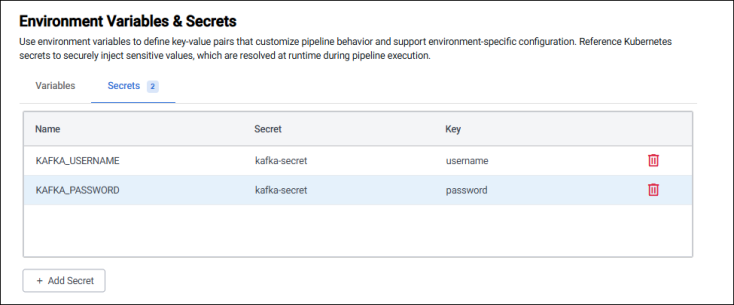
Mount the username and password keys into the pipeline as environment variables. For this example, call these variables KAFKA_USERNAME and KAFKA_PASSWORD.
The names of these environment variables must match the values used in the node parameters later.
The way you do this depends on how you build your pipelines.
-
Navigate to the Environment Variables section of the Pipeline Settings panel.
-
Add the two environment variables referencing
kafka-secret, and theusernameandpasswordkeys.
If you're deploying a code pipeline, using either q or python, add the following to your pipeline YAML definition to define the environment variables.
base: q
name: kafka
spec: file://src/kafka.q
env:
- name: KAFKA_USERNAME
    valueFrom:
        secretKeyRef:
            name: kafka-secret
            key: username
- name: KAFKA_PASSWORD
    valueFrom:
        secretKeyRef:
            name: kafka-secret
            key: password
Expand to see YAML details
This defines two environment variables:
KAFKA_USERNAMEwhose value is pulled securely from a Kubernetes Secret namedkafka-secret, using the keyusername.KAFKA_PASSWORDwhose value is pulled from the same secret, using the keypassword.
Use environment variables in pipeline nodes
Once the secret is created and mounted to environment variables, you can then use it as a parameter in your pipeline nodes. The Kafka broker the pipeline is connecting to requires SASL authentication which require the username and password configured already.
To use the environment variable, follow the relevant steps depending on whether you're using a Web Interface pipeline, q code, or Python code pipeline. The environment variables referenced below must match those created earlier.
-
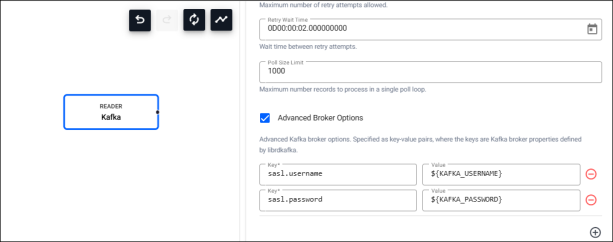
Open the Kafka reader node. Enable Advanced Broker Options, and set the following Key/Value pairs
sasl.username=${KAFKA_USERNAME}sasl.password=${KAFKA_PASSWORD}
In the Web Interface environment variables are supported using ${VAR NAME} syntax.
When creating a q code pipeline:
- Use the
.qsp.useVarfunction to set an environment variable as a node parameter. - In the code snippet below, the
$KAFKA_USERNAMEand$KAFKA_PASSWORDenvironment variables are specified using this API.
The variables are resolved to their values at runtime.
username : .qsp.useVar "KAFKA_USERNAME"
password : .qsp.useVar "KAFKA_PASSWORD"
options : `sasl.username`sasl.password!(username; password);
.qsp.run
    .qsp.read.fromKafka[topic; broker; .qsp.use enlist[`options]!enlist options]
Expand to see snippet details
username : .qsp.useVar "KAFKA_USERNAME"- Creates an object to resolve the$KAFKA_USERNAMEenvironment variable.password : .qsp.useVar "KAFKA_PASSWORD"- Creates an object to resolve the$KAFKA_PASSWORDenvironment variable.options :sasl.usernamesasl.password!(username; password);- Builds a q dictionary with two keys;sasl.usernameandsasl.password, whose values come from the environment variable objects..qsp.run- Launches the pipeline..qsp.read.fromKafka[topic; broker;- Creates the Kafka reader with a specific topic and broker..qsp.use enlist[options]!enlist options]` - Pulls the username and password into the Kafka reader.
When creating a Python code pipeline:
- Use the
kxi.sp.use_varfunction to set an environment variable as a node parameter. - In the code snippet below, the
$KAFKA_USERNAMEand$KAFKA_PASSWORDenvironment variables are specified using this API.
The variables are resolved to their values at runtime.
from kxi import sp
username = sp.use_var("KAFKA_USERNAME")
password = sp.use_var("KAFKA_PASSWORD")
options = {"sasl.username": username, "sasl.password": password};
sp.run(
    sp.read.from_kafka(topic; broker; {"options": options})
Expand to see snippet details
from kxi import sp- Imports the SP API.username = sp.use_var("KAFKA_USERNAME")- Creates an object to resolve the$KAFKA_USERNAMEenvironment variable.password = sp.use_var("KAFKA_PASSWORD")- Creates an object to resolve the$KAFKA_PASSWORDenvironment variable.options = {"sasl.username": username, "sasl.password": password};- Builds the Kafka authentication options.sp.run- Starts the pipeline.sp.read.from_kafka(topic; broker; {"options": options}- Defines the Kafka reader using the environment variables in the Kafka authentication options.