Package Query Routing Configuration
This page outlines how to configure query routing in kdb Insights Enterprise, guiding you through setup and package routing options
Query routing is managed by two primary components, the Service Gateway and the Resource Coordinator. When a query is executed, partial results across tiers are merged in the Aggregator. These components are installed globally as part of a standard deployment in your kdb Insights Enterprise base install. In addition to having the global routing processes, additional Resource Coordinator(s) and Aggregator(s) can be installed within a package. This gives the capacity to handle increased query load because these are scalable. Having these as additional and separate also enables you to have custom aggregations that can be applied within individual packages.
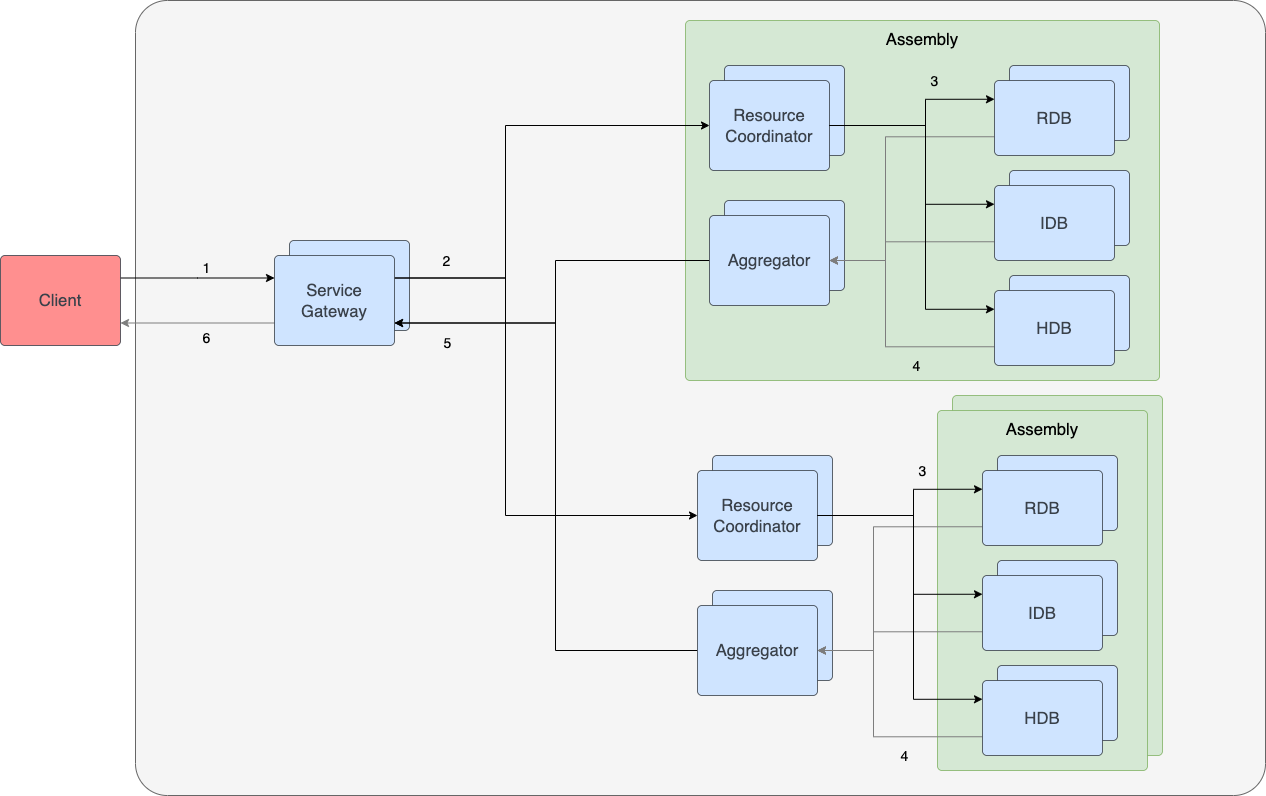
Unless otherwise specified, the arrows in the diagram represent asynchronous q IPC communication between processes. Query flow is as follows:
| Arrow | Description |
|---|---|
1 |
Client makes API request to a Service Gateway replica. This can be synchronous or asynchronous. |
2 |
The Service Gateway forwards the request to the Resource Coordinator. |
3 |
The Resource Coordinator sends partial requests to each DAP relevant to the query based on purview. |
4 |
DAPs forward their responses to a single Aggregator for aggregation. |
5 |
The Aggregator sends the response to the same Service Gateway the client connected to. |
6 |
The Service Gateway sends response back to client. |
Global router
Refer to the Resource Coordinator and Aggregator configuration page for details on tuning the global routing components.
Configuration
Package query routing is configured in the package's router file, router/router.yaml. The rc, agg and qe keys are fields of the router; they are not shard settings, and must not be placed in a database shard file.
# router/router.yaml
name: router
rc:
  size: 1
agg:
  size: 1
qe:
  enabled: true
  size: 1
All three keys are optional. If rc and agg are omitted, the deployment uses the instance-common routing services described in Resource Coordinator and Aggregator configuration. The qe key enables query environments for the package.
Resource Coordinator
Configuration for the Resource Coordinator is nested under a rc key within the router file.
| Name | Type | Required | Description |
|---|---|---|---|
args |
string[] | No | Optional command line arguments to pass to the running container. |
env |
object[] | No | Additional environment variables can be added to tune and customize the configuration for this instance. Refer to Resource Coordinator environment variables for details. |
image |
object | No | A custom image can be provided to override the version included with this install. This object must include a repo, container and tag argument pointing to the desired Resource Coordinator image. |
k8sPolicy |
object | No | Allows you to specify additional Kubernetes configuration for this instance. This configuration can be used to modify process availability and resource limits. Refer to Kubernetes configuration for more details. |
size |
integer | No | This is the total number of instance replicas to deploy for a given Resource Coordinator. Increasing this value provides higher query availability and can increase the number of concurrent queries the database can service. Each instance requires its own resources for memory and CPU. The default is 1 and the minimum is 1. |
The table above covers the most commonly tuned fields. The rc key also accepts annotations, config, port, qePolicy, sideCarConfig and volumeMounts. For the complete generated field reference, refer to Rc.
Aggregator
Configuration for the Aggregator is nested under an agg key within the router file.
| Name | Type | Required | Description |
|---|---|---|---|
args |
string[] | No | Optional command line arguments to pass to the running container. |
env |
object[] | No | Additional environment variables can be added to tune and customize the configuration for this instance. Refer to Aggregator environment variables for details. |
image |
object | No | A custom image can be provided to override the version included with this install. This object must include a repo, container and tag argument pointing to the desired Aggregator image. |
k8sPolicy |
object | No | Allows you to specify additional Kubernetes configuration for this instance. This configuration can be used to modify process availability and resource limits. Refer to Kubernetes configuration for more details. |
size |
integer | No | This is the total number of instance replicas to deploy for a given Aggregator. Increasing this value provides higher query availability and can increase the number of concurrent queries the database can service. Each instance requires its own resources for memory and CPU. The default is 1 and the minimum is 1. |
The table above covers the most commonly tuned fields. The agg key also accepts annotations, config, customFile, port, qePolicy, sideCarConfig and volumeMounts. For the complete generated field reference, refer to Agg.