KDB-X Workloads (Beta)
This page provides an overview of KDB‑X Workloads in kdb Insights Enterprise and explains how KDB‑X code and modules are packaged, deployed, and run using the platform’s built‑in services.
KDB‑X Workloads are currently available as a Beta feature.
Functionality, APIs, and configuration options may change before general availability. Beta features may contain limitations, unexpected behaviour, or reduced stability. Refer to the official Beta Feature Standard Terms page for full details.
KDB-X is a modular analytics platform allowing developers to build real-time, data-intensive, and AI-driven applications using the kdb+ ecosystem. Developers can deploy code written in KDB‑X as scripts or modules to kdb Insights Enterprise as KDB‑X Workloads, using its core services out of the box, including:
- Authentication
- Encryption in Transit
- Secure REST APIs
- Scalability
- Monitoring
- Developer Experience with kdb VS Code Extension
- Packaging and deployment management
- RT integration - publish & subscribe
Definitions
- Insights Enterprise package - A package that bundles one or more Insights Enterprise workloads together with user source code and modules. It provides a single deployable unit for running on kdb Insights Enterprise.
- KDB-X workload group - A collection of KDB-X workload instances, optionally metrics configuration and storage resources.
- KDB-X workload instance - A single KDB-X process deployable to Insights Enterprise. Each instance includes deployment configuration, user source code, dependency information, and storage resources.
- Entrypoint - An initialization script that a KDB-X process runs on startup. It can be local to the package (
src/init.q) or defined through a dependency on another package (common-lib:/src/run.q).
KDB-X Workload basics
A KDB-X workload follows the same orchestration model as other workloads in kdb Insights Enterprise:
- You use the
kxiCLI to create, update, deploy, manage, and tear down KDB-X workloads. - You define KDB‑X workloads using a YAML configuration file. This file specifies a KDB-X workload group which contains one or more KDB‑X workload instances.
- You wrap the workload group in a kdb Insights Enterprise package and deploy it to kdb Insights Enterprise.
Important
KDB-X Workloads support q-based source files only. Python/PyKX workloads are not available.
Group
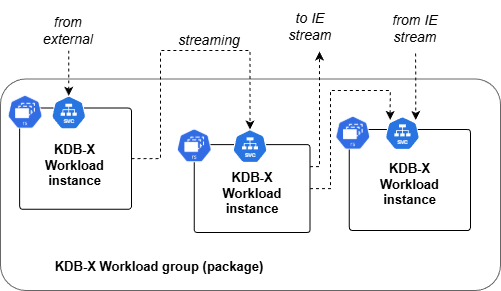
A KDB-X workload group contains:
-
A collection of KDB-X workload instances combined to implement a specific user workflow.
-
Optional shared storage defined in the workload configuration and made available to all KDB-X workload instances.
-
Optional Prometheus metrics resources that enable KDB-X workload instances to provide metrics.
Instance
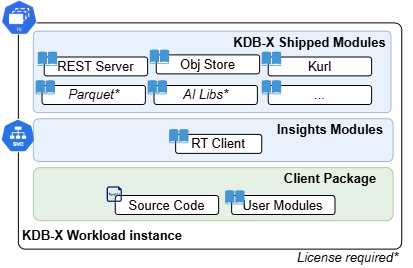
A KDB-X workload instance contains:
-
A deployable base KDB-X image, including the latest released KDB-X and internal modules.
-
Dependencies for referencing KDB-X modules and packages available on kdb Insights Enterprise, automatically pushed to the correct
QPATHlocation at runtime. -
An entrypoint which acts as the runtime script for the KDB-X process and loads user-defined application code, modules, and artifacts.
-
Authenticated external REST endpoints exposed through the Insights Enterprise API Gateway.
-
Persistent storage for the KDB-X workload instance (in addition to the ability to utilize KDB-X workload group shared storage).
-
A Kubernetes scalable ReplicaSet for the KDB-X workload instance.
Refer to the KDB-X workload file Reference guide for further details on the resources and configuration.
User code and dependencies
Deployed KDB-X workload instances load dependent user-defined application code. Typically, this code is part of the KDB-X workload package, where the user's code is co-located with the KDB-X workload and the --entrypoint script resides within the workload definition. The resulting workload YAML file references the current package and relative path to the initialization file.
...
      initFile: src/run.q
      package: my-package
KDB-X modules
User-defined
It is also possible to create a reusable custom KDB-X module, package it up and deploy to kdb Insights Enterprise. You can then declare this package as a dependency of the main KDB‑X workload package. If you do not specify a version, the workload automatically uses the latest available version. The dependency model follows the structure described in the Reference guide.
...
    dependencies:
      - common-src==1.0.1
To push modules to kdb Insights Enterprise you must first Create a package and then structure the KDB-X module in a folder according to the module documentation. After you push the package, you can mark it as a dependency of the KDB-X workload and it becomes available on the QPATH. You can then import and use the module in the KDB‑X workload as supported by KDB-X Modules.
...
utils:use`common-src/utils;
...
In addition, you can use the dependency as the entrypoint to the KDB-X workload. You can define this at workload creation time through the CLI --entrypoint argument or by updating the workload YAML file's package and initFile fields:
...
      initFile: src/init.q
      package: common-src
...
Pre-installed
KDB-X workload-instance application code can directly load installed, official KDB-X modules in the same way as any other KDB-X process. The application code loads these modules according to the KDB-X documentation, for example, by loading the Rest module.
KDB-X workload deployment
As in existing kdb Insights Enterprise deployments, the internal Kubernetes operator manages KDB-X workloads. The operator deploys the KDB-X workload definition and handles the creation and placement of all required configuration files, packaged dependencies, KDB-X instances, services and storage to bring a KDB-X workload group online.
During a KDB-X workload deployment, the operator provisions the following Kubernetes resources:
- StatefulSets
- PersistentVolumeClaims (PVCs) for a given storage class
- Services
- Prometheus ServiceMonitors
For further information about Kubernetes resources, refer to the Kubernetes documentation or consult your system administrator.
Integrations
KDB-X workloads on kdb Insights Enterprise give developers a way to deploy flexible custom workloads alongside existing kdb Insights Enterprise resources – such as kdb Insights Database services and Stream Processor pipelines – to extend these applications. KDB-X workloads can integrate with these services in the following ways:
- Through an RT stream: KDB‑X workloads can publish and/or subscribe through the kdb Insights q interface. This allows data to flow seamlessly between KDB-X workloads and existing kdb Insights Enterprise pipelines, streams, and databases.
The kdb Insights q interface libraries are pre-installed in KDB-X instances.
-
Using the
kurlclient through the KDB-X kurl module to call Insights Database REST APIs and UDAs. -
Calling into KDB‑X workloads from existing services: existing kdb Insights Enterprise pipelines and databases custom code can use
kurlto call KDB-X workloads through the REST services they expose.