Pipeline Settings
This page describes how to configure pipeline settings in the Web Interface.
When creating a pipeline, the Settings tab lets you configure resources, environment variables, and other tuning options. The following sections detail these settings.
Pipeline Settings screen
This is a large screen, you must scroll to see all the options shown below.
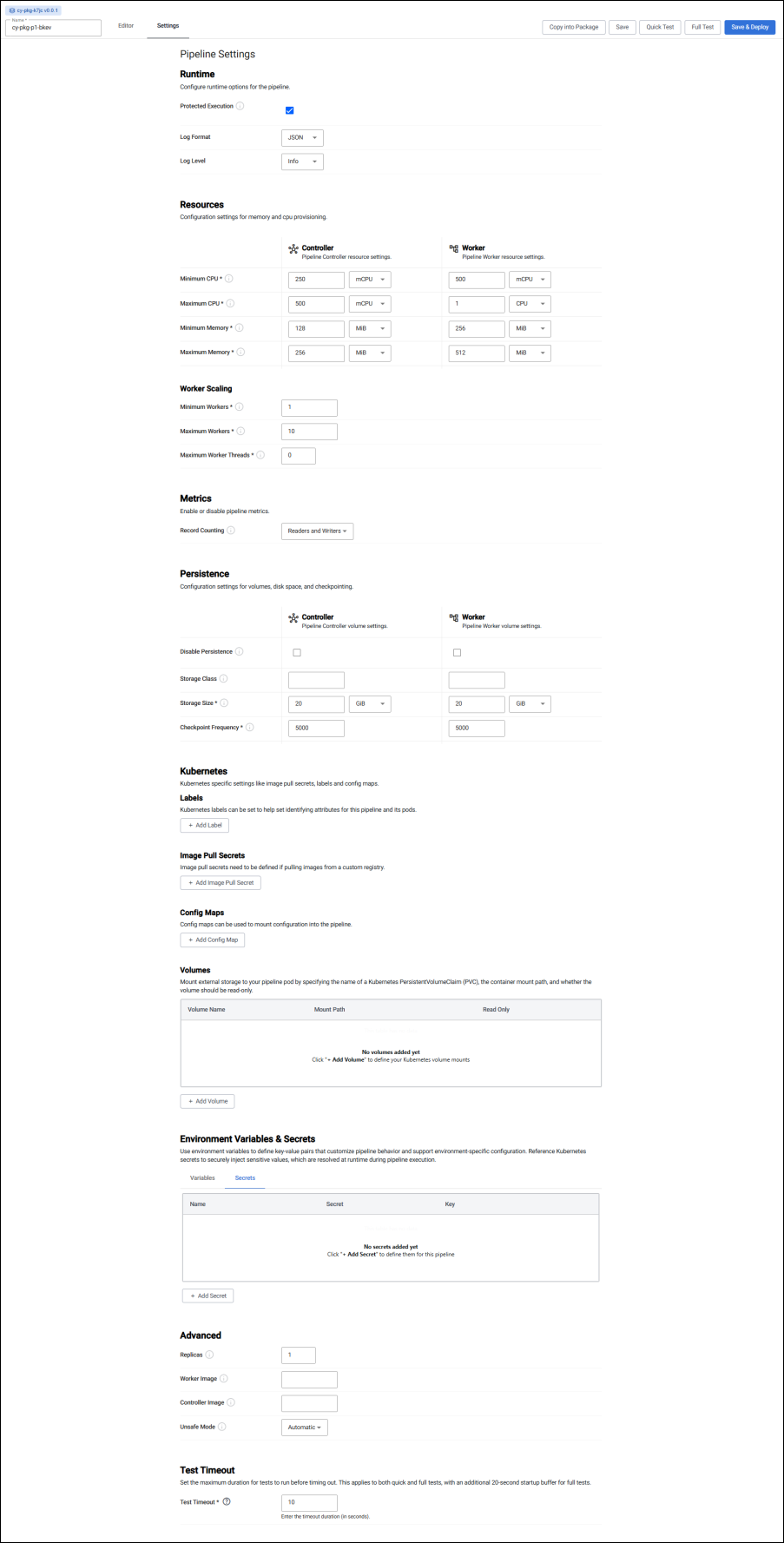
Runtime
| Setting | Description |
|---|---|
Protected Execution |
Enabled for greater granularity in error reporting. When enabled, operating performance may be impacted. |
Log Format |
Define debug reporting format; select between JSON or Text formats. It is recommended to leave this set to JSON for more structured logs. |
Log Level |
Select between Trace, Debug, Info, Warning, Error or Fatal. Lower log levels include higher ones. For example, the default level is Info which includes Warning, Error and Fatal. |
Resources
Resources are the amount of computational resources that this pipeline is allowed to consume. When allocating resources, it is important to remember that only the worker is responsible for processing data. To increase throughput, increase resources on the worker. The controller resources only needs to be modified when a high degree of parallelism is used.
Controller
CPU
| Setting | Description |
|---|---|
Minimum CPU |
Minimum amount of CPU for the controller; 1 CPU or 1000 mCPU for one core, 0.5 CPU or 500 mCPU is half time for one core. Must be >= 0.1 CPU. |
Maximum CPU |
Maximum amount of CPU for the controller; must be <= 4 CPU. |
Memory
| Setting | Description |
|---|---|
Minimum Memory |
Minimum memory to allocate to the controller and always be available; >= 50 MiB. |
Maximum Memory |
Maximum memory to allocate to the controller; once reached it will return out-of-memory error; <= 10 GiB. |
Worker
CPU
| Setting | Description |
|---|---|
Minimum CPU |
Minimum amount of CPU for for the worker; 1 CPU or 1000 mCPU for one core, 0.5 CPU or 500 mCPU is half time for one core. Must be >= 0.1 CPU. |
Maximum CPU |
Maximum amount of CPU for for the worker. |
Memory
| Setting | Description |
|---|---|
Minimum Memory |
Minimum memory to allocate to the worker and always be available; >= 100 MiB. |
Maximum Memory |
Maximum memory to allocate to the worker; once reached it returns out-of-memory error. Must be <= 500GiB. |
Config
| Setting | Description |
|---|---|
Minimum number of workers |
Define the minimum number of workers that can be created to run the pipeline; >= 1. |
Maximum number of workers |
Define the maximum number of workers that can be created to run the pipeline; <= 10. |
Maximum number of worker threads |
Maximum number of worker threads; value between 1 and 16. |
Metrics
Customize or disable pipeline metrics.
Record counting
Pipeline record counting allows pipelines to calculate an average input and output data rate, which is a good indication of how much data the pipeline is ingesting and outputting. Disabling record counting increases pipeline performance by a small amount.
| Setting | Description |
|---|---|
Readers and Writers |
Enable record counting for all readers and writers, allowing input and output data rates to be calculated. |
Disabled |
Disable record counting. This increases performance but doesn't allow input and output data rates to be calculated. |
Persistence
Controller
Kubernetes persistence configuration.
| Setting | Description |
|---|---|
Disabled |
Enabled by default, click to disable. |
Storage Class |
Kubernetes storage class name; e.g. standard. |
Storage Size |
Size volume allocated to each controller; defaults to 20Gi. |
Checkpoint Frequency |
Check frequency in milliseconds, defaults to 5,000. |
Storage Class
Ensure Storage Class is set to a valid class. This is defined in the cluster and may be different across cloud providers i.e. GCP: standard, AWS: gp2, Azure: default. This information can be retrieved by running:
kubectl get storageclass
Worker
Kubernetes persistence configuration.
| Setting | Description |
|---|---|
Disabled |
Enabled by default, click to disable. |
Storage Class |
Kubernetes storage class name; e.g. standard. |
Storage Size |
Size volume allocated to each Worker; defaults to 20Gi. |
Checkpoint Frequency |
Check frequency in milliseconds, defaults to 5,000. |
Kubernetes
| Setting | Description |
|---|---|
Label |
Add a label and value to created resources. This is a Kubernetes label and can be used to identify resources associated with this pipeline. |
Image Pull Secrets |
Add Kubernetes secret reference name; for example, kx-access. Secrets can be used for mounting in passwords, TLS certificates or just protected data. |
Environment Variables & Secrets
Use this section to define environment variables and Kubernetes Secrets.
Variables
Use environment variables to define key-value pairs that customize pipeline behavior and support environment-specific configuration.
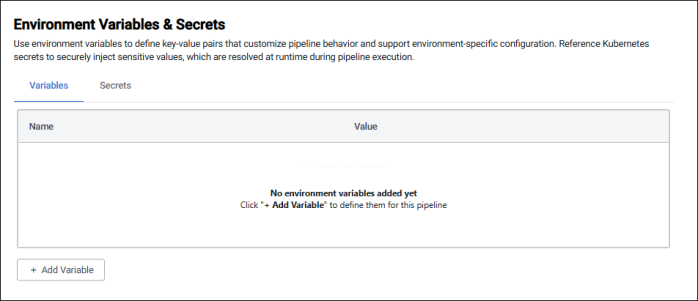
Environment variables have the following attributes:
| Setting | Description |
|---|---|
Name |
The name of the environment variable. |
Value |
The variable value. |
See the list of environment variables for available options.
Secrets
Reference Kubernetes secrets to securely inject sensitive values, which are resolved at runtime during pipeline execution.
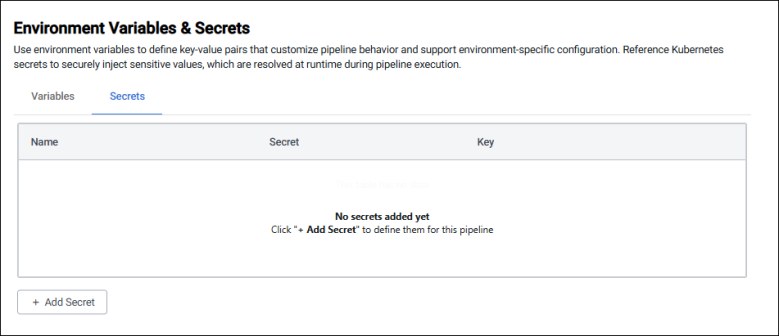
Secrets have the following attributes:
| Setting | Description |
|---|---|
Name |
The name of the environment variable that stores the secret. |
Secret |
The kubernetes secret name. This is used to find the object in the cluster. |
Key |
The specific values in the secret. For example this could be username or password. See setting Kubernetes Secrets for an example. |
Advanced
| Setting | Description |
|---|---|
Replicas |
The number of pipeline replicas to deploy. Default value of 1 means only a single pipeline is deployed with no replicas. |
Worker Image |
A registry URL that points to a custom Stream Processor worker image. This can be used for extending the core set of functionality of the Stream Processor with custom code or libraries. |
Controller Image |
A registry URL that points to a custom Stream Processor controller image. |
Unsafe Mode |
This enables unsafe mode, which disables determinism and may lead to duplicate or lost data in failover scenarios. The options are: - Automatic: Inherits the system default (default setting) - Disabled: Enables determinism (safe mode) - Enabled: Disables determinism (unsafe mode) |
Full test timeout
This setting defines the maximum amount of time a full test is allowed to run before it automatically times out. It ensures that tests do not hang indefinitely if expected data does not arrive in time.
A timeout is especially useful when the timing of incoming data is unpredictable, such as when the pipeline involves multiple readers. Setting a timeout improves the overall testing experience and removes the need to either use a full deployment for testing or stub out data readers with a callback function.
This timeout only applies when running full tests, with an additional 20-second startup buffer for test initialization.
It applies only to the legacy Full Test feature, and not to the standard test feature.
| Setting | Description |
|---|---|
Test Timeout |
Enter the timeout duration in seconds. The default value is 10 seconds. |