Configure a Package
This page provides detailed instructions for configuring your package to enable seamless deployment, management across environments, and debugging and logging.
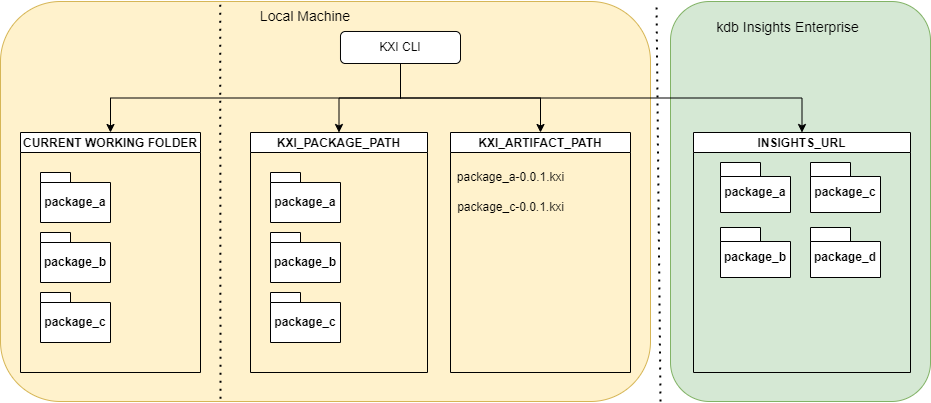
The CLI can act on files in any of the following locations:
-
The current working folder.
-
The package path (
KX_PACKAGE_PATH): Packages in this location are known to be installed locally. -
The
.kxipackage path (KX_ARTIFACT_PATH): The location where.kxipackages are stored. Optionally, before uploading to kdb Insights Enterprise, packages can be packed as.kxipackage files. -
The kdb Insights Enterprise URL: Packages can be uploaded, deployed, torn down, and removed from kdb Insights Enterprise.
Configure environment variables
You can specify the packaging specific variables as environment variables or in the ~/.insights/pakx-config file as defined below:
| variable | file | key in config | default | description |
|---|---|---|---|---|
KX_PACKAGE_PATH |
pakx-config |
KX_PACKAGE_PATH |
/tmp |
Where "installed" packages are stored |
KX_ARTIFACT_PATH |
pakx-config |
KX_ARTIFACT_PATH |
/tmp |
Where .kxi packages are stored |
Environment variables take precedence over keys in the configuration file. For example: export KX_PACKAGE_PATH=/some/where.
Recommendations when setting these variables.
-
If the
KX_PACKAGE_PATHis not set, it will be set to a temporary directory (which your OS may clean up unexpectedly). -
KX_PACKAGE_PATHandKX_ARTIFACT_PATHshould not be set to the same folder.
❯ cat ~/.insights/pakx-config | head -5
[envvars]
KX_PACKAGE_PATH = ""
KX_ARTIFACT_PATH = ""
KX_PACKAGE_FORMAT = ".yaml"
After configuring the tool to connect to a running kdb Insights Enterprise instance as described in the CLI authentication, you can verify the connection by running the following command:
kxi pm list
This command returns all available packages in your kdb Insights Enterprise deployment.
Configure debugging and logging flags
In addition to passing in the various directory variables as command line arguments, you can also pass in debug and log level flags. Use the kxi package --help command for more information and a full list of possible arguments.
Log level
To increase log verbosity, add the -v modifier to the kxi package command. You can add this modifier multiple times to increase the log level further. The following example demonstrates this:
kxi package -vvv <subcommand>
Debug mode
Debug mode controls whether the error traceback gets printed and is intended to be helpful for developers:
kxi package --debug <subcommand>
Quiet mode
Quiet mode minimizes the printout to only the result without any other messages. This can be helpful if you need to pipe the output:
kxi package -q <subcommand>
Debug and log level flags need to be directly after kxi package when running the command
For example:
kxi package --debug --add database
Package help
The kxi package --help command provides detailed information about kxi Insights Packages, including available options and commands for managing packages within kdb Insights Enterprise. This command is useful for understanding how to build, configure, and manage packages effectively.
Run the kxi package --help command for more information and a full list of possible arguments.
kxi package --help
 Usage: kxi package [OPTIONS] COMMAND [ARGS]...

 Insights Package Building CLI.

╭─ Options ────────────────────────────────────────────────────────────────────╮
│ --version                            Show the version and exit.              │
│ --artifact-store      DIRECTORY                                              │
│ --pkg-lib             DIRECTORY                                              │
│ --debug                              Enable stacktrace print statements and  │
│                                      increase verbosity for easier           │
│                                      debugging.                              │
│ --verbose         -v  INTEGER RANGE  Increase verbosity level                │
│ --quiet           -q                 Disable logs. Only print errors.        │
│ --stacktrace                         Enable stacktrace print statements.     │
│ --help                               Show this message and exit.             │
╰──────────────────────────────────────────────────────────────────────────────╯
╭─ Commands ───────────────────────────────────────────────────────────────────╮
│ add         Add an entity to the specified package.                          │
│ checkpoint  Update the package version given a source code directory.        │
│ config      Local configuration options.                                     │
│ convert     Converts Assembly specs to packages or changes package format.   │
│ copy        Copy an entity from the specified package.                       │
│ field       Find, list or mutate fields within a package.                    │
│ info        show some info about the package                                 │
│ init        Creates a bare package at the specified target path.             │
│ list        List all installed packages or artifacts.                        │
│ lock        Lock the q files within a source directory. Files whose first    │
│             line is /dnc or //dnc will be ignored.                           │
│ overlay     Overlay a package using a spec file containing a subset of       │
│             fields.                                                          │
│ packit      Create a package artifact given a source code directory.         │
│ refresh     Refresh a package, picking up any available changes from disk    │
│ remote      Insights Package Manager Service commands.                       │
│ rm          Remove an entity from the specified package.                     │
│ unpack      Unpack an artifact to a specified location.                      │
│ validate    Validate the contents of a source directory to ensure it is a    │
│             valid package.                                                   │
╰──────────────────────────────────────────────────────────────────────────────╯
Next steps
- Find out how to create a package.