Encoders
This page explains how to set up encoder operators for kdb Insights Enterprise pipelines using the Web Interface.
Encoding allows data to be converted into a format that can be passed to an external system either by writing the content to a static file or by streaming the data to a different system.
See APIs for more details
Both q and Python interfaces can be used to build pipelines programmatically. See the q and Python APIs for details.
The pipeline builder uses a drag-and-drop interface to link together operations within a pipeline. For details on how to wire together a transformation, see the building a pipeline guide.
Arrow
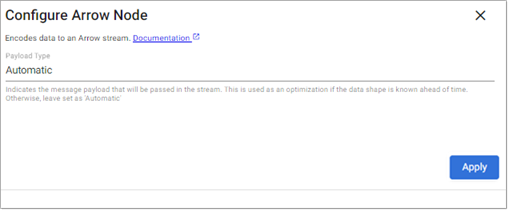
(Beta Feature) The Arrow operator encodes kdb Arrow data.
Beta - For evaluation and trial use only
This feature is currently in beta.
- Beta feature are included for early feedback and for specific use cases. They are intended to work but have not been marked ready for production use. To learn more and enable beta features, see enabling beta features.
- We invite you to use this beta feature and to provide feedback using the Ideas portal.
- During deployment, the entitlements feature is disabled by default, meaning no restrictions are applied and you can manage all databases, pipelines, and views as well as query all data in a kdb Insights Enterprise deployment.
- When you enable the feature, you do not have access to query data in a database unless you have been given a data entitlement to query the database in question.
Note
See q and Python APIs for more details: Arrow
Optional Parameters:
| Name | Description | Default |
|---|---|---|
| Payload Type | Indicates the message payload that will be passed in the stream. This is used as an optimization if the data shape is known ahead of time. Otherwise, leave set as 'Automatic' | Automatic |
Avro
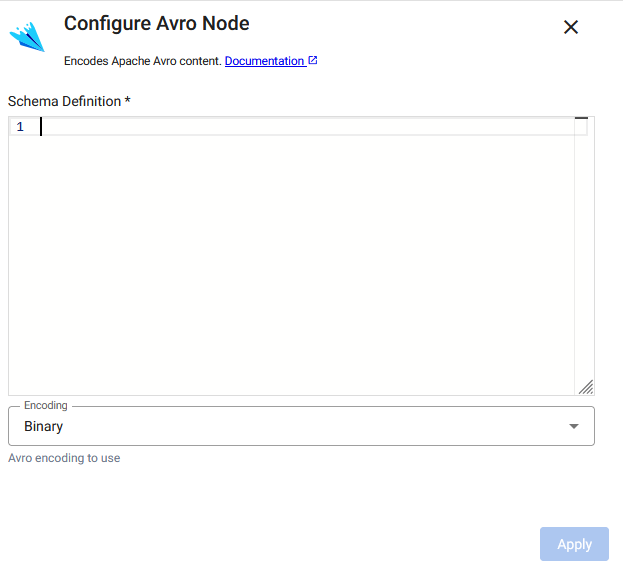
(Beta Feature) The Avro operator encodes kdb Arrow data.
Beta - For evaluation and trial use only
This feature is currently in beta.
- Beta feature are included for early feedback and for specific use cases. They are intended to work but have not been marked ready for production use. To learn more and enable beta features, see enabling beta features.
- We invite you to use this beta feature and to provide feedback using the Ideas portal.
- During deployment, the entitlements feature is disabled by default, meaning no restrictions are applied and you can manage all databases, pipelines, and views as well as query all data in a kdb Insights Enterprise deployment.
- When you enable the feature, you do not have access to query data in a database unless you have been given a data entitlement to query the database in question.
Note
See q and Python APIs for more details: Avro
Required Parameters:
| Name | Description | Default |
|---|---|---|
| Schema | A schema definition indicating the Avro message format to be encoded |
Optional Parameters:
| Name | Description | Default |
|---|---|---|
| Encoding | Indicates whether to encode data as Avro binary or JSON | Binary |
CSV
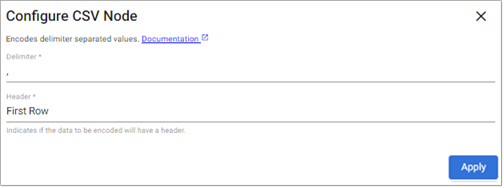
This operator converts data into CSV format.
Note
See q and Python APIs for more details:CSV
Required Parameters:
| Name | Description | Default |
|---|---|---|
| Delimiter | Field separator for the records in the encoded data | , |
Optional Parameters:
| Name | Description | Default |
|---|---|---|
| Header | Indicates whether encoded data should start with a header row. Options are Never, First Row, or Always. |
First Row |
JSON
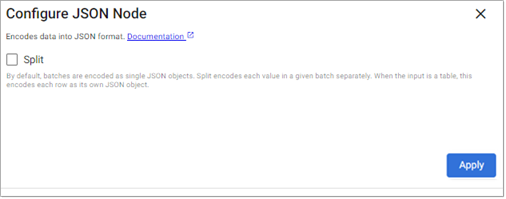
The JSON operator serializes data into JSON format.
Note
See q and Python APIs for more details: JSON
Optional Parameters:
| Name | Description | Default |
|---|---|---|
| Split | By default, batches are encoded as single JSON objects. Split encodes each value in a given batch separately. When the input is a table, this encodes each row as its own JSON object. | No |
Protocol Buffers
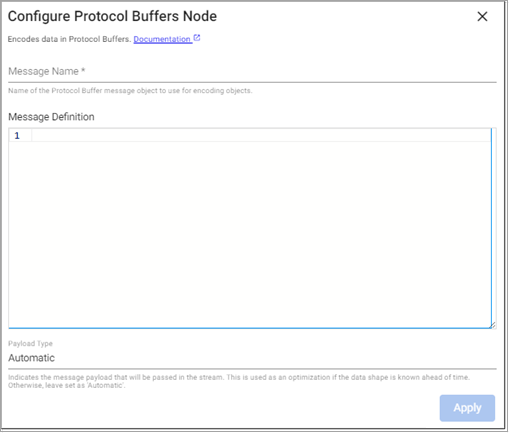
The Protocol Buffers operator serializes data into Protocol Buffers.
Note
See q and Python APIs for more details: Protocol Buffer
Required Parameters:
| Name | Description | Default |
|---|---|---|
| Message Name | The name of the Protocol Buffer message type to decode | |
| Message Definition | A .proto definition containing the expected schema of the data to decode. This definition must include a definition of the Message Name referenced above. |
Optional Parameters:
| Name | Description | Default |
|---|---|---|
| Payload Type | Indicates the message payload that will be passed in the stream. This is used as an optimization if the data shape is known ahead of time. Otherwise, leave set as Automatic. |
Automatic |