Help and Feedback
This page explains how to access help resources and provide feedback for the kdb Visual Studio Code Extension.
The Help and Feedback view appears in the primary sidebar and provides quick access to documentation and support channels. These options allow you to learn more about the extension, request enhancements, report issues, or share feedback directly with the development team.
A Help and Feedback view is displayed in the primary sidebar of the kdb Visual Studio Code Extension. This includes links to:
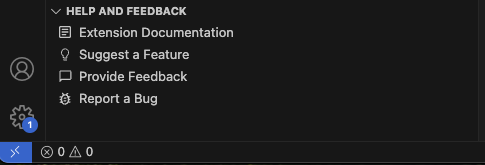
The view includes links to:
- Extension documentation — Opens the kdb Visual Studio Code Extension documentation in a new browser tab.
- Suggest a feature — Displays a pop-up confirmation and opens a browser window after confirmation, allowing you to propose improvements.
- Provide feedback — Displays a pop-up confirmation and opens a feedback form in your browser after confirmation.
- Report a bug — Takes you directly to the extension’s GitHub issue tracker.
These links help you quickly access the resources you need without leaving the editor.
User feedback notification
At times, VS Code may display a notification inviting you to provide feedback about your experience with the extension. This system notification appears after a few uses of the extension and helps us improve your experience. You may dismiss the notification or choose not to see it again.
If you choose to opt out permanently but wish to revert this, open VS Code settings, search for survey, and check the Hide Survey option, as shown below.

Next steps
- Learn more about the kdb Visual Studio Code Extension settings