Install KDB-X from the kdb Visual Studio Code Extension
This page explains how to install KDB-X directly from within the kdb Visual Studio Code Extension.
The kdb Visual Studio Code Extension includes built-in support for installing, activating, and launching KDB-X. This provides a ready-to-use environment for developing q code, running sessions, and working with KDB-X features without requiring manual setup.
KDB-X is the next generation of kdb+, and is designed for scalable analytics, real-time data processing, and AI workflows.
When you open the kdb Visual Studio Code Extension for the first time, you are greeted by a Welcome to KDB-X screen with installation instructions.
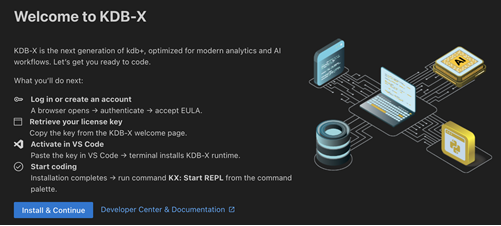
If you previously dismissed the welcome message, you can restore it through:
- Command Palette → “Welcome to KDB-X”
If you already have a KDB-X license key and simply want to install or activate it (locally or remotely), use:
- Command Palette → “Install KDB-X”

Setup instructions
-
Click the Install & Continue button.
- A browser window opens automatically.
- Log in using your email address (verify using the code sent to you) or sign in with Google, then accept the KDB-X EULA.
-
Retrieve your KDB-X license key
- After login, navigate to the KDB-X Welcome Page or check your welcome email to copy your unique license key.
-
Activate KDB-X in VS Code
- Paste your license key when prompted.
- The KDB-X runtime will install automatically using the terminal.
-
Start coding
- Once the installation completes, the runtime path and environment should appear in the KX Extension panel.
- You can start coding immediately using KDB-X scripts and sessions.
Note
A KDB-X runtime must be installed before you can start a REPL session. The REPL cannot run without a valid runtime.
The REPL does not require any changes to your system PATH. When KDB-X is installed through the kdb Visual Studio Code Extension, the extension records the installation location and uses it automatically for all future REPL sessions.
Using q outside of VS Code
If you want to use q outside of VS Code, set a QHOME environment variable to the location used by the kdb VS Code install.
For example, if q is installed at C:\q, then QHOME is C:\q.
When locating the q executable for REPL, the kdb Visual Studio Code Extension resolves the location in this order of precedence:
- The workspace-level
kdb.qHomeDirectorysetting - The
QHOMEenvironment variable - The machine-level
kdb.qHomeDirectorysetting
For more details, refer to the QHomeDirectory wiki page.