User authentication
This page describes KX Sensors v3 user authentication, including the master key, the user credentials database, configuration, and communication paths.
KX Sensors supports user authentication to control access to the system.
User authentication overview
KX Sensors v3 supports authentication based on usernames and passwords. With authentication enabled, connections to q processes and other entry points are validated using credentials.
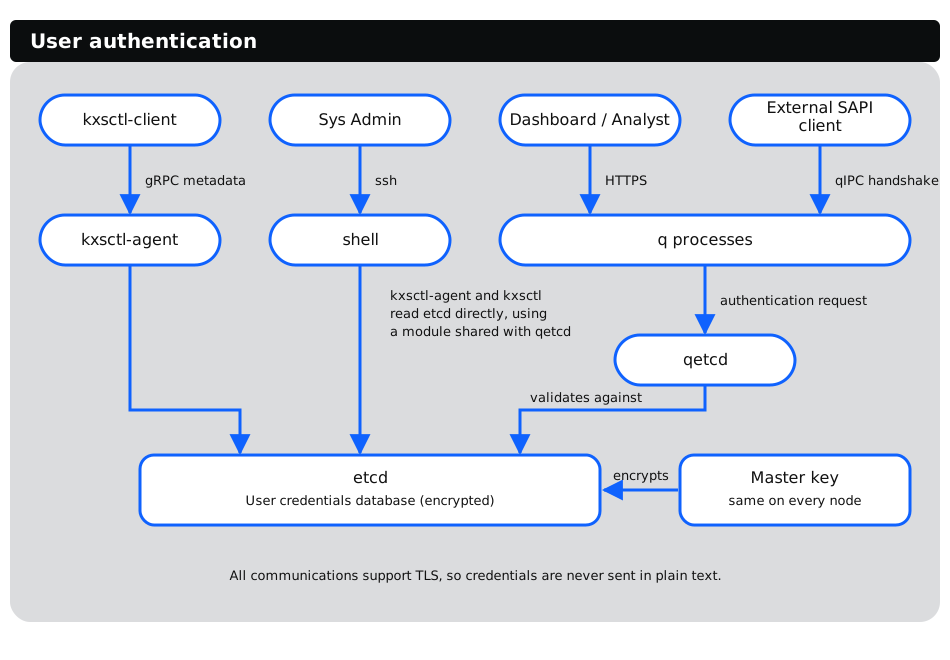
The following diagram shows each authentication entry point, the transport that carries the credentials, and where they are validated and stored:
Master key
- Used to encrypt and decrypt the user credentials database.
- Initialized by installation process.
- Exists on every node.
- Same on every node.
- Cannot be changed after creation.
- Not the same as the master key used for database encryption.
User credentials database
- Stored centrally in etcd for access across nodes.
- Encrypted (using the master key) to prevent unauthorized viewing/editing from sources that can access etcd.
- System is initialized with one "admin" user by the installer, regardless of whether user authentication is enabled or not. This is referred to as the "seed user" by the installer.
- "admin" user has role with permission to add other users.
- Additional users can be added via
kxsctl usercommands; also supported bykxsctl-client user. Pass passwords with the long-form--passwordand--new-passwordflags; the-pand-nshorthands were removed in v3.3. - User credential database contains: username, password, role, and enabled flag.
- Roles map to internal permissions; current role set is:
USER- Can connect to q processes, invoke commands via kxsctl-client; cannot edit user base.ADMIN- Can do everything user can, and edit user base
Configuration
- Authentication is enabled in manifest and can be set for all or by service class.
- For qetcd and kxsctl-agent, authentication is not enabled via manifest but instead via environment variables in
kxsenv(initialized by the installer).
Communication
- SAPI sends username/password as part of qIPC handshake.
- kxsctl-client sends username/password as gRPC request metadata; kxsctl-agent parses these and validates via call to qetcd.
- Dashboard and Analyst send username/password using standard HTTP authentication as supported by kdb+.
- All communications support TLS to avoid sending credentials plain-text.
- Most authentication requests go to qetcd which validates against the User Credential Database. kxsctl and kxsctl-agent go directly to etcd using a module shared with qetcd.
v3 user authentication compared to v2
The following v2 features are currently not supported in v3:
- SAML
- User groups
- Revision history
- Password policies
- Entity groups
- RBAC