Set up query processing
This page explains how to configure Gateway (GW) and Response Process (RP) service classes for query processing, in manifest.yaml and systemParams.yaml.
Overview
Query processing in KX Sensors involves a Gateway process (GW), which receives and dispatches requests, and a Response Process (RP), which aggregates results and sends them to the originating client. An RP is not involved in servicing a request unless a response is expected. There is one GW per node, but there can be multiple RPs. If a synchronous interface is required, SGW is used instead of GW.
In addition to GW and RP, specific service classes (such as RDB, IDB, HDB, SDL, and MDL) may be involved in the request's execution. These processes are recruited by GW based on the API involved and the specific properties of the request. If required for the API's execution, an RP is also selected by GW.
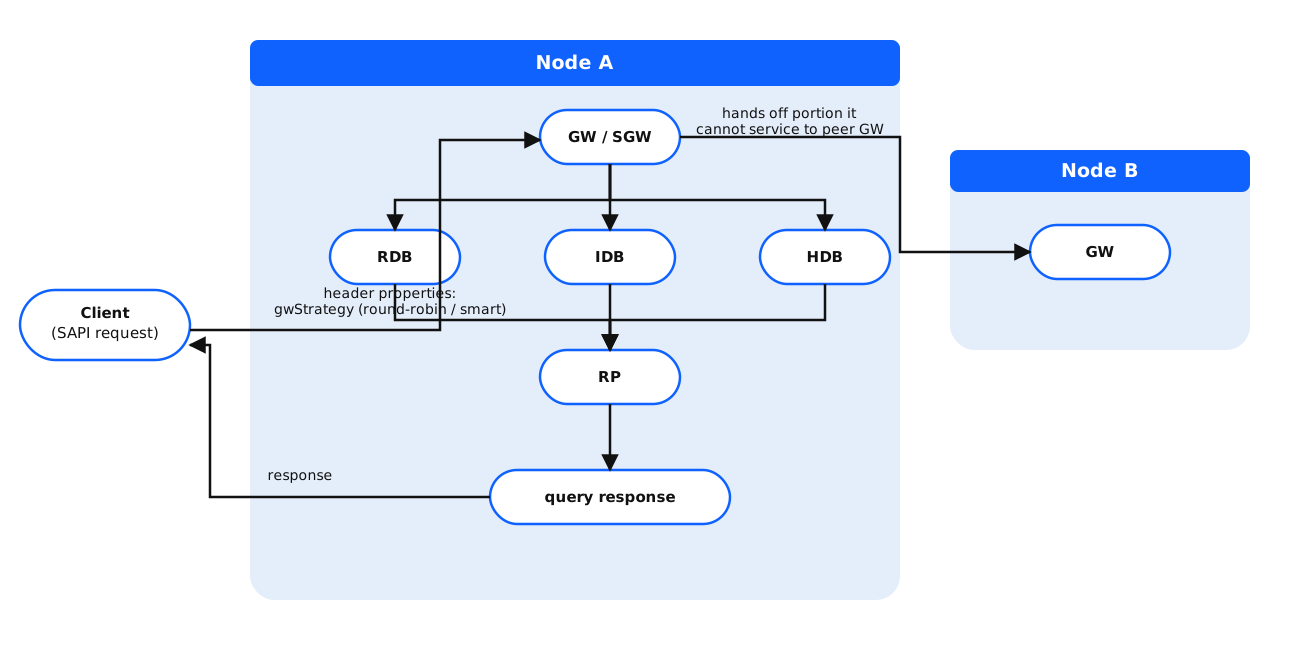
A Gateway has responsibility only for processes on the same node as itself. If a GW determines that it cannot service some or all of a request, it hands off the portion that it is unable to handle to a peer GW (which may do the same). In this way, data that resides on multiple nodes can be integrated into the response from a single API call transparently to the invoking client.
The choice of Gateway to which a request is directed is made by routing logic within the SAPI client, and is influenced by the configurable Gateway selection strategy of round-robin or smart.
The following diagram shows how an asynchronous request that requires service of an RDB, IDB and HDB on one node might be fulfilled.
Synchronous requests
The interface exposed by the Gateway is asynchronous with respect to the caller, which provides better execution throughput and permits interleaving of work when the client can support it. Sometimes, the topology of the application requires a synchronous interface. In that case, the application can invoke the Synchronous Gateway (SGW) process by instead calling .sapi.scall from q. Again, the external interfaces provide an equivalent entry point for synchronous service.
Node selection criteria
The Gateway that receives the request will dynamically select one or more nodes to perform the operation, with a bias toward the receiving node (gwStrategy = smart).
Phase 1: initial elimination of ineligible nodes
Ineligible nodes are eliminated based on:
- the processes needed to execute the query are running on the node at the time of the query
- if the client application specifies particular nodes for a query (for example, a mandated routing preference), the query will be restricted to those nodes and will not consider other nodes
- if the client application specifies a particular API version, the query will be restricted to nodes on which that API version is running
- if the request is identifiable as requiring certain data feeds, the request is restricted to nodes that have the required data
Phase 2: initial selection of eligible nodes
Eligible nodes are selected based on:
- the feed and node health
- the load factor or CPU usage of a node — the load factor of a node is defined to be the 75% percentile of recent non-idle CPU time on the node
- the query health factor of a node — the query health factor of a node is defined to be the sum of the weighted counts of key service class instances (such as RDB, IDB and HDB) where the instance and node are both healthy
- the routing preferences specified in the SAPI request header
Phase 3: point of dispatch and final choice of processes
The final choice of processes recruited on the node is based on:
- the target service classes
- the expected duration or execution time of the query
- the priority of the query
- the outstanding work allocated to an RP
- the presence of a connection from an RP to the originating client
- the non-mandated routing preferences specified in the SAPI request header
The routing analysis is done dynamically for each request based on the request properties and the known system state across the cluster at the time. In other words, two similar or identical query requests following each other in close proximity may be directed to different nodes or sets of nodes and possibly to difference processes on those nodes.
You set up query processing in two configuration objects: manifest.yaml and config/systemParams.yaml.
Set up GW and RP in manifest.yaml
The default configuration for Gateway is a single instance per node and this cannot be changed. However, multiple RPs on a node can be configured; the number of RPs that you choose depends up on your anticipated query volumes and the priority that you assign to queries over data ingestion.
.default_service: &default_service
    enabled: true
    portOffset: 0
    num: 1
    threads: 1
    prefix: ""
    taskset: "0-10"

services:
  - sc: GW
    <<: *default_service

  - sc: RP
    <<: *default_service
    num: 2
After making your changes to manifest.yaml in your deployment folder, you must import the file into etcd.
Set up your system parameters for Gateway
The following Gateway/query processing attributes in config/systemParams.yaml are dynamic and take effect as soon as the dynamic upgrade is applied.
| Attribute | Description | Default |
|---|---|---|
gwConnTO |
Gateway connection timeout in milliseconds | 1000 |
gwDeleteRatio |
Ratio of deleted to active requests above which queue purge is performed | 0.5 |
gwDeleteThr |
Number of deleted entries above which queue purge is performed | 500 |
gwDurEpicWt |
Weight assigned to an active request of epic duration | 2 |
gwDurLongWt |
Weight assigned to an active request of long duration | 1 |
gwMaxDurWt |
Maximum aggregate weight for active requests of long or epic duration. Requests that cause the maximum weight to be exceeded remain queued until the resource situation improves. | 2 |
gwPeerNfySettle |
Settling time in milliseconds between Gateway receipt of changes to supported service classes and subsequent registry update to peer GWs | 750 |
gwStage1Retries |
Maximum number of times a Gateway is willing to attempt first stage (process) recovery | 2 |
gwStage2Retries |
Maximum number of times a Gateway is willing to attempt second stage (node) recovery | 2 |
gwStrategy |
Gateway selection strategy (rr for round-robin or smart for historically influenced selection). Under the smart strategy, the Gateway used for the last successful query is preferred. Under the rr strategy, the next gateway in a round-robin sequence is preferred. |
|
qhfHdbWt |
Query health factor weight for HDB process instances | 10 |
qhfIdbWt |
Query health factor weight for IDB process instances | 10 |
qhfRdbWt |
Query health factor weight for RDB process instances | 10 |
rpRetryFreq |
Response process retry frequency in milliseconds for opening connection to client | 1000 |
rpConnRetryTO |
Response process connection retry timeout in milliseconds (if negative, measured from the request expiry time) | -500 |
rpConnTO |
Response process timeout in milliseconds when opening a connection to a client process | 1000 |
sapiDurEpicTO |
Default SAPI timeout in seconds for epic operations | 600 |
sapiDurLongTO |
Default SAPI timeout in seconds for long operations | 20 |
sapiDurMediumTO |
Default SAPI timeout in seconds for medium operations | 5 |
sapiDurShortTO |
Default SAPI timeout in seconds for short operations | 2 |
sapiQueryTestPct |
Percentage of eligible queries that choose test versions over production | 50 |
sapiStage2Retries |
Maximum number of times a client is willing to attempt second stage (node) recovery | 3 |
sapiTO |
The default timeout in milliseconds for SAPI invocations. This value is overridden by any explicit client-specified timeout in a SAPI request or by a timeout derived from the request's duration. 0 sets the default timeout to infinity. |
30 |
The following attribute is static and requires a process restart to take effect.
| Attribute | Description | Default |
|---|---|---|
sapiTimerFreq |
Timer frequency in milliseconds for checking the timeout status of SAPI requests. This value is used by q client processes and by Gateway processes | 1000 |
Retry parameters
If a query cannot be completed because either the database is busy or there is a "vintage mismatch", you can configure the number of retries at both the process (stage 1) or node (stage 2) levels. A vintage mismatch occurs when a query request goes to two different databases processes on a node (for example RDB and HDB) and the database versions of the processes do not match. This can occur transiently during a database write-down event that advances each process's internal state.
Retry scenario
Suppose you have a two-node system (A and B), each with two RDBs, and you set both stage 1 and stage 2 retries to 1. Imagine that there is a vintage mismatch between the RDBs and the HDBs on node A, with the RDBs being inferior. An execution retry sequence could be the following:
- Initial request goes to
GW_A, which selectsRP_A1,RDB_A1, andHDB_A1. - A vintage mismatch is detected, and
GW_Aattempts stage-1 retry by choosingRDB_A2. - A vintage mismatch is detected, and
GW_Aattempts stage-2 retry by choosingGW_B. GW_BselectsRDB_B1andHDB_B1, which send their responses toRP_A1.RP_A1amalgamates the results and sends them to the originating client.
Query health factor attributes
There are three query health factor parameters in config/systemParams.yaml: qhfRdbWt, qhfIdbWt and qhfHdbWt. These parameters allow you to specify the relative importance of the related service class when determining the suitability of a node to handle a particular query.
For example, if you assign a query health factor weight of 10 to HDB processes and 20 to RDB processes, you are saying that the health of an RDB instance is twice as important as the health of an HDB instance when evaluating the health of a given node. (This is presumably because you have configured fewer RDBs than HDBs.) If queries were relatively slow on node A but RDB processes were running normally on the same node, node A would still be considered healthy and a good candidate for a client query.
   - name: qhfRdbWt
     type: int
     description: Query health factor weight for RDB process
     value: 10
     dynamic: true

   - name: qhfIdbWt
     type: int
     description: Query health factor weight for IDB process
     value: 10
     dynamic: true

   - name: qhfHdbWt
     type: int
     description: Query health factor weight for HDB process
     value: 10
     dynamic: true
Minimum API version preference
There are two columns in meta/api.yaml for version information: minVersion and version.
  minVersion:
    m-type: float
    m-description: Minimum extant API version number supported, in format MNN (where M is the major version number and NN is the minor version number), or M.NN
    m-required: true
    m-default: 0.00

  version:
    m-type: float
    m-description: Current API version number, in same format as minVer
    m-required: true
    m-default: 1.00
| Column | Description |
|---|---|
minVersion |
Minimum API version number supported in the format MNN (where M is the major version number and NN is the minor version number). For example, 1.03. If you specify a minimum version for an API and the current version of the API on a given node is less than the minimum, that node will not be considered by GW to service a request. |
version |
Current API version number in the same format as minVersion. |
To set a minimum API version:
-
Edit the
api/my-api.yamlfile defining the API's properties, or create an overlay file with your version properties and place it in the appropriate overlay directory.my-api: m-meta: api.yaml minVersion: 1.03 version: 1.21 -
Perform a dynamic upgrade to deploy your changes.
Custom classification functions
You can define custom classification rules to be applied to an API through the classFns property in your API's YAML definition. These functions are invoked by the Gateway as part of its logic to choose an execution plan for a request.
A classification function takes certain parameters, including the request header, and has the opportunity to modify them in application- or API-specific ways. classFns specifies a list of such functions, which are applied in sequence.
The default classification function performs no transformations on the request header, as shown below.
//
// @desc Implements a "no-op" classification function, leaving most routing classification header
// fields as populated by static API configuration or transmitted header.
//
// Applications may specify API-specific overrides that can augment the given header with new values
// for the header's routing fields. For example, an API could be limited to a subset of the
// implementation service classes based on aspects of dynamic system state and the API arguments.
//
// @param api    {symbol}    API name.
// @param hdr    {dict}        SAPI request header.
// @param args    {dict}        API arguments (as intended to be presented to API implementation).
// @param cfg    {dict}        API configuration properties.
//
// return        {dict}        Request header with any modifications applied.
//
classNop:{[api;hdr;args;cfg] hdr}
Here is an example classification function that always sends a request to node A.
//
// @desc Implements classification function that always directs a request to node `A`.
//
// @param api    {symbol}    API name.
// @param hdr    {dict}        SAPI request header.
// @param args    {dict}        API arguments (as intended to be presented to API implementation).
// @param cfg    {dict}        API configuration properties.
//
// return        {dict}        Request header with any modifications applied.
//
classNop:{[api;hdr;args;cfg] @[hdr;`nodes;:;`A]}
To set up a classification function for an API implementation:
- Implement the classification function in a new code file (or in an existing file associated with classification) and place it in the appropriate overlay directory.
- Make sure your classification function is loaded into the Gateway by creating an overlay for
config/process.yamland amending thelibrariesproperty for GW to include your file. - Edit the
api/my-api.yamlfile defining the API's properties, or create an overlay file with yourclassFnsproperty and place it in the appropriate overlay directory. If required, you can chain multiple functions together in a comma-delimited list. - Perform a dynamic upgrade to deploy your changes.
Duration and priority preferences
There are two service-related KXS parameters that you can attach to the API request header: dur (duration) and priority. Duration is a classification that reflects the expected execution time of the request. Note that expected execution time should include required aggregation time executed within the RP. If results of an API typically take long to aggregate, consider increasing the duration classification. The duration classification also affects the default request timeout, if one is not specified. The default duration is MEDIUM. Possible values are defined in config/enum/sapiDur.yaml and summarized in the table below.
| Name | Value | Description |
|---|---|---|
SHORT |
1 | Short-running request duration |
MED, MEDIUM |
2 | Medium-running request duration |
LONG |
3 | Long-running request duration |
EPIC |
4 | Very-long-running request duration |
For more detail about how the GW factors in durations of API requests in its dispatch logic, see Gateway dispatch logic.
Priority is a classification that reflects the desired level of service for the request. Possible values are defined in config/enum/sapiPriority.yaml and summarized in the table below.
| Name | Value | Description |
|---|---|---|
VLOW |
10 | Very low request priority |
LOW |
20 | Low request priority |
NORMAL |
30 | Normal request priority |
HIGH |
40 | High request priority |
VHIGH |
50 | Very high request priority |
Assuming equal resource requirements, a request with higher priority is always dispatched before one with lower priority, and requests with equal priority are dispatched in arrival order. The priority of a request is automatically increased during stage-1 or stage-2 retry to reduce its overall service time.
Routing preferences
Several optional API request properties influence routing and execution. These properties are generally defined as part of the API specification, but may be provided as request header values when an API is invoked. Values provided in the request header override specifications bound to the API definition.
| Property | Description |
|---|---|
feeds |
Target numeric data feed IDs |
nodes |
Target nodes for execution |
isMut |
Indicates if the operation will or may publish data mutations; routing prefers the primary node for affected feeds if so |
isSolo |
Indicates if dispatch (including RP) must be to a single node |
routePrefs* |
Dictionary mapping route preference enumeration values to their preferred route targets (nodes or processes) |
scs |
Target numeric service classes for execution |
tsRange* |
Date range pair (inclusive of low end, exclusive of high end); requires tsArgs property to be defined in the API YAML specification |
* This property is typically provided at run-time only.
Include/exclude/prefer/avoid preferences
You can define routing preferences for processes and nodes by using the routePrefs property in the request header. Possible values are defined in config/enum/routePref.yaml and summarized in the table below.
| Name | Value | Description |
|---|---|---|
INCLUDE |
0 | The specified targets must be included in the execution plan. If one or more of these targets are not available, the request fails with NO_DEST. |
EXCLUDE |
1 | The specified targets must be excluded from the execution plan. If other suitable targets are not available, the request fails with NO_DEST. |
PREFER |
2 | The specified targets are preferred over peer candidates in the execution plan, if they are available. |
AVOID |
3 | The specified targets are avoided in the execution plan, but may be included if doing so optimizes the execution plan. |
Note
Routing preferences may be used separately or in combination. For example, a request may exclude node A but prefer data process RDB_B1.
If you specify a preference for a specific data process, the related node is also included in the preference. For example, if you set PREFER (2) to RDB_B1, node B is preferred by implication.
If you set INCLUDE (0) to two processes on different nodes (e.g., RDB_A1 and RDB_B1), or two nodes (e.g., A and B), or a mixture of these (e.g., RDB_A1 and B), the request is directed to multiple nodes.
If you set PREFER (2) to two processes on different nodes (e.g., RDB_A1 and RDB_B1), or two nodes (e.g., A and B), or a mixture of these (e.g., RDB_A1 and B), those nodes are placed at the front of the preference list but other nodes are not excluded. The request is directed to the first suitable node.
Excluding a specific data process does not exclude other processes on the node associated with that process.
A request may be directed to a data process or a node that is to be avoided, if the receiving Gateway is on that node and it is able to service the request.
Temporal ranges
Requests can specify a temporal range to be associated with their execution, if one is relevant. This information is used by the Gateway to choose nodes that hold the required data. For example, a feed may exist on a node for all time and on another node starting only after a particular date.
The specification of a temporal constraint is typically done in two parts. First, the API's YAML definition includes the tsArgs property, which marks the API as having temporal considerations. tsArgs is a short list of parameter names that are particular to that API. The interpretation of tsArgs depends upon the number of names in the list, as follows:
| Count | Interpretation |
|---|---|
| 0 | The API has no temporal considerations. This is the default. |
| 1 | The API expects a single timestamp (or date) vector in a parameter of the specified name. Its minimum and maximum values are used as the starting and ending timestamps, respectively. If the argument is missing or contains only nulls, then the timestamp range is set to infinity. |
| 2 | The API expects two timestamp (or date) scalars or vectors in parameters of the specified names. The minimum of the first is used as the starting timestamp and the maximum of the second as the ending value, in the order they appear in tsArgs. A missing or null value defaults to -0Wp or 0Wp, respectively. |
The second aspect of a temporally aware API is the run-time values of the request parameters identified in tsArgs. These are used by the Gateway to calculate the effective timestamp range, and thereby target the appropriate nodes. The result of this calculation is placed in the header property tsRange, which is made available to the processes recruited to service the request.
In some cases, the originator of the API may know the temporal range directly. If so, it can set the tsRange property in the request header to one or two timestamps or dates. Dates are converted to timestamps, but otherwise the values provided are made available to the executing processes without modification. tsArgs is not required for this use case and its value is ignored.
Test vs production version preferences
By default, GW chooses nodes that offer the specific API version number requested or, if none is specified, the latest production version of an API.
A request may include the testCtl property to specify a preference for selecting an API version when a choice is available. Possible values are defined in config/enum/sapiTestCtl.yaml and summarized in the table below.
| Name | Value | Description |
|---|---|---|
ANY |
0 | Use any version |
PROD |
1 | Use the production version (the lowest of available versions) |
TEST |
2 | Use a test version if one is available; otherwise, use the production version |
RANDOM |
3 | Choose randomly between production and test versions where one is available, biasing according to the value of the system parameter sapiQueryTestPct |
The default setting is to choose the production version of an API. When a random choice is made, the probability of choosing test over production is determined by the system parameter sapiQueryTestPct.
For example, suppose you have both a test and production version of an API running on the same or different nodes. If you set the value of the sapiQueryTestPct attribute to 20, and if you specify a value of 3 (random) in the testCtl property of the request header, GW will choose the test version over the production version 20% of the time.
This option is designed for use in rolling deployments or A/B testing scenarios, where you want to limit exposure to verify that a change works as intended.
Gateway dispatch logic
Below is a description of the standard order of operations when the Gateway (GW) dispatches a query request:
- Request Selection
The GW selects the next runnable request from the queue. Requests are processed in descending priority order: HIGH, then NORMAL, and finally LOW.
- Data Process (DP) Selection
Next, the GW selects Data Processes (DPs) based on availability and any provided routePrefs. RDB, IDB, HDB, and MDL are all supported DP types.
If a complete set of all required DP types is not available, the request remains queued until the required resources become available.
- Response Process (RP) Assignment
Once a request and its required DPs are selected, the GW assigns a Response Process (RP) using the following logic:
- If the request header includes a list of RPs to which the client is already connected, the GW biases selection toward RPs with existing client connections to reduce connection setup overhead.
- After applying connection bias, the GW selects an RP based on RP queue depth and the sum of SAPI duration weights currently assigned to that RP.
Once the request has been dispatched to the selected DPs and RP, the GW increments both the RP queue count and the aggregate SAPI duration weight for that RP.
- Duration Weight Throttling
The GW tracks the aggregate duration weight of all in-flight requests across the node. If this aggregate exceeds the configured system parameter gwMaxDurWt, additional requests remain queued until the in-progress duration weight decreases.
- Example Scenario
Consider five incoming requests with the following duration classes, assuming gwMaxDurWt = 2:
MEDIUM, LONG, LONG, LONG, MEDIUM
The GW will dispatch the MEDIUM, LONG, and LONG requests. At this point, the aggregate duration weight is 2 (from the two dispatched LONG requests).
The next LONG request remains queued until at least one of the in-flight LONG requests completes. However, the remaining MEDIUM request may be dispatched immediately, as it does not contribute to the duration weight.
- RP Load Distribution Behavior
The GW assigns RPs based on request duration weight and current RP queue state. As a result, the GW avoids assigning LONG or EPIC requests to an RP already processing high-duration work, unless all RPs are similarly loaded.
In the above scenario, assuming four RPs, the RP queues after dispatch would appear as follows (with one LONG request still queued at the GW):
kxsRP_A1 | 1 0        # 1 request, aggregate duration weight 0 (MEDIUM)
kxsRP_A2 | 1 1        # 1 request, aggregate duration weight 1 (LONG)
kxsRP_A3 | 1 1        # 1 request, aggregate duration weight 1 (LONG)
kxsRP_A4 | 1 0        # 1 request, aggregate duration weight 0 (MEDIUM)
Since gwMaxDurWt = 2, the third LONG request remains queued until either kxsRP_A2 or kxsRP_A3 completes and reduces the aggregate duration weight.
Strong data consistency
By default, KX Sensors provides eventual data consistency. Data ingested is guaranteed to be propagated to all DB instances eventually. Queries may be processed by a DB which has not yet received the most recent preceding write (ingestion or mutating request). For certain use cases, strong data consistency is required: a query must return information including all preceding writes. Strong data consistency is now supported for mutating queries and read-only queries when the API is configured to do so.
Under the covers, strong data consistency is achieved by sequencing the mutating queries and reading queries in the same EMS. Because the EMS (TP+ or RT) guarantees ordering of queries, any preceding mutations are guaranteed to be in place when a following read query is received.
To enable this, the required APIs must be configured with isSequenced set to true in api.yaml. Alternatively, isSequenced can be set in the SAPI header of a particular request, rather than in the API definition.
Note
It is recommended to set the flag only for APIs that require strong consistency as they will incur some additional latency.