Compression
This page explains tiered storage and how KX Sensors automatically migrates and compresses historical data to lower-cost tiers using DBM.
Tiered storage allows you to divide your historical database into two or more layers or tiers based on the age of your data. Data is initially stored in the first tier. As it ages, it is automatically transferred to a second or third tier reserved for older less important data where it can be stored in compressed format to save disk space. The transfer occurs immediately after EOD and is performed by the database migrator (DBM).
Tiering offers a cost-effective way of managing large amounts of data such that recent data can be quickly retrieved whenever needed while older infrequently accessed data can be stored in compressed format on slower lower-cost media.
The following example shows a two-tier configuration in hdbTiers.yaml, in which the second tier holds older partitions in compressed format:
hdbTiers:
  values:
    /root/kxs/db/hdb/data:
      parts: 5
      isEncrypted: false
    /root/kxs/db/compressed:
      parts: 5
      isEncrypted: false
      cmprAlg: 2
      cmprBlock: 17
      cmprLevel: 9
Tiering in KX Sensors is optional; if you do not set up tiering in hdbTiers.yaml a single tier will be assumed, and the database migration process will proceed normally. In that case, hdbTiers.yaml contains no records:
hdbTiers:
  values:
A single-tier system has the following trade-offs:
| Advantages | Disadvantages |
|---|---|
| Fewer migrations performed every day | Higher cost due to need for more high-performance hardware, much of which used to store older infrequently accessed data that should be compressed to save disk space |
Set up your tiers
For each tier, you must define the directory path and the number of continuous partitions. If the data in the tier is to be compressed, you also must define the compression algorithm, the logical block size of a compressed partition and the compression level (gzip or lz4hc only).
The number of tiers that you need depends on your hardware. Typically, a tier represents some form of storage device. The first tier should always consist of high-performance hardware supporting fast operations involving the newest data. Other tiers can store older data in slower lower cost media. For most systems, two or three tiers is the optimal number to set up; any more than that is not recommended as numerous tiers increase the number of database migrations performed every day and hence could hurt system performance.
The following example shows two tiers for uncompressed data because a second storage mount was added after the first storage mount ran out of space.
hdbTiers:
  values:
    /root/kxs/db/hdb/data:
      parts: 6
      isEncrypted: false
    /data2/kxs/db/hdb2/:
      parts: 4
      isEncrypted: false
    /data2/kxs/db/hdb3/:
      parts: 0
      isEncrypted: false
      cmprAlg: 2
      cmprBlock: 17
      cmprLevel: 6
| Attribute | Description | Default |
|---|---|---|
| parts | The number of continuous date partitions to be created in the tier. The value in the last tier must be set to 0, which means it will keep all oldest partitions in that tier. Example Suppose that you have the following dates in your HDB as of EOD at 2 am on June 19: June 10, June 11, June 12, June 13, June 14, June 15, June 16, June 17, June 18. If you set parts to 4, June 18 (your reference date) -4 = June 14. All dates less than or equal to June 14 will move to the next tier. Tier 1: June 15, June 16, June 17, June 18. Tier 2: June 14, June 13, June 12, June 11, June 10. | n/a |
| hash | The number of hash folders to be created (if any) for each tier. That is, date partitions specified for this root will be distributed between these folders (1 if no hashing is required). You must add (N) to the end of each directory path to activate hashing for that path. /data2/kxs/hdb2/{N} Hashing allows for simultaneous I/O processing and faster retrieval when retrieving data spanning several days. | 1 |
| pctThr | You can override your parts value by specifying a percentage threshold of total disk usage for each tier (for example, 80%). If the number of partitions configured for a tier takes up more space than your threshold for that tier, the DBM will move the required number of partitions to the next tier to satisfy the pctThr. | 85 |
| transPctThr | Your disk usage threshold for DBM rewrites of data in this tier, which transiently hold two copies of a partition: tier recompressions, encryption changes, and row-level retention prunes. If DBM detects that your projected disk usage on the target directory will exceed your threshold, it will halt operations involving this target for the rest of the day. They will resume on the following day and will continue for as many days after that as required. | n/a |
| isEncrypted | Whether this tier is encrypted. See hdbTiers.yaml encryption parameters for more details. | true |
| cmprAlg | KX Sensors supports the following compression algorithms: Code 0 = none (N/A); Code 1 = q IPC (N/A); Code 2 = gzip* (levels 0-9); Code 3 = Snappy, version 3.4 or greater (N/A); Code 4 = lz4hc, version 3.6 or greater (levels 1-12). *If you intend to use gzip compression on a Windows machine, the zlib library is required. You install this library by downloading it from http://www.winimage.com/zLibDll/index.html. Once installed, you must add the bin directory of zlib containing a zlibwapi dll to the path. For Windows 64-bit machines, the highlighted library should be downloaded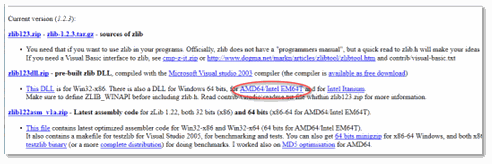 |
n/a |
| cmprBlock | The logical block or page size as a power of 2 between the values of 12 and 20. Example 17 (= 2^17) When choosing a block size, make sure that it is sufficiently large to accommodate the page size or allocation granularity of all platforms that will access the files; otherwise, you may encounter the error: ”disk compression – bad logicalBlockSize”. Applicable page sizes or allocation granularity for supported systems are: AMD64 = 4kB SPARC = 8kB Windows = 64kB | n/a |
| cmprLevel | The compression level (gzip or lz4hc algorithm only). | n/a |
Define your chunk size
You can speed up or slow down the transfer of data from one partition to another by adjusting the default values for the chunk size parameters in systemParams.yaml. dbmChunkSize refers to the total number of table rows in a chunk.
- name: dbmChunkSize
  type: int
  description: Size of chunks when migrating tables
  value: 1000000
  dynamic: true
Define your partition retention period
You configure your partition retention period in the hdbRetPrtns parameter in systemParams.yaml. The default value is 0W (infinity), which means that date partitions will be kept indefinitely. It should be changed to ensure that you do not eventually run out of disk space.
To remove only some of the rows in a partition once it reaches a given age, rather than the whole partition, see Row-level retention.
Next steps
- HDB files — the directory structure that tiered and compressed data is organized into.
- Delete historical partitions — remove partitions outright instead of, or in addition to, tiering them.
- Row-level retention — prune rows within aging partitions using the same migration pipeline.
- Recover your data — back up and restore HDB/IDB data.