Export your sensor data
This page describes how to configure REPL, KX Sensors' data replication engine, to export sensor table data to local storage or Amazon S3.
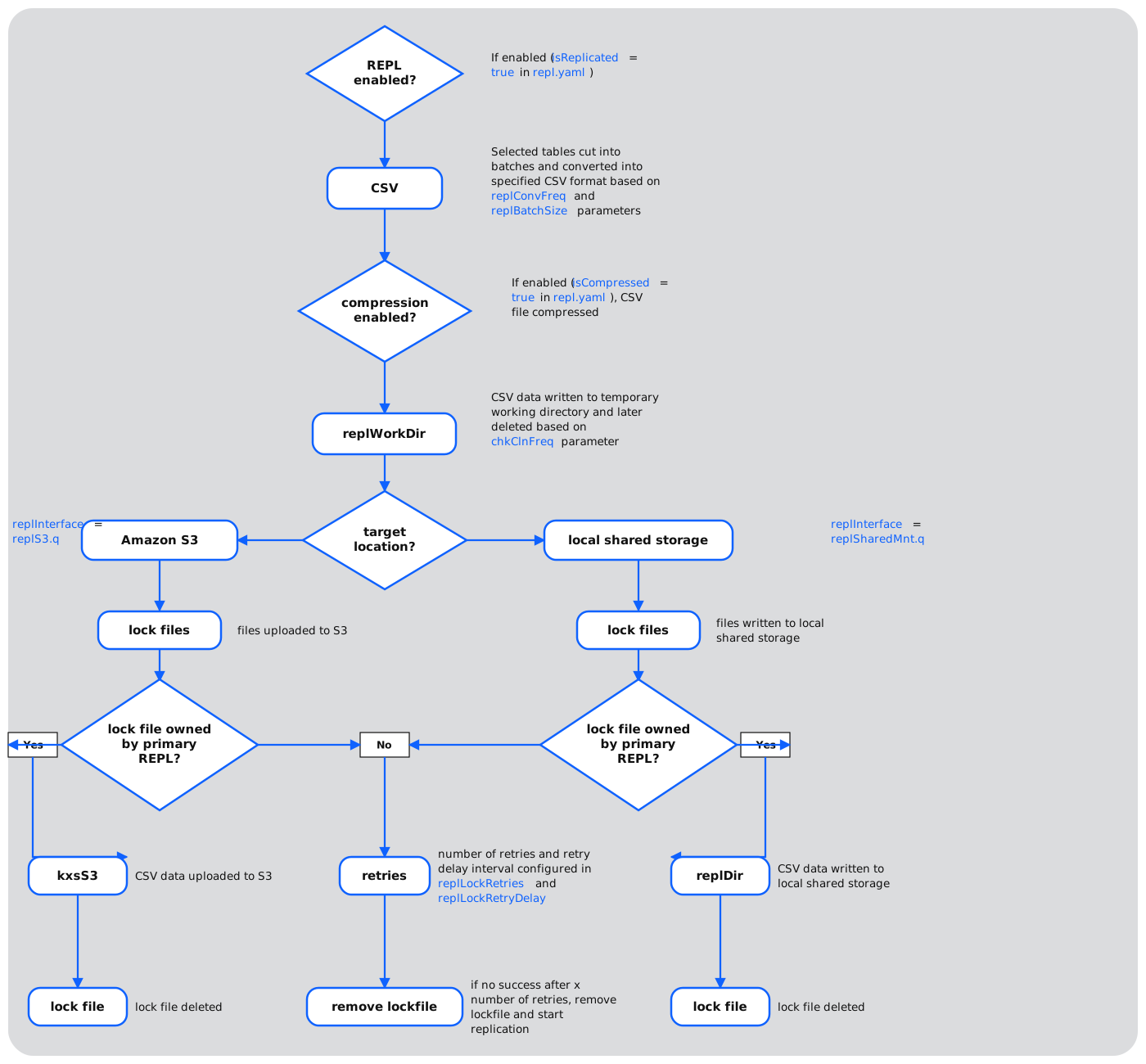
REPL is an operational service responsible for exporting selected tables to files for consumption by external systems. It supports two types of export targets: local shared storage and Amazon S3.
In multi-node deployments, REPL operates in a primary/secondary mode for high availability:
- Only the primary instance performs exports.
- On failover, the new primary resumes from the last published watermark.
- No manual intervention is required following a failover.
REPL configuration is defined across the following files:
feed.yaml— stream definitions and watermark publicationsystemParams.yaml— global export behaviorrepl.yaml— table-level export ruless3.yaml— configuration for target S3 location, if applicablemanifest_<node>.yaml— add a REPL instance to required nodes
feed.yaml – Defining the REPL feed
In feed.yaml you define the input stream and topic from which data is exported. You also define the output stream and topic used to publish watermark positions. These watermark positions allow REPL to resume exporting from the last confirmed position after a failure or restart. The input stream must be emsint and the output stream must be different to the input stream.
feed:
  values:
    REPL:
      nodes: [ A, B ]
      procs: [ kxsREPL_A1, kxsREPL_B1 ]
      id: 400 # Specify any unique ID
      sc: repl # Must specify the repl service class
      streamIn: emsint # Always emsint: the source of data to
                       # replicate after it has gone through
                       # the ingestion pipeline
      topicIn: data # This should match the topicsOut field for feeds of interest
      streamsOut: mutreqs # Using mutreqs to avoid adding another stream
      topicsOut: replWm # Default topic name for repl watermarks
      desc: Replication feed
Note
repl.yaml should not be configured to subscribe to any tables beyond its default subscription list because it is a long running process that cannot accept any publishes from other processes while active.
systemParams.yaml – Configuring global export behavior
The parameter replConvFreq controls the frequency at which the export of files occurs. All data received on the stream since the last time the replication timer was triggered gets exported at the defined frequency.
REPL also triggers an export when the configured memory threshold is exceeded. This can happen if REPL is down for a prolonged period or if there is a spike in the data received on the stream. The parameter replMemPctThr controls the amount of physical memory REPL can consume before the export begins.
The full set of parameters in systemParams.yaml related to REPL is listed below. Settings apply globally to all tables.
| Column | Definition | Example |
|---|---|---|
| chkClnFreq | Frequency in hours of checking which old, exported CSV files should be deleted from replWorkDir. | 1 |
| csvEnclQuote | For non-comma delimiters in CSV exported files, indicates whether fields containing this delimiter, line breaks or double quotes should be enclosed in double quotes with existing double quotes duplicated. | N |
| csvDel* | Delimiter in exported CSV files. Can be specified either as the actual characters or their 3-digit octal ASCII codes following the backslash symbol (e.g. \012). | , |
| csvNestDel* | Delimiter inside nested columns in exported CSV files. Can be specified either as the actual characters or their 3-digit octal ASCII codes following the backslash symbol (e.g. \012). | | |
| csvRetDays | Number of days exported CSV files are kept before being automatically deleted. | 5 |
| replConvFreq* | Frequency in minutes for the CSV conversion routine | 15 |
| replMemPctThr | Percentage of physical memory used by REPL before it starts replicating data | 5 |
| replSnapTime* | Time of day when the snapshot of IDB table is exported each day | 00:00:00 |
| replBatchSize | Maximum size in GB of tables to be exported per CSV file | 2 |
| replCompr | Compression function for CSV exporting. If you set isCompressed to true, the compression is performed by using the gzip utility (with default compression level), assuming that it is available on the system. The extension .gz is added to the compressed file. You can override this behavior by specifying either zip or tar as your compression method. The extension .zip and .tgz are added to the compressed file when using these compression methods. The following syntax is used for each of the compression methods: gzip \<source file name>; zip –j –m \<destination file name> \<source file name>; tar –zcvf \<destination file name> \<source file name> --remove-files | zip |
| replFilePerm | Unix permissions in octal notation for exported CSV files (only applies to Linux filesystems) | 644 |
| replInterface* | Instruction containing custom definitions of key export functions for desired interface (shared storage or Amazon S3) | replSharedMnt.q |
| replLockRetries | Number of retries after which a primary REPL deletes a foreign lockfile | 10 |
| replLockRetryDelay | Delay in milliseconds between lockfile retrievals when retrying reads of a foreign lockfile | 2000 |
| ReplPreConvFn* | Hook that allows applications to manipulate exported table data before your CSV conversion | .repl.preConvNoop |
| ReplPreSnapshotFn* | Hook that allows applications to manipulate exported snapshots before your CSV conversion | .repl.preSnapshotNoop |
| replWorkDir* | Directory for temporary exported files | ${KXS_REPLDIR}/tmp |
| Local shared storage only | Local shared storage only | Local shared storage only |
| replDir* | Target export location for REPL | ${KXS_REPLDIR}/csv |
| Amazon S3 storage only | Amazon S3 storage only | Amazon S3 storage only |
| s3CredsFile* | S3 credentials file for authenticating access to the Amazon service | ${KXS_OPDATADIR}/s3credentials.csv |
| * Requires process restart for changes to take effect | * Requires process restart for changes to take effect | * Requires process restart for changes to take effect |
repl.yaml – Export rules for individual tables
In repl.yaml you define specific export rules for individual tables. The supported columns are:
| Column | Definition | Example |
|---|---|---|
| table | Table name(s) to be exported or not exported | Reading |
| isReplicated | Whether or not the table should be exported | false |
| isCompressed | Whether or not the table is compressed upon export | false |
| useSnapshots | If set to false, the table data is streamed from EMS. Direct replication from EMS is intended to be used for partitioned and MRU tables (including delta tables). Using EMS data as a source for master data table exports means only updated/inserted records are included instead of the entire table. If set to true, the table data is taken from snapshot files that the DBW saves in the IDB directory on disk during EOIs. This export option should be used for master data tables. If you use the snapshot option for partitioned or MRU tables, KX Sensors retrieves all data collected within the last interval, which may be resource consuming. | false |
| exportCols | Name(s) of the exported columns. If you leave this parameter blank or if any column's name is misspelled, all columns are exported. | (empty) |
Below is an example repl.yaml:
repl:
  values:
    - table1:
        isReplicated: true
        isCompressed: false
        useSnapshots: false
    - table2:
        isReplicated: true
        isCompressed: true
        useSnapshots: false
    - table3:
        isReplicated: false
        isCompressed: false
        useSnapshots: true
s3.yaml - Setting up Amazon S3 storage
Use s3.yaml to configure Amazon S3 bucket endpoints for REPL:
| Attribute | Definition | Example |
|---|---|---|
| name | Set to repl. | repl |
| uri | Unique Resource Identifier (URI) associated with an S3 bucket | s3://my-data-analytics-bucket |
For example:
s3:
  values:
    - name: repl
      uri: s3://my-data-analytics-bucket
Add REPL to manifests
To start REPL and data exporting simply include the REPL service class to the manifest of at least one node. In a multi-node cluster, it is recommended to add REPL to every node for redundancy.
Output format
REPL exports tables in CSV format using the following conventions:
- Timestamp format: YYYY-MM-DD HH:MM:SS.NNNNNNNNN
- Column delimiter: defined by
csvDel - Nested column delimiter: defined by
csvNestDel
Both csvDel and csvNestDel can be specified either as the actual characters or their 3-digit octal ASCII codes following the backslash symbol (e.g. \012).
Users should ensure that the character chosen for csvNestDel is not present in the actual data. If the main delimiter, csvDel, is any character other than a comma and csvEnclQuote = true, the data cannot contain characters that are the same as csvDel (interpreted as column separators) or line breaks (row separators).
If csvDel is a comma or csvEnclQuote = false, any character (other than csvNestDel within nested columns) may be present in the data: the delimiter collision is avoided by enclosing fields that may be interpreted ambiguously in double quotes and duplicating the existing double quotes.
The file name format is <table name>_<UTC timestamp of file creation>[_<date of first partition>_<date of last partition>].csv [.zip], where the timestamp format is YYYY.MM.DD_HH_MM_SS.NNNNNNNNN.
Lock file
In addition to data export CSVs, REPL creates a lock file to track work in progress. It is written to the target export location just before data is exported to the target location and deleted once the export is complete. It is a kdb binary file with a dictionary containing the following:
| Key | Definition |
|---|---|
| name | Name of lock file (lock) |
| author | Name of process that created the file (e.g., kxsREPL_A) |
| node | Node that was responsible for exporting the data (e.g., A) |
| files | List of filenames being exported to remote location for this replication |
| wm | Position in the input stream where replication was triggered by a timer event or by a memory limit breach |
Note
To avoid data duplication, automated processes that retrieve exported data should be configured to pause data retrieval while a lock file is present in the target location.
Data recovery
In the case of a planned or unexpected shutdown of the export process, the export starts from where it terminated previously. Tables exported using snapshots are not recovered.
Next steps
- Recover your data — back up and restore the HDB/IDB data that REPL exports are sourced from.
- Compression — configure tiering and compression for the historical data behind these exports.