High availability overview
This page explains the multi-node topology options in KX Sensors, and how automatic failover, primary/secondary modes, and automatic failback work.
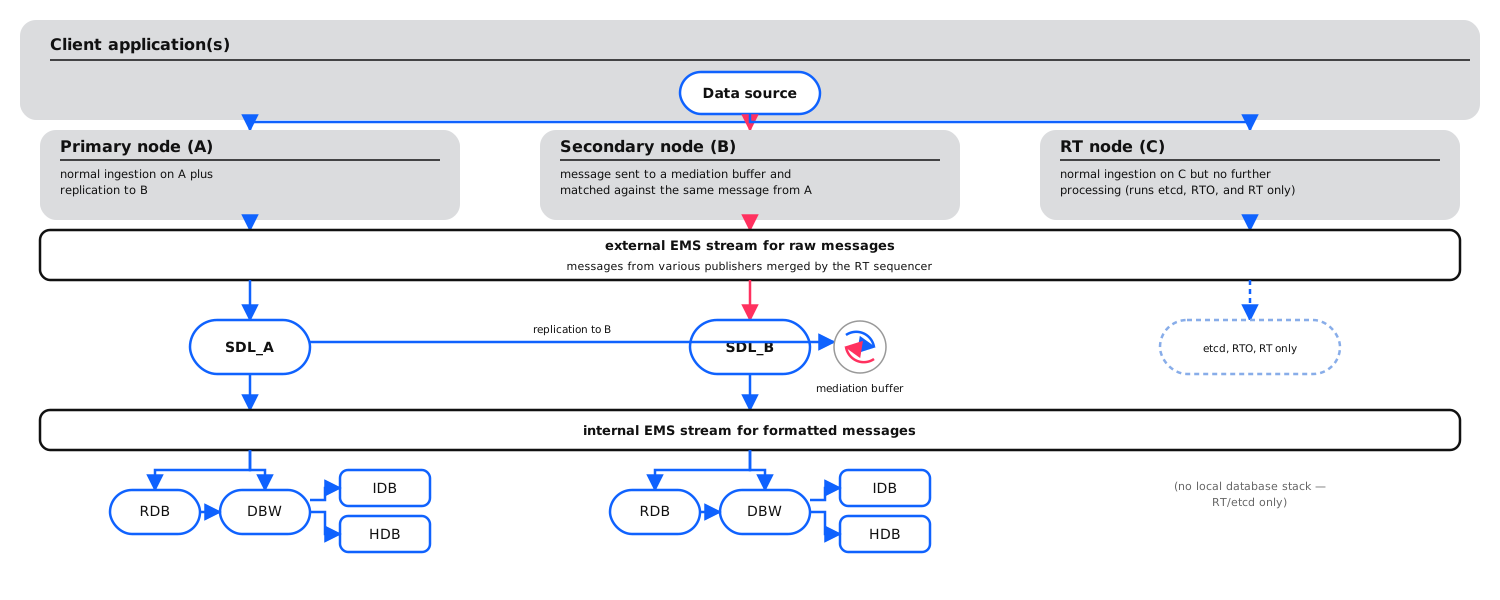
In a high-availability or multi-node environment, the same KX Sensors processes, services, APIs, and feeds run concurrently on different physical servers. In the event of a network, feed, or hardware failure, the system remains fully operational and can route traffic seamlessly away from failing components and toward operational ones.
KX Sensors supports automatic failover and failback, as well as various operator-initiated functions such as manual failover and manual failback, that let you determine the health of a node or feed and take appropriate action.
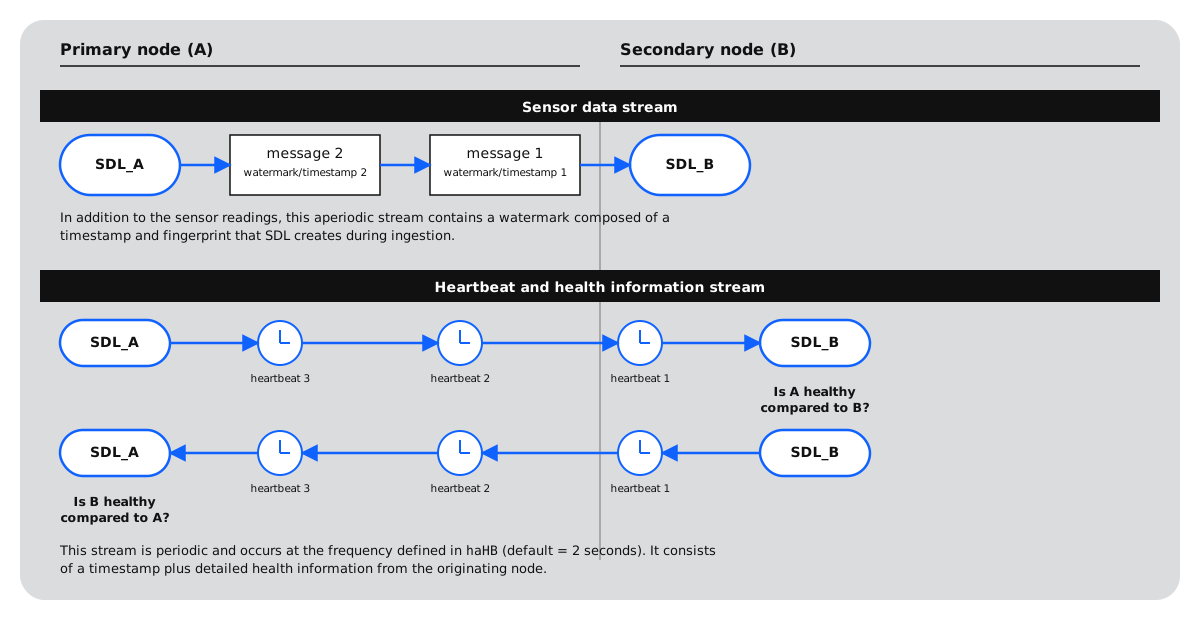
There are two different message streams between any two primary/secondary node pairs: one for sensor data and one for heartbeats and health information.
Configuration options
KX Sensors supports a wide range of high-availability configuration options, including:
| Topology | Description |
|---|---|
| Single feed distributed across two nodes | A single feed distributed across two nodes with the secondary node mediating replicated data with the feed received directly from the client. |
| Two non-identical feeds distributed over four nodes | Two feeds and four nodes arranged in pairs so that the secondary node for each pair mediates replicated data with the feed received directly from the client. |
| Single feed distributed across three nodes | A single feed distributed across three nodes with the two secondary nodes mediating replicated data with the feed received directly from the client. |
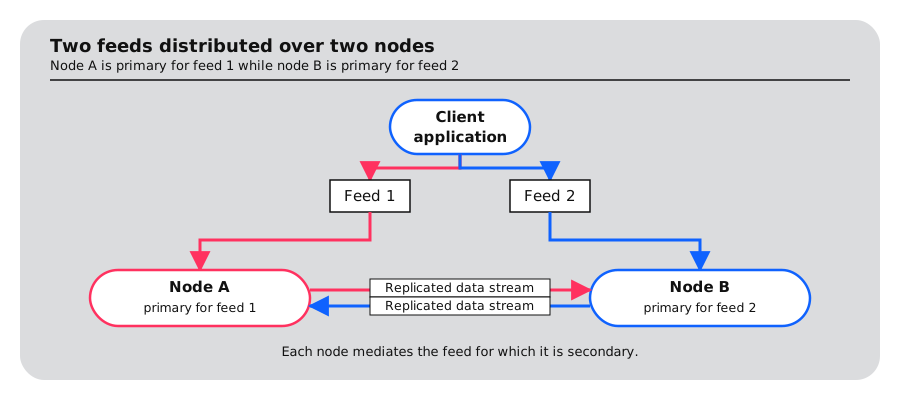
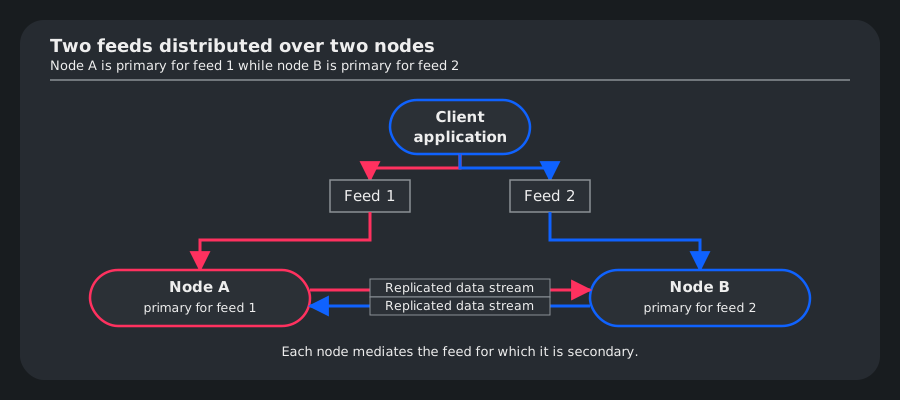
| Two non-identical feeds distributed over two nodes | Each node is primary for one feed and secondary for the other feed. |
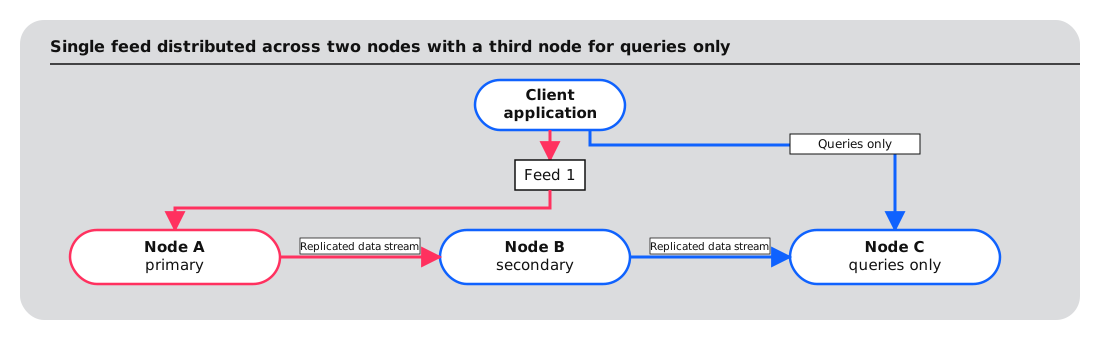
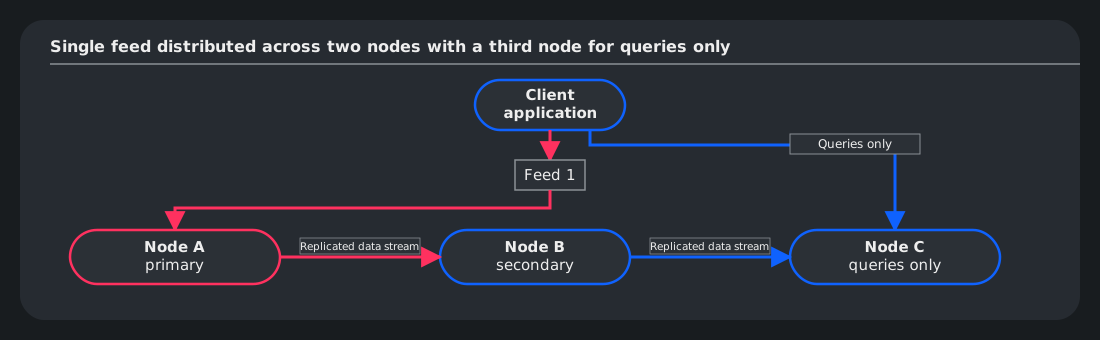
| Additional node for queries only | A single feed distributed across two nodes with the secondary node mediating replicated data with the feed received directly from the client. A third node not connected to any feed receives replicated data from the primary node and is used only for queries. |
High availability is only supported for non-coherent feeds.
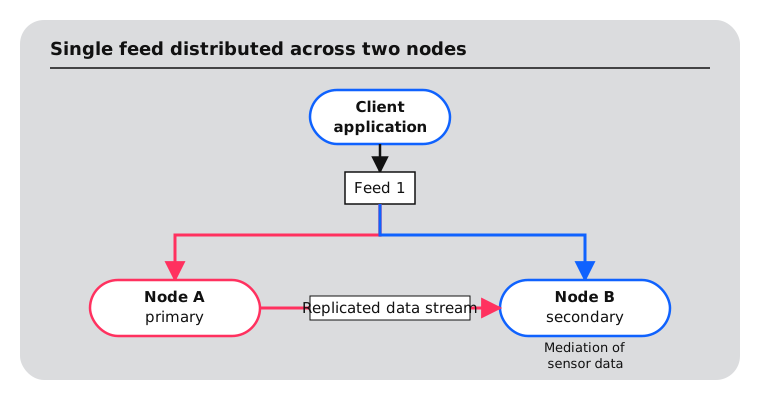
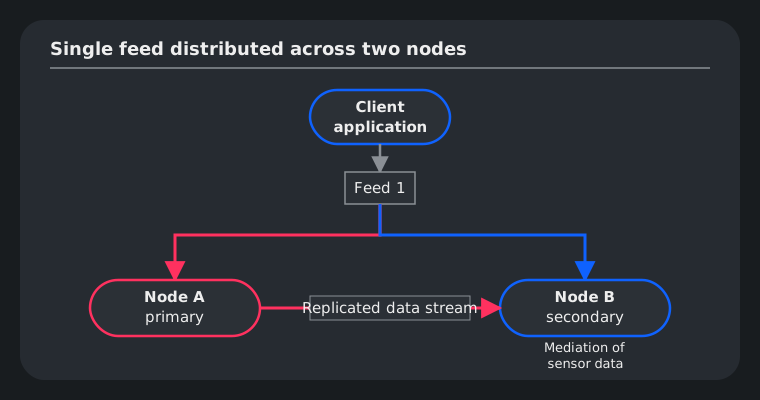
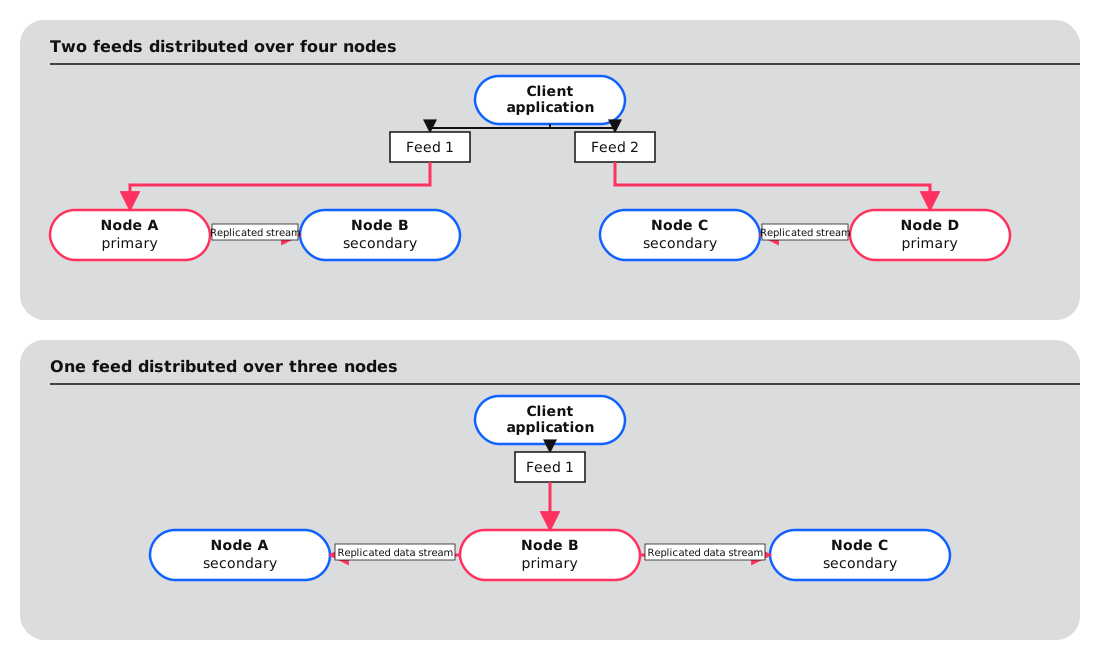
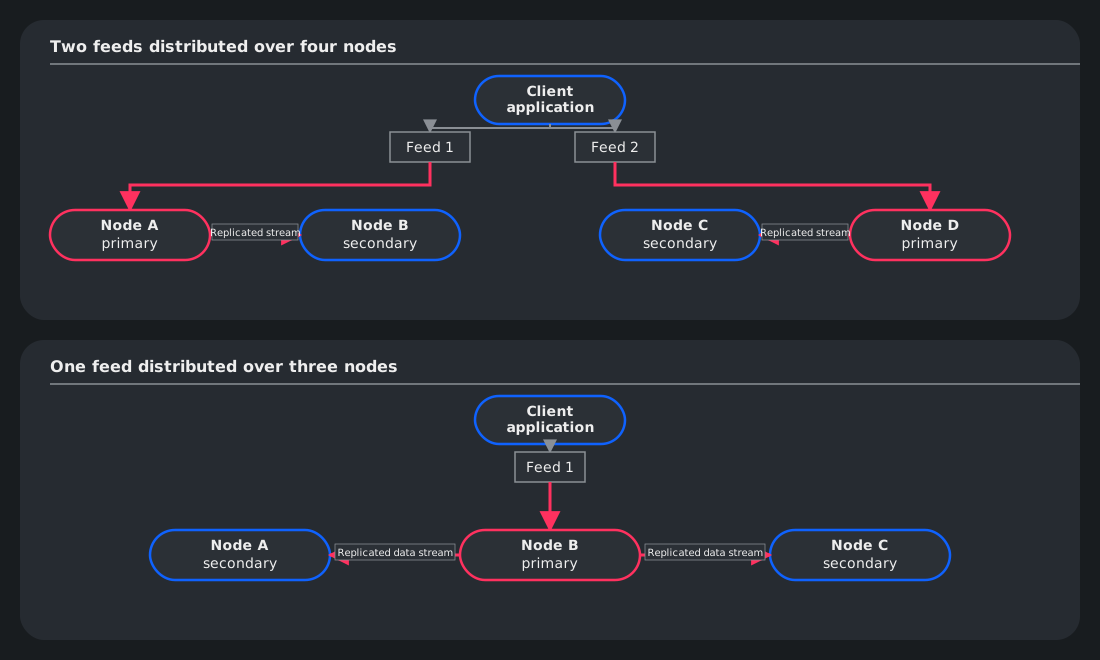
Automatic failover
Automatic failover is the process by which a less preferred node seizes control from a more preferred node when the less preferred node believes that it is more capable than the more preferred node. For example, if your node sequence in feed.yaml is A, B, C, D, then A is your first choice for a feed, B is your second choice, C is your third choice, and so on.
The following node/feed health indicators are evaluated in automatic failovers:
| Property | Description |
|---|---|
| phi | The probability distribution of the heartbeat interarrival times (φ). This compares the recent interarrival times of heartbeat messages on all nodes to the expected distribution. |
| lts | The timestamp associated with the last raw feed message received by a node. This compares the age of the most recent message received across all nodes and looks for acceptable latency when any node is reporting activity. |
| wts | The timestamp associated with the last formatted feed message published/received by a node. This compares the published watermark latency observed on all nodes to that reported by the primary, which may legitimately withhold publishing due to micro-batching. |
| cur | The currency of the feed report from the process. Feed reports are published as part of the heartbeat data. Heartbeats are sent even if the feed report has not been updated by the process. If this condition persists past a configurable period of time (determined by the setting of the system parameter haFeedDelinq), the feed data is considered delinquent. |
| rsp | The responsiveness of the process. This is determined by the age of the feed report, which is published as part of the heartbeat data. Heartbeats are sent even if the feed report has not been updated by the process. If this condition persists past a configurable period of time (determined by the setting of the system parameter haProcHung), the process is considered non-responsive. |
| ems | The state of the enterprise messaging system associated with the process. This is determined by monitoring the reception latency of ping messages emitted periodically (controlled by the setting of the system parameter emsPingFreq) by the process to itself. |
| ns | The general process or hardware node state, based mostly on the determination of the KX Sensors hardware monitor process (HWMON). HWMON runs tests to assess the health of configured storage volumes, predicting deterioration or failure and weighting test outcomes according to drive criticality. Nodes marked unhealthy by HWMON, or explicitly disabled by system administrator action (through the maintenance console), fail this test. |
| qr | The presence of a registry server quorum. This ensures that the HA client process is part of an active server quorum in discovery. The impact of this heuristic is briefly suppressed in the vicinity of process start or quorum acquisition (controlled by the value of the system parameter haQuorumSettle), to permit heartbeats to arrive after a network partition has healed and to favor recovery of the incumbent primary. |
| bp | The absence of a pending busy operation on the process. A primary HA client that has scheduled a deferred operation, such as garbage collection, flags itself as busy-pending in its heartbeats. The flag marks the node as a less capable primary so that a healthy secondary takes over the feed, and clears once the operation has run. |
Failover is always initiated by a secondary node. It occurs when a secondary node determines that it is more capable than the current primary and promotes itself to primary. In the following example, one feed is distributed across four nodes. The preferred sequence of nodes in feed.yaml is A, B, C, D.
| Node A | Node B | Node C | Node D | Event |
|---|---|---|---|---|
| current primary | secondary | secondary | secondary | Initial state — Node A is primary. |
| secondary | current primary | secondary | secondary | Feed state on node A = lagging — A is not healthy so B seizes control. |
| secondary | secondary | secondary | current primary | Critical volume on node B fails hardware/IO test — B is not healthy so D, the healthiest less preferred node, seizes control. |
| current primary | secondary | secondary | secondary | Manual failback by operator to node A — the operator performs a manual failback. |
Primary vs. secondary modes
There are four possible modes for a node/feed combination in KX Sensors:
- primary
- secondary
- acting primary (pri-sec)
- acting secondary (sec-pri)
Primary and secondary describe a node/feed in its default state; that is, in the absence of a failover. For example, if a single feed is assigned to nodes A, B, C, and D, the first node in the sequence (here A) is always the primary while B, C, and D are the secondaries. In the event of a failover to B, A becomes acting secondary, B becomes acting primary, and C and D remain unchanged.
Primary/acting primary differs from secondary/acting secondary in two important respects. First, there is only one primary/acting primary combination at any given time; there may be multiple secondaries. Second, data is replicated from primary/acting primary to secondary/acting secondary, never the other way round.
Note
Mode always refers to a node/feed combination rather than to the node itself. The same node can be primary for one feed and secondary for another.
Automatic failback
Automatic failback is the exact reverse of automatic failover; that is, it is a "failover" to a more preferred node in your preference list rather than a less preferred node in your preference list.
| Setting | Behavior |
|---|---|
| automatic failback activated | KX Sensors may automatically redirect the feed to a more preferred node in the preference list if it detects that that node is healthier than the current primary for the feed. |
| automatic failback NOT activated | The feed remains on the current node as long as that node stays healthy. If it becomes unhealthy, failover candidates are restricted to inferior or less preferred nodes in the preference list. |
Automatic failback is an option to consider in a two-node (A, B) environment; should node B be acting primary and become unhealthy, node A may be able to seize control. If you do not activate automatic failback and node B, as acting primary, becomes unhealthy, you must initiate a manual failback.
Deferred operations on primary nodes
Some housekeeping operations, such as garbage collection (.util.gc), can be run at any time but might occupy an HA client for several seconds. On a primary node, this pause can delay ingestion. To avoid this, an HA client can schedule such an operation to run only while it is secondary.
When an HA client schedules a deferred operation:
- If the process is secondary for all of its feeds, or the deployment has a single node, the operation runs immediately. If the process is primary or transitioning into or out of primary for any feed, the operation is deferred.
- If the process is primary for at least one feed, it sets the busy-pending (
bp) flag in the heartbeats for the feeds it is a failover candidate for. The flag fails thebphealth check described in Automatic failover, so the next healthy node in the feed's preference order seizes the feed. The process then re-evaluates its mode at the interval set by the system parameterschedAsSecDefer. Once it is secondary for all of its feeds, it runs the operation and clears the flag.
Keep the following in mind when relying on deferred operations:
- A deferred operation triggers an automatic failover. If automatic failback is not activated, the feed stays on the new primary until you perform a manual failback.
- If no other node is healthy enough to take the feed, the operation stays deferred until one is. The primary keeps its role and ingestion continues.
- Different operations can be pending at the same time, but only one call per function. Scheduling a function again while a call to it is pending replaces the pending call.
For developers
Schedule a deferred operation from an HA client with .ha.schedAsSec, passing a list of the function name and its arguments, as accepted by value. For example, to defer a garbage collection: .ha.schedAsSec (`.util.gc;::).