Add tables
This page explains how to add new database tables to KXS, and how to modify and override existing ones.
The main table types in KXS are memOnly, basic, splayed, mru, partitioned, partitionedDelta, partitionedDeltaMem, delta, deltaMem, deltaMRU, and monitor. See Table types for what each one stores and which processes hold it.
Use case 1: Add a new master data table
In this use case, you add a new table, employees.yaml, to the database schema.
-
Navigate to
kxs-core/meta/schema.yamlto look up the required metadata for your new table. The following example showsschema.yaml:schema: type: m-type: symbol m-description: Table type m-overlay: first m-required: true description: m-type: string m-description: Table description m-overlay: discard groups: m-type: symbols m-description: Table group membership m-overlay: union primaryKeys: m-type: symbols m-description: Names of ordered primary key columns m-overlay: first partitionCol: m-type: symbol m-description: Name of column to be used for storage partitioning m-overlay: first shards: m-type: integer m-description: Number of shards into which the table is split m-overlay: first ... -
Create a schema file for your new table in the appropriate override directory, giving it the same name as your table; for example,
schema/Employees.yaml. The following example shows the resultingEmployees.yamltable definition:Employees: m-meta: schema.yaml type: splayed description: This table holds employee information. groups: [ op ] primaryKeys: [ empID ] columns: - name: empID type: integer description: Unique employee identifier attr: unique - name: orgID type: integer description: Organization associated with this user (FK to organization) foreignKey: orgID attr: grouped attrOrd: parted attrDisk: parted - name: extEmpID type: symbol description: External employee identifier uniqueWithin: orgID attr: grouped isExternaKey: T
Use case 2: Modify an existing master data table
In this use case, you modify the Employees.yaml table as part of a package, pkg1, overlaying the base-pkg.
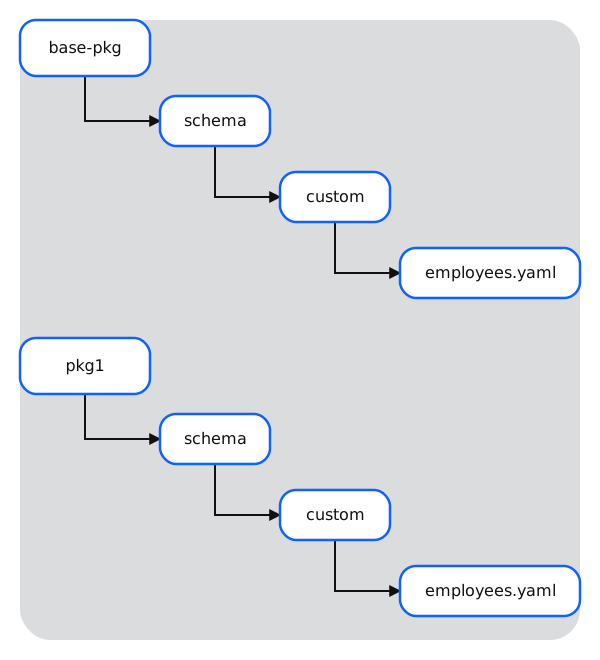
- Copy the YAML file that you created in the previous use case and place it in the
schema/directory of your custom package. -
Proceed to make your changes to your new schema. KXS supports the following changes:
- You can delete table properties that are already defined in the lower-level schema.
- You can add new table columns that do not exist in the lower-level schema.
- You can modify existing table columns, such as
typeorattr.
The following example shows the
Employees.yamloverride with a new column:Employees: m-meta: schema.yaml description: This override table contains a new value for XYZ columns: -name: empID type: integer description: Unique employee identifier attr: unique -name: myNewColumn type: integer description: my new column description attr: unique -name: orgID type: integer description: Organization associate with this user (FK to organization) foreignKey: orgID attr: grouped attrOrd: parted attr: Disk -
Save your changes.
Use case 3: Configure a table override in mdbTables
The configuration object config/mdbTables.yaml links processes to in-memory tables and specifies which functions to run upon initialization, receiving data, and receiving signals for EOD, EOI, and EOP.
- Create a new YAML file called
mdbTables.yamland place it in the appropriateconfig/directory of your new package. - Add only the new parameters that apply to your override.
The following example applies the function .samp.Func every time data is received for table demoSchema in a process of service class myProcess:
process:
   values:
     - process: myProcess
       table: demoSchema
       rcv: .samp.Func
Use case 4: Set up publishing for a new table in process.yaml
The configuration object config/process.yaml specifies, among other things, which tables a service class publishes and subscribes to. This is done using the pub and sub fields.
The following example specifies that instances of service class processA publish to InExampleTable, and instances of processB subscribe to updates to OutExampleTable:
process:
   values:
     - process: <default>
       load: Version
       mdbNS:
       mountNS: .mdbtmp
       rcv: .mdb.rcv
       dbwSync: false

     - process: processA
       pub: InExampleTable

     - process: processB
       pub: OutExampleTable
       load: [ Version, .dbw.loads ]