Configuration objects
This page describes how KX Sensors configuration objects are stored as YAML files, and details the structure of the core configuration objects.
All configuration objects, tables, and APIs are stored in YAML files that you can view and edit using any text editor. Changes to a YAML file require a dynamic upgrade to take effect. Refer to the metadata files for details about the expected structure, field data types, and whether or not a field is required.
For example, the following metadata file defines the process configuration object:
process:
  m-description: 'This configuration parameter stores the process wide level configurations, including how to intialize and receive data, what to publish and subscribe to, how to react to EOX events, and where to store in memory tables.

 In any package the top row can be left blank in the Process column to define new global defaults at the package level'
  values:
    m-type: list
    m-required: true
    m-keys: [ process, svcClass ]
    m-value:
      process:
        m-type: symbol
        m-description: Process name

      parent:
        m-type: symbol
        m-description: Row above to use as base configuration

      svcClass:
        m-type: symbol
        m-description: Service class of the process

      node:
        m-type: symbol
        m-description: Node of the process in HA system

      analytics:
        m-type: symbols
        m-description: Analytics/Analytic groups to load into process #! Remove field when conversion of most client packages is complete

      libraries:
        m-type: symbols
        m-description: Instructions to load into process, in order
        m-overlay: merge
...
The meta/ directory of kxs-core holds the metadata file for every configuration object in the system:
$ ls meta/
alert.yaml            process.yaml
alertEmail.yaml       protectedWords.yaml
api.yaml              repl.yaml
dbSum.yaml            rLogPubSub.yaml
dbSumParams.yaml      sapi.yaml
enum.yaml             scaleDefaults.yaml
estDefaults.yaml      schema.yaml
feed.yaml             sdl.yaml
flags.yaml            streams.yaml
hdbTiers.yaml         svcClassLimits.yaml
hosts.yaml            systemParams.yaml
javaEmail.yaml        tableDefaults.yaml
logLevels.yaml        tblGen.yaml
logWatch.yaml         uomConversion.yaml
masterNodes.yaml      valDefaults.yaml
mdbTables.yaml        veeDefaults.yaml
mon.yaml              volumes.yaml
msProxy.yaml          watch.yaml
nodeConfig.yaml
nodes.yaml
nodeState.yaml
opsReportEmailList.yaml
pen.yaml
Validate changes
To test the syntax of your edited YAML object, run your YAML code through a YAML validator. To test the logic of your YAML object, restart a KXS process that uses the configuration object or table.
Metadata, config, and override files
There is a minimum of two different YAML files for each configuration object: a metadata file and a core config file. If required, there may be one or more package override files; for example, a utilities config object or IoT config object.
The metadata file defines each column in the configuration object; for each column the datatype (short, string, symbol, etc.) is defined as well as an optional description. Unlike configuration values, which can be overridden in overlay packages, metadata files for objects defined in KX packages such as KXS Core should never be modified.
For example, here's the metadata for the feed configuration object, with no overlay type specified:
feed:
  m-description: Specifies data feeds being processed by the system, including sufficient details for automatic failover in high-availability (HA) systems
  values:
    m-type: dict
    m-required: true
    m-value:
      id:
        m-type: short
        m-description: Numeric identifier, unique within system
        m-required: true

      isCoherent:
        m-type: boolean
        m-description: Indicates if feed is coherent (i.e. can be safely processed simultaneously by separate nodes)

      isMediated:
        m-type: boolean
        m-description: Indicates if feed is actively mediated by non-coherent secondary nodes

      isActiveSec:
        m-type: boolean
        m-description: Indicates if secondary is expected to receive feed

      compFn:
        m-type: symbol
        m-description: Comparison function used to compare relative position within the stream of two fingerprints. See `.ha.comp` for details
        m-required: true
The core config object contains the default values for each column in the metadata file. Core config files should never be modified; if a default value is not acceptable, create an override with the desired value(s). For example, here's the core config file for feed.yaml:
feed:
  values:
    <default>:
      isCoherent: false
      isMediated: true
      isActiveSec: true
      compFn: .ha.comp
      nodes: <all>
      skewThr: 10
      phiThr: 2.5
      phiMeanOfs: 2200
      phiMinDev: 100
      desc: Default entry

    MD:
      id: 0
      sc: mdl
      streamIn: mutreqs
      topicIn: MD
      streamsOut: emsint
      topicsOut: MD
      desc: Master data feed (API calls to MDL)
The utilities 1-node config object contains overrides for the utilities package. For example, a utilities-layer override for feed.yaml might look like this:
feed:
  values:
    feed1:
      id: 100
      sc: sdl
      nodes: [ A ]
      procs: [ kxsSDL_A1 ]
      streamIn: feed1
      topicIn: feed1
      streamsOut: emsint
      topicsOut: [ preSD1 ]
      dbIgnoreTopics: [ preSD1 ]
    AGG:
      id: 200
      sc: agg
      nodes: [ A ]
      procs: [ kxsAGG_A1 ]
      streamIn: emsint
      topicIn: SD1
      streamsOut: emsint
      topicsOut: [ AGG1 ]
    MD:
      nodes: [ A ]
      procs: [ kxsMDL_A ]
    CD:
      nodes: [ A ]
      procs: [ kxsCDL_A ]
      id: 52
      sc: cdl
      streamIn: mutreqs
      streamsOut: emsint
      topicIn: CD
      topicsOut: CD
      desc: Calculation data feed (API calls to CDL)
process.yaml
In this configuration object, you configure your default process parameters including how to initialize and receive data, how to react to EOX events and where to store in-memory tables. You define your process parameters at the service class level; all processes assigned that service class will inherit its parameters.
For example, suppose you have three SDLs running on node A. The service class is called SDL while the service class instances or processes will be called kxsSDL_A1, kxsSDL_A2 and kxsSDL_A3. You define the prefix and numbering for your service class instances in systemParams.yaml.
process:
  values:
   - process: <default>
     load: Version
     mdbNS: .
     mountNS: .mdbtmp
     destroyMountNS: true
     rcv: .mdb.rcv

   - svcClass: DBW
     libraries: [ src/proc/storage/dbw/dbw.q ]
     init: .dbw.init
     sub: "func:.dbw.subs"
     load: [ Version, .dbw.loads ]
     eoia: .dbw.eoia
     eopa: .dbw.eopa
     eoda: .dbw.eoda
     lrz: .dbw.lrz
| Attribute | Description | Example |
|---|---|---|
process |
If you specify a specific process, the parameters will apply to that process only. If you leave this column blank, the parameters will apply to all processes assigned the designated service class. | initNoder |
parent |
This column for grouping similar processes has been largely replaced by the svcClass column. |
|
svcClass |
Service class of the process. | rdb |
node |
Node that the process will run on or blank for all nodes. | |
libraries |
q code files to load into process in the sequence specified. | src/sapi/sapimon.q |
init |
Initialization functions to execute in the sequence specified. Must be a niladic function. | .rdb.init |
pub |
EMS topics and tables to publish to on the emsint stream.Warning! Topics beginning with "_" are for internal KXS use and should never be used in extensions to the core packages of Sensors. |
MdUpdate |
sub |
EMS topics and tables to subscribe to on the emsint stream.Warning! Topics beginning with "_" are for internal KXS use and should never be used in extensions to the core packages of Sensors. |
[ MdUpdate, QueryLog, MD, SD ] |
load |
List of non-subscription tables to keep in memory. | Version |
tables |
Tables or table groups of interest from EMS subscriptions. MDB handlers will be registered for these tables. | [ SD, ImportLog ] |
mdbNS |
Namespace in which to store in-memory tables. | .mdb |
mountNS |
Where to mount any on-disk database for initialization. | .mdbrmp |
destroyMountNS |
Boolean denoting whether or not to keep database mounted. | true |
rcv |
Defines the update function to be executed when receiving table data. | .mdb.applyRcv |
eoia |
Functions to run at the end of your end-of-interval signal from EMS. | |
eoiz |
Functions to run at the end of your end-of-interval signal from DBW. | |
eopa |
Functions to run at the start of your EOP signal. | eoia |
eopz |
Functions to run at end of your EOP finish signal from DBW. | |
eoda |
Functions to run at the end of your EOD start signal from EMS. | |
eodz |
Functions to run at the end of your EOD finish signal from DBW. | |
lra |
Functions to run prior to process catching up to the live point in an EMS stream; that is, the process is replaying a log file. | |
lrz |
Functions to run once a process has caught up to the live point in an EMS stream; that is, the process is receiving new data. | .dbw.lrx |
mdbTables.yaml
In this configuration object, you link your processes to your in-memory tables and specify which functions to run during and after the EOD, EOI and EOP signals from EMS.
mdbTables:
  values:
   - process: <default>
     table: <default>
     isvp: false

    #
    # Set splitType default as NONE for all tables.
    #
   - table: <any>
     splitType: NONE

    #
    # Defaults by table category.
    #
   - table: basic
     init: [ loadSnapshot, applySchemaAttrs ]
     rcv: upd

   - table: partitionedDeltaMem
     init: [ loadEmpty, unenum, applySchemaAttrs ]
     rcv: upd

   - table: splayed
     init: [ loadSnapshot, unenum, applySchemaAttrs ]
     rcv: upd

   - table: partitionedDelta
     init: [ loadEmpty, unenum, applySchemaAttrs ]
     rcv: upd

   - table: memOnly
     init: [ loadEmpty, applySchemaAttrs ]
     rcv: upd

   - table: memOnlyRepl
     init: [ loadEmpty, applySchemaAttrs ]
...
Note
For changes to take effect, a restart of the affected process is required.
| Attribute | Description |
|---|---|
process |
Process name. Can be blank for all processes, the name of a specific process, or a parent process group. |
table |
Table name. Can be blank for all tables, a schema group, a table category, or a specific table name. |
isvp |
Whether or not the table should be virtually partitioned in the process. |
colnames |
Column names to maintain. |
init |
How the process initializes this table on startup. |
rcv |
Receive function (real-time and log replay). |
splitType |
May be set to NONE (default), MEMORYMAP, or MEMORY. See Split master data tables for more details. |
The process field may contain one of the following values (from low to high precedence):
| Value | Example | Description |
|---|---|---|
| literal | <default> |
Entry applies to any process that is not otherwise specified by service class or name. |
| literal | <any> |
Entry applies to any process that is not otherwise specified by service class or name. |
| service class | RDB |
Entry applies to any process of the service class that is not otherwise specified by name. |
| process name | RDB_A1 |
Entry applies to the specified process. |
| literal | <all> |
Entry applies to all processes. |
Likewise, the table field may contain one of the following values (from low to high precedence):
| Value | Example | Description |
|---|---|---|
| literal | <default> |
Entry applies to any table that is not otherwise specified by category, group, function, or name. |
| literal | <any> |
Entry applies to any table that is not otherwise specified by category, group, function, or name. |
| table category | splayed |
Entry applies to tables of the category that is not otherwise specified by group, function, or name. |
| table group | MD |
Entry applies to tables of the group that is not otherwise specified by function or name. |
| table name | ns.getTbls |
Entry applies the tables whose names are returned by the given niladic function. |
| literal | <all> |
Entry applies to all tables. |
Split master data tables
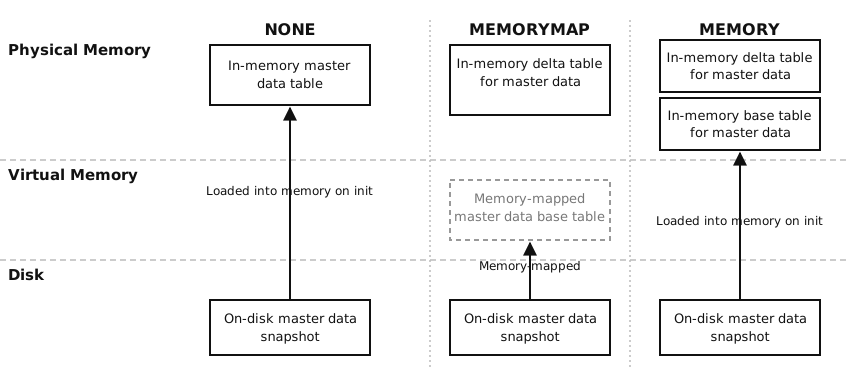
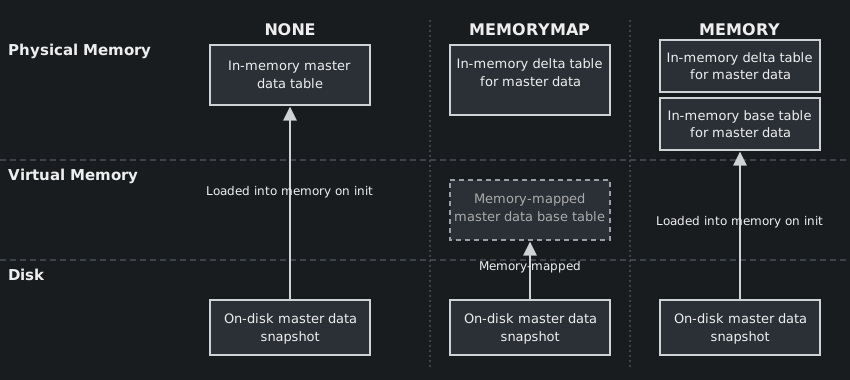
If a master data table is very large, it may be neither feasible nor desirable to load the entire table in memory. In such cases, KXS offers the following splitType options for use in mdbTables.yaml:
| Value | Description |
|---|---|
NONE (default) |
Entire table is loaded into memory. This offers the best query performance. |
MEMORYMAP |
Split table with the base table memory-mapped from the on-disk snapshot and the delta table in memory. The delta table retains only recent updates. This configuration offers faster in-memory updates as they are applied to the delta table which is generally smaller than the base table. It offloads the rest to disk, reducing the memory footprint at the cost of query performance. |
MEMORY |
Split table into a base and delta table, with both maintained in memory. The main benefit is faster in-memory updates as they are applied to the delta table which is generally smaller than the base table. It does impact query performance but not as much as the MEMORYMAP option. It does not reduce the memory footprint. |
Note
If you change your memory split configuration, the processes affected will require a restart. If multiple process instances are available, this can be done in a rolling manner.
Configuration
To enable a splitType for a table, set it in mdbTables.yaml. For example, if all processes should use the MEMORYMAP option for the Sensor table, add the following:
#
# Table customizations.
#
mdbTables:
  values:
   - table: Sensor
     splitType: MEMORYMAP
On the other hand, if only the RDB service class should use the MEMORYMAP option for the Sensor table, add the following:
#
# Service class customizations.
#
mdbTables:
  values:
   - process: RDB
     table: Sensor
     splitType: MEMORYMAP
Use of functions in the .mdb namespace
If APIs make use of the .mdb functions, the detail of memory mapping is abstracted away from the user. All the .mdb functions can be used seamlessly between the different configurations. For example, an API that calls .mdb.sel can simply continue to do so; the framework takes care of resolving this function to the appropriate variant depending on the configuration.
Choose splitType configurations
To decide which tables and service classes should use the MEMORYMAP option, consider:
- Table size: tables can be sorted by size to identify candidates for memory mapping to yield the largest memory footprint reductions.
- Use in queries: memory mapping tables that are heavily used in query joins has a larger adverse effect on query performance. The impact is proportional to the size of the tables.
- Query load by service class: different service classes perform different queries, so the sets of tables to be memory mapped may vary across service classes.
- Service class instance count: memory footprint reductions are realized by each process instance, so multiply accordingly to project memory footprint reductions.
uomConversion.yaml
This configuration object contains your seed unit of measure conversions (feet to inches, inches to centimeters, gallons to litres, kilograms to pounds, etc.).
uomConversion:
  values:
   - from: THERM
     to: BTU
     scaling: 99976.1

   - from: GAL
     to: L
     scaling: 3.78541

   - from: GPM
     to: GPH
     scaling: 60

   - from: LPM
     to: LPH
     scaling: 60

   - from: GPM
     to: LPM
     scaling: 3.78541

   - from: FT
     to: IN
     scaling: 12

   - from: FT
     to: CM
     scaling: 30.48
...
Warning
This configuration object is static rather than dynamic. Any changes to it require a complete system shutdown and restart.
| Attribute | Definition | Example |
|---|---|---|
from |
The source unit of measure before conversion. | FT (feet) |
to |
The target unit of measure after conversion. | IN (inches) |
scaling |
The value by which to scale the source unit of measure. | 12 |
pen.yaml
In this configuration object, you define your “penning” (suspending) rules, if any, for each service class. Penned data is sensor data from SDL and VEE awaiting a certain event such as completion of a request or arrival of other data and cannot be processed immediately. For example, VEE receives a set of readings with an unknown channel and “pens” or defers their processing until MDL creates the missing channel.
If you do not define overrides for individual service classes in this configuration object, the system defaults will apply to all service classes.
pen:
  values:
   - proc: <default>
     rlfreq: 15
     stto: 30
     arqfreq: 2
     arqth: 2
     isstr: false
     strdef: 0
     strmax: 0

   - proc: VEE
     stto: 60
     isstr: true
     strdef: 15000
     strmax: 10

   - proc: PROF
     rlfreq: 5
Note
If you change a record in this configuration object, you must restart the relevant process (VEE, SDL, etc.).
| Attribute | Definition | Example |
|---|---|---|
proc |
The name of the service class. | <default> |
rlfreq |
The frequency in minutes that the recovery log snapshot is generated. | 15 |
stto |
Short-term request timeout in seconds for GW operations. | 30 |
arqfreq |
The frequency in minutes to check for aged requests. | 60 |
arqth |
The age in minutes of a request at which point it is considered “aged” and an alert is generated in the client application. | 1440 |
isstr |
Flag indicating if short-term requests should be retried if the request times out or fails to reach a destination target. | N |
strdef |
Retry deferral in milliseconds for short-term requests that result in NO_DEST (timeout requests will be retried immediately). |
0 |
strmax |
Maximum number of retries for short-term requests that result in TIMEOUT or NO_DEST. |
0 |
protectedWords.yaml
In this configuration object, you define your programming language specific aliases for enumerations where the default KXS enumeration conflicts with protected words in that language.
For example, the enumeration IN within KXS refers to the inch unit of measure. However, in a language such as plsql, the word IN is a protected word and therefore causes compilation issues. Hence, for the plsql-specific exports of KXS enumerations, we use the INCH alias instead.
protectedWords:
  values:
   - language: plsql
     word: IN
     replacement: INCH

   - language: cpp
     word: KG
     replacement: KGR

   - language: cpp
     word: ERANGE
     replacement: ERANGECHK

   - language: c
     word: KG
     replacement: KGR

   - language: c
     word: ERANGE
     replacement: ERANGECHK
| Attribute | Definition | Example |
|---|---|---|
language |
The programming language. | plsql |
word |
The word to be protected. | IN |
replacement |
The replacement word or alias. | INCH |
sdl.yaml
In this configuration object, you define your custom ingestion functions and micro-batching rules for application-specific message types.
sdl:
  values:
    MD_REISSUE:
      isBatch: false
      ingestFn: .sdl.ingestMdRepub
      batchLenThr: 0
      maxHoldTm: 0D00:00:00.000000000
      maxInactTm: 0D00:00:00.000000000
      expTm: 0D00:00:00.000000000
| Attribute | Definition | Example |
|---|---|---|
isBatch |
Flag indicating whether or not the message type will be micro-batched. | true, false |
splitFn |
Dyadic function that is responsible for dividing the incoming message into one or more segments that will be microbatched separately in each batch. | .sdl.splitTable |
preIngestFn |
Dyadic pre-ingestion processing function for the message type. | .sdl.valData |
ingestFn |
Function used to perform ingestion of incoming sensor data, typically transforming the data into one or more database tables (including ImportLog and ImportException if required) to be forwarded to the next step in the ingestion pipeline (e.g. VEE). |
.sdl.transform / .example.ingFn |
batchLenThr |
Maximum batch length threshold to release a batch. You define this application-specific length (number of records, number of bytes, etc.) in your splitting function. If you enter zero as your batch length threshold, the decision to release a batch will be based on time rather than batch size. | 1000 |
maxHoldTm |
Maximum age threshold for a batch. Batches older than the specified age will be ingested. | 0D00:00:10 |
maxInactTm |
Optional. Maximum inactivity threshold for a batch. Batches that have not received a new segment for longer than the specified threshold will be ingested. | 0D00:00:10 |
expTm |
Expiration threshold for a batch in the event that a publishing client fails to terminate a batch. You should set this parameter to a value larger than the expected life of a batch. | 4D |
tblGen.yaml
In this configuration object, you configure the functions that can be used to generate initial seed versions of database tables created by the DBW process during the initial start-up of an environment.
Each entry in the configuration specifies the name of the function to be run and its associated q file. Note that multiple entries for the same table are supported and each entry will be executed. The execution sequence for each table is determined by the repository-based sequence for the configuration overrides and the row order within each.
tblGen:
  values:
   - table: TimeZone
     file: tblGen
     function: genTZ

   - table: User
     file: tblGen
     function: genUser

   - table: Organization
     file: tblGen
     function: genOrg

   - table: Watermark
     file: tblGen
     function: genWatermark

   - table: CalcWatermark
     file: tblGen
     function: genCalcWatermark
Note
Changes to this configuration object only take effect when you are performing an initial install of KX Sensors or you are rebuilding your database.
| Attribute | Definition | Example |
|---|---|---|
table |
The name of the table to be created. | TimeZone |
file |
The q file containing the function. | TblGen |
function |
The name of the function to be run. Functions specified in the parameter should take three parameters:ts: timestamp of table creation, of type timestamptn: table name, of type symbolt: table data, of type table (initially empty, but may have had rows added by previous invocations)These functions should return an augmented version of t (with rows added, modified, or removed, but honoring the configured schema of the table). |
genTZ |
rLogPubSub.yaml
In this configuration object, you specify the publishers and subscribers of recovery logs as well as the directory path of the write-down folder and the rollover frequency.
rLogPubSub:
  values:
    <default>:
      dir: "${OPDATA}/rlog" # See opDataDir in systemParams.yaml
      lfreq: 60
      rfreq: 60
      mincut: 5
Note
For changes to take effect, a restart of the affected process is required.
| Attribute | Definition | Example |
|---|---|---|
name |
Name of the folder that the process writes recovery logs to. | SDL |
topic |
Name of the table for the process to listen for. | ReadingVal |
dir |
Directory path to write-down folder. | /data/kxs/rlog |
lfreq |
The log rollover frequency in minutes. | 60 |
rfreq |
The subscriber reporting frequency in seconds. | 60 |
mincut |
The minimum number of messages in a log file before it is cut. | 5 |
pub |
||
subs |
Comma-separated list of service classes expected to subscribe to the recovery log. | |
rcv |
Name of the dyadic application-defined function to receive control on receipt of new data. | |
rcvm |
Name of the dyadic application-defined function to receive control on receipt of new batched data. |
The sample values in the table above indicate that the subscriber is listening for the topic ReadingVal within the SDL folder of the directory and is checking every 60 seconds to see whether it has caught up with everything published here by the publishing process. This log is rolled over to a new file every 60 minutes, and SDL doesn't write a file to it until it has at least five messages. On receiving this topic (table), it executes the function defined in rcv (.vee.recv).