Network requirements
This page describes the network requirements for KX Sensors, including firewall rules, UDP usage, and MTU and latency recommendations.
Most connections between external SAPI clients and server hosts originate from the client to the server. However, some connections originate from the server to external SAPI query clients — specifically, from Response Processes (RPs) to clients, to transmit responses to API calls. Make sure your firewall rules support this connection direction.
Ports
For multi-node deployments, keep the following ports open between KX Sensors hosts for inter-node communication.
| Protocol | Port range | Description |
|---|---|---|
| TCP | 22 | SSH |
| TCP/UDP | KXS_BASE_PORT to KXS_BASE_PORT + 1000 |
KX Sensors |
For a remote installation of a single-node deployment, make sure port 22 is open on the target host for at least the duration of the installation. You can close it afterwards.
Within the KX Sensors range, the following offsets from KXS_BASE_PORT are reserved.
| Offset | Description |
|---|---|
| +0 | etcd client port, used by qetcd |
| +1 | etcd peer port, used by etcd peers |
| +2 | qetcd local client port, used by local q processes |
| +3 | qetcd external client port, used by external SAPI clients |
| +4 | qetcd external client port for TLS, used by external SAPI clients when TLS is enabled |
| +5 | kxsctl-agent port, if installed |
| +800 to +1000 | RT ports |
As of KX Sensors 3.3, RT listens on these host ports directly rather than on container-internal ports forwarded from the host. Each RT stream is allocated 30 ports within the reserved RT range, and individual RT services, such as the pull and push servers, take fixed offsets within each stream's allocation. In single-node deployments, TP+ is allocated one port per stream instead.
Changed in 3.3
Earlier v3 releases also required the Docker Swarm ports — 2377/TCP for the swarm manager, 4789/UDP for the swarm network, and 7946/TCP for swarm discovery — because RT traffic crossed a Docker overlay network. Docker is no longer used, so you can remove these rules.
UDP
In addition to TCP, v3 uses UDP communication (both unicast and multicast).
Increased MTU (jumbo frames)
- Although not a hard requirement, increase the MTU to the maximum supported by your network infrastructure to avoid fragmentation in the IP layer and reduce overhead.
- For RT in KX Sensors 3.3 and later, RT processes run directly on the host and use the MTU of the host network interface. Set the interface MTU to match your network infrastructure so that RT uses jumbo frames.
- For RT in KX Sensors v3 releases before 3.3, configure this during installation using
DOCKER_NETWORK_MTUin the installation profile, because RT traffic crossed a Docker overlay network. By default, this is set to 1500. Increase this value to match your network MTU and ensure RT uses jumbo frames. This setting is removed frominstall.profilein 3.3.
Network latency
KX Sensors v3 doesn't enforce a strict maximum network latency between HA cluster nodes. However, network latency directly impacts ingestion latency, query performance, and HA behavior.
If you don't account for latency, the system may exhibit:
- Unnecessary failovers
- Frequent Raft elections (etcd/RT)
- False connection failures
- Increased ingestion and query latency
Tune the following settings by component.
Network failure detection
See Network conditioning and fast failure detection.
HA heuristics
Tune the following parameters based on observed RTT:
skewThrhaWmLathaHBhaChkFreqemsPingFreq
Increase these values for higher-latency environments, for example, cross-region deployments. Higher values result in slower failover and fewer false positives.
etcd
When using etcd over networks with high latency, tune the heartbeat interval and election timeout. Follow the official guidance at https://etcd.io/docs/v3.7/tuning/.
Reliable Transport EMS
Tune the Raft heartbeat in ems.yaml. This affects the latency for messages published via RT, including ingested sensor data and the application signals that various stream processors publish internally.
Multicast
Validate multicast support in your network as part of deployment preparation. KX Sensors uses multicast to disseminate messages such as:
- Heartbeats between HA clients
- HA control requests, for example, failover or failback
- Node and feed status updates
To confirm multicast communication is working after deploying a multi-node environment, check for heartbeat reception entries in the SDL log.
2025.10.22 16:46:05.962 TRACE [kxsSDL_A1] HA Received heartbeat from kxsSDL_B1, ts=2025.10.22 16:46:04.113071605 feeds=100h intv=2.000 delinq=N
In single-node deployments, you can restrict multicast traffic to the host running the KXS node by setting the system parameter mcRestrict to true. This prevents the traffic from reaching other parts of the network.
For multi-node deployments where your network doesn't support multicast traffic across nodes, use Multicast Bridge instead.
Multicast Bridge
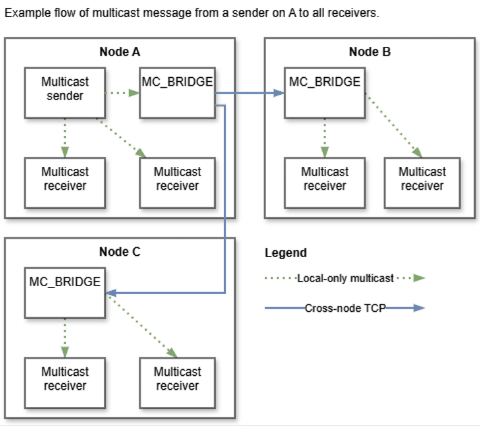
Multicast Bridge is a KXS service class designed for network topologies that don't support multicast communication across nodes. A bridge receives all the multicast traffic from its local node that's destined for remote nodes, then sends this traffic to remote bridges via TCP. The receiving bridges forward this traffic to their local multicast channels.
Note
Because there's an additional hop in this message path, using Multicast Bridge increases latency.
To run KXS with Multicast Bridge, the service class must exist in the manifest file for each full KXS node, and the system parameter mcRestrict must also be set to true.