OneTick Data Volume Prep
This page describes how to configure and deploy the ot-data-vol-prep package
The ot-data-vol-prep prepares the HDB volume used by the fsi-app-ot-uscomp package so the database can initialise from an existing S3-backed HDB store. It deploys a workload to create a PVC named fsi-app-ot-uscomp-hdb (used by fsi-app-ot-uscomp as the HDB tier storage), creates a data directory on that volume, and downloads the S3 store’s sym file into it.
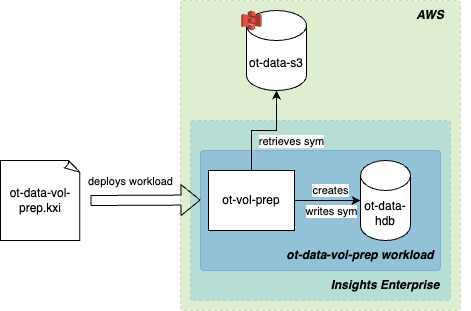
Run this package successfully before the first run of fsi-app-ot-uscomp. If you do not, S3 store initialization fails due to a missing sym file.
Prerequisites
-
AWS credentials — A Kubernetes secret named
ot-data-s3must exist in the cluster namespace with the following keys:AWS_ACCESS_KEY_ID,AWS_SECRET_ACCESS_KEY, and optionallyAWS_SESSION_TOKEN. These are exposed as environment variables to the workload for S3 access. If usingAWS_SESSION_TOKEN, uncomment the relevant section in theworkload.yamlfile in the volume prep package. -
S3 bucket and path for sym file — Set
OT_DATA_S3_BUCKETin theworkload.yamlfile to the bucket (and prefix) that contains the sym file for the market data. See Values you must set. -
AWS region — The
AWS_REGIONenvironment variable defaults toeu-west-1. If your bucket is in another region, update it in theworkload.yamlfile. -
HDB volume size — Configure the PVC size in the
workload.yamlfile. Plan for around 50 GiB per day of data retained on local disk; align this value with theretainsetting in thefsi-app-ot-uscomppackage’sfsi-app-ot-uscomp/databases/fsi-core-db/shards/fsi-core-db-shard.yamlfile (tiers→mount: hdb→retain.time). -
kxi CLI — Install and configure the kxi CLI for building, pushing, and deploying packages to kdb Insights Enterprise.
Configuration
Configure the ot-data-vol-prep package with your environment-specific values. First, unpack the package:
kxi package unpack ot-data-vol-prep-${VOLPREPVER}.kxi
Then update the below variables as required:
| Purpose | Where | Key / path | Default | Notes |
|---|---|---|---|---|
| S3 HDB sym file location | ot-data-vol-prep/workload.yaml |
spec.instances.ot-vol-prep.env → OT_HDB_S3_BUCKET |
s3://<INSERT_BUCKET_NAME>/<INSERT_PATH_TO_SYM_FILE>/sym |
Location of the sym file in your S3 HDB. Note that it must be the fully-qualified path to the file. |
| AWS region | ot-data-vol-prep/workload.yaml |
spec.instances.ot-vol-prep.env → AWS_REGION |
<INSERT_OT_HDB_S3_BUCKET_REGION> |
Must match the bucket region. |
| HDB PVC name | ot-data-vol-prep/workload.yaml |
spec.storage.name |
fsi-app-ot-uscomp-hdb |
Must match the volume name used by fsi-app-ot-uscomp. To be changed if you plan on deploying a package with a custom name other than fsi-app-ot-uscomp. |
| HDB PVC size | ot-data-vol-prep/workload.yaml |
spec.storage.size |
20Gi |
Increase / decrease depending on your needs. |
| Storage class | ot-data-vol-prep/workload.yaml |
spec.storage.storageClass |
rook-cephfs |
Adjust if your cluster uses a different default or required storage class. |
| AWS credentials | Cluster | Secret ot-data-s3 |
— | Create the secret; no default. Required secret keys: AWS_ACCESS_KEY_ID, AWS_SECRET_ACCESS_KEY, optionally AWS_SESSION_TOKEN.See the example below. |
AWS credeantials example
Example command to create secret with these values:
kubectl create secret generic ot-data-s3 -n <namespace> --from-literal=AWS_REGION=<region> --from-literal=AWS_ACCESS_KEY_ID=<access-key-id> --from-literal=AWS_SECRET_ACCESS_KEY=<secret-access-key>
If using AWS_SESSION_TOKEN, uncomment the relevant section in ot-data-vol-prep/workload.yaml.
After configuration, deploy the ot-data-vol-prep package by following the steps in the Quickstart Guide.
Troubleshooting
If, for any reason, the log output does not confirm a successful sym file write, resolve the issue before proceeding.
Access issues
If the AWS credentials are invalid, inspect the logged Response output and fix access by updating the bucket configuration, IAM permissions, and/or the secret.
INFO: Using license file [/opt/kx/lic/k4.lic]
recieved args [ `package`initFile!`ot-data-vol-prep`src/init.q ]
setting active directory [ /opt/kx/deps/ot-data-vol-prep ]
loading packaged script src/init.q
2026.06.22D15:59:48.516012861 info PID[21] HOST[ot-data-vol-prep-ot-vol-prep-0] Launching ot volume prep
2026.06.22D15:59:48.516185838 info PID[21] HOST[ot-data-vol-prep-ot-vol-prep-0] Will get sym file from S3 Bucket in Region = [ eu-west-1 ]
2026.06.22D15:59:48.516217375 info PID[21] HOST[ot-data-vol-prep-ot-vol-prep-0] Will get sym file from S3 Bucket at URI = [ s3://bucket/path/to/sym ]
2026.06.22D15:59:48.526654756 info PID[21] HOST[ot-data-vol-prep-ot-vol-prep-0] Registering AWS credentials.
2026.06.22D15:59:48.526755981 info PID[21] HOST[ot-data-vol-prep-ot-vol-prep-0] Downloading sym file from [ https://bucket.s3.region.amazonaws.com/path/to/sym ]
2026.06.22D15:59:48.606786974 error PID[21] HOST[ot-data-vol-prep-ot-vol-prep-0] Sym file download failed
2026.06.22D15:59:48.607844062 error PID[21] HOST[ot-data-vol-prep-ot-vol-prep-0] Response: ...
Existing volume
This log output indicates the volume already contains data and has been initialised. Confirm that this is expected. If needed, connect and inspect the volume’s directory layout and existing sym file.
INFO: Using license file [/opt/kx/lic/k4.lic]
recieved args [ `package`initFile!`ot-data-vol-prep`src/init.q ]
setting active directory [ /opt/kx/deps/ot-data-vol-prep ]
loading packaged script src/init.q
2026.06.22D16:03:22.673869197 info PID[21] HOST[ot-data-vol-prep-ot-vol-prep-0] Launching ot volume prep
2026.06.22D15:59:48.516185838 info PID[21] HOST[ot-data-vol-prep-ot-vol-prep-0] Will get sym file from S3 Bucket in Region = [ eu-west-1 ]
2026.06.22D15:59:48.516217375 info PID[21] HOST[ot-data-vol-prep-ot-vol-prep-0] Will get sym file from S3 Bucket at URI = [ s3://bucket/path/to/sym ]
2026.06.22D16:03:22.674576460 info PID[21] HOST[ot-data-vol-prep-ot-vol-prep-0] Sym file already exists in HDB. Not downloading sym file
Next steps
- After completing volume prep, return to the Quickstart Guide to deploy
fsi-app-ot-uscomp. - Review the release notes for the latest updates.