PyKX integration
PyKX enables you to make use of the full functionality of Python in a q session. It is a core package of KX Delta Platform since version 4.9. It can also be integrated in version 4.8.1 and above as an asset.
Currently all Linux versions supported by the KX Delta Platform support PyKX integration. As part of the KX Delta Platform installation, the necessary files for PyKX are installed into the QHOME directory.
Use the following documentation depending on your platform version:
| Platform | Documentation |
|---|---|
| kdb Insights Core | PyKX under q |
| KDB-X | KDB-X Python overview |
PyKX dependencies
The dependencies for PyKX are listed in the following documentation:
- kdb Insights Core: Supported environments
- KDB-X: Supported environments
During installation, the KX Delta Platform installer attempts to detect your Python version to install the package. If Python is not installed, the installation is skipped. If the Python version does not have an associated pip module, the installation is also skipped.
Supported Python virtual environments
Delta Platform PyKX integration is not currently compatible with Anaconda.
KDB-X only
If installing directly with pip fails, an attempt to install in the virtual environment $HOME/.kx-delta-platform-pykx-venv will be made.
To use PyKX features within Delta Platform, ensure you have a licensed version of PyKX, that is a k4.lic or kc.lic file with the required feature flags enabled for PyKX.
kdb Insights Core
For more information, refer to prerequisites.
KX Delta Platform PyKX installation
PyKX is automatically installed into KX Delta Platform QHOME upon upgrade to KX Delta Platform version 4.8.1 or later if all dependencies are met.
You need to specify the executable used for the installation if the server is running multiple versions of Python. To do that, include the path to the executables in the install config profile.
For example:
PYKX_EXECUTABLE=/usr/bin/python3
The Delta Platform installer uses these executables to install PyKX.
PyKx on a Python virtual environment
PyKX can be set to use a Python virtual environment. In this case, the PYKX_EXECUTABLE environment variable should point to the Python within the virtual environment.
PyKX libraries are not automatically loaded into q sessions on start up. These can be initialized by running the following command:
\l pykx.q
Alternatively, execute a Python statement within a q session using the p) notation.
Refer to our troubleshooter for any issues with installing or inititializing PyKX.
Upgrading from KX EmbedPy
The KX Delta Platform installer detects any existing installations of KX EmbedPy. Due to significant syntax differences between PyKX and EmbedPy, the installer does not automatically overwrite EmbedPy with PyKX. Before upgrading, it is important to understand the differences listed in Upgrading from EmbedPy.
To upgrade to PyKX from EmbedPy, add the below to the install config profile.
OVERWRITE_EMBEDPY=True
You can also manually install from the command line:
PyKX KX Analyst integration
PyKX is fully integrated with the KX Analyst component of the KX Delta Platform. This ensures you are able to recognise Python files and migrate variables through the Analyst interface. Further information can be found in KX Analyst.
Python simple code execution
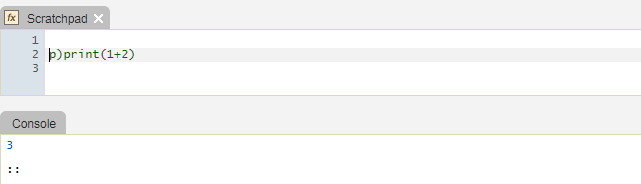
The PyKX integration allows execution of Python code within the KX Analyst IDE or from a script. In both the IDE and scripts prefix Python code with p)
Q scripts can load and execute multiline Python code. Prefix the first line of the code with p) and indent subsequent lines of Python code according to the usual Python indentation rules.
$ cat test.q
a:1                   / q code
p)def add1(arg1):     # Python code
    return arg1+1     # still Python code
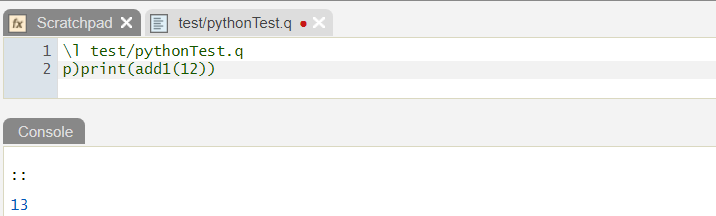
Full scripts of Python code can be executed in q, using the .p file extension. The script is loaded as usual.
Converting Python data to q
Given obj, a PyKX object representing Python data, we can get the underlying data as foreign or q.
For example:
q)x:.pykx.eval"(1,2,3)"
q)x
{[f;x].pykx.util.pykx[f;x]}[foreign]enlist
q)x`.
foreign
q)x`
1 2 3
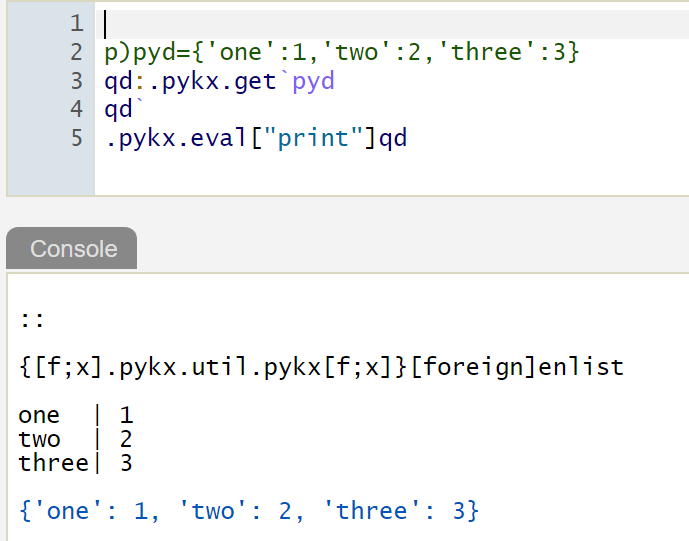
Python dictionaries
Python dictionaries convert to q dictionaries, and vice versa.
References
For more details on using PyKX in q, see: