System Setup
This page covers the first step in KX Control: creating the package that holds the entities you build in this tutorial series.
Entity view vs. Package view
KX Control lets you view your system in two ways:
- Package view — entities are arranged by the package they belong to.
- Entity view — entities are arranged by type across the whole system.
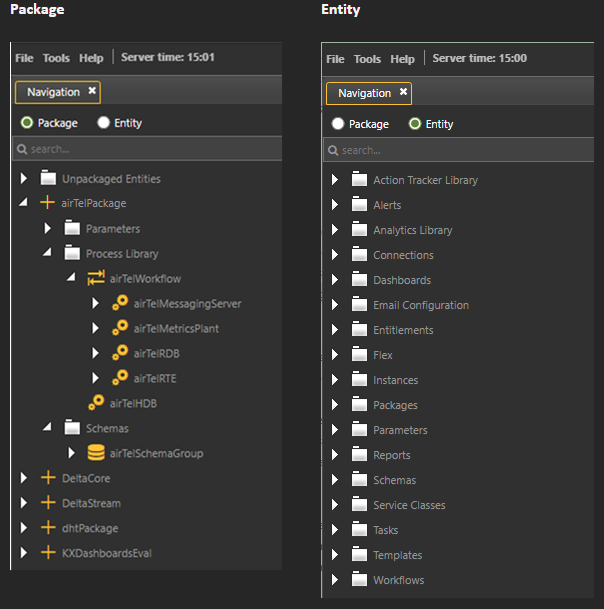
Both views are useful, but this tutorial uses Package view exclusively.
Create a package
Packages organize your system and make it portable. Everything you build in this tutorial will live inside a single package called airTelPackage.
Steps:
- In the tree, click the Package radio button to switch to Package view.
- Right-click the tree and select New > Package.
-
In the new dialog box:
- Enter
airTelPackageas the package name. - Select the base directory; for example,
/path/to/kxinstall/packages. - Enter the custom directory,
airTelPackage. - Click Add.
- Enter
-
Check that the package appears in the tree.
Why packages?
Once everything is inside a package, you can export it from one KX Control system and import it into another with a single action.
Next step
Proceed to Schema and Infrastructure to define your data schema and configure the core infrastructure processes.