Deploy the Bloomberg Market Data Feed Handler with kdb Insights Enterprise
This page details how to install and run the KX Bloomberg Market Data Feed Handler on kdb Insights Enterprise.
Accelerator available
A KX Accelerator is available for the Bloomberg B-PIPE Feed Handler, providing a pre-built, ready-to-deploy solution. For more information, see the Bloomberg B-PIPE Overview or jump straight to the Quickstart.
Bloomberg deployment process with Insights Enterprise overview
To successfully configure, deploy and query the data feed handler with kdb Insights Enterprise, the following tasks must be completed:
- Prerequisites
- Set up Kubernetes secrets
- Download the feed handler Helm chart
- Configure the feed handler
- Deploy a kdb Insights Enterprise app
- Deploy the feed handler
- Query the data
- View the logs
- Tear down the feed handler
- Tear down the example package
- B-PIPE EMRS
Note
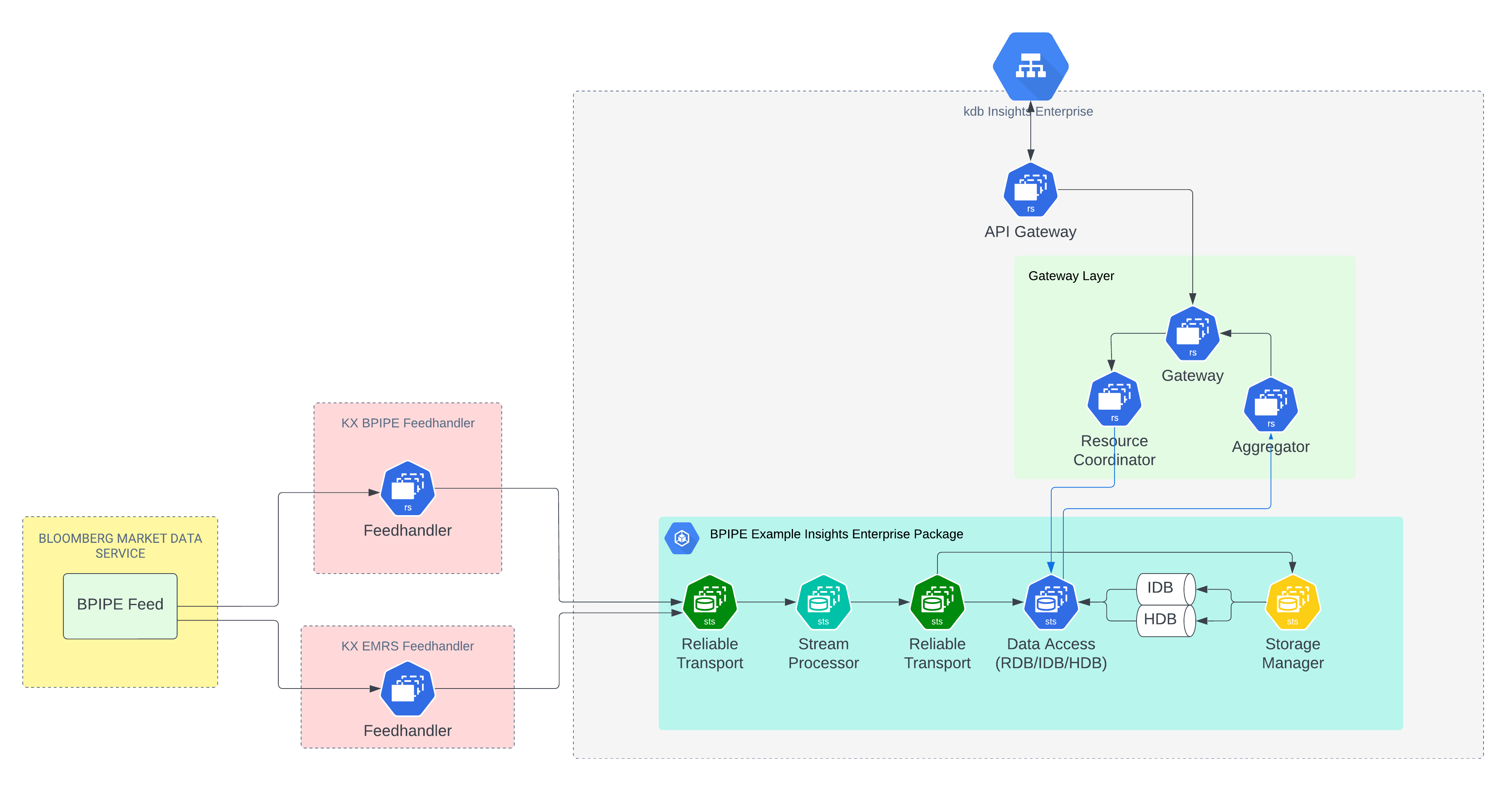
Both the BPIPE and EMRS feeds are needed for a compliant solution — BPIPE to stream market data, and the stream from EMRS to control access.
Architecture
Prerequisites
Before running the KX Bloomberg Market Data Feed Handler on kdb Insights Enterprise, ensure the following prerequisites are met:
- kdb Insights Enterprise is installed.
kxiCLI is installed.helmCLI is installed.- Command line access to the Kubernetes cluster where your kdb Insights Enterprise install is running.
- Login credentials for the Bloomberg Market Data Feed.
- Login credentials for portal.dl.kx.com.
Set up Kubernetes secrets
First, create a Kubernetes secret containing your B-PIPE login credentials:
kubectl create secret generic my-bpipe-secrets --from-literal=my-username=<insert bpipe username> --from-literal=my-password=<insert bpipe password> -n <insert kubernetes namespace>
Then, create a secret containing your credentials for the KX Docker portal.dl.kx.com:
kubectl create secret -n <insert kubernetes namespace> docker-registry regcred --docker-username=<insert registry username> --docker-password=<insert registry password> --docker-server=portal.dl.kx.com
Download the feed handler Helm chart
The Helm chart for the KX Bloomberg Market Data Feed Handler is available on KX's public chart repository. Add this repository to your local Helm configuration by running the following:
helm repo add kx-ext https://portal.dl.kx.com/assets/helm --username <insert portal username> --password <insert portal password>
Update the repository to load the latest available charts:
helm repo update kx-ext
Use helm search to list the available versions of the KX Bloomberg Market Data Feed Handler:
helm search repo kx-ext/rt-bpipe-pub
Select the latest version of the chart from the list of versions, then download it:
helm fetch kx-ext/rt-bpipe-pub --version <insert latest version> --untar --devel
Note
Replace <insert latest version> with the latest version of the rt-bpipe-pub chart; for example 1.0.1.
This downloads and untars the rt-bpipe-pub chart in your current working directory.
Configure the feed handler
The default configuration for the KX Bloomberg Market Data Feed Handler is in the values.yaml file. To modify this configuration, create a copy, as follows:
cp rt-bpipe-pub/values.yaml my-values.yaml
Edit my-values.yaml to configure the Feed Handler.
Key sections in this configuration file include:
bpipe
Contains the settings for configuring the KX Bloomberg Market Data Feed Handler. For detailed information of each setting, refer to the B-PIPE Configuration documentation. Ensure the following settings are correct:
bpipeHostbpipePortbpipeAuthTypebpipeAppName
rt
In a kdb Insights Enterprise deployment, the KX Bloomberg Market Data Feed Handler typically publishes data to an RT stream.
The rt section configures the interaction between an RT stream and the KX Bloomberg Market Data Feed Handler. For detailed information of each setting, refer to the RT documentation. Ensure the following setting is correct:
| Setting | Description |
|---|---|
| sinkName | Set this to the name of the RT stream for publishing. For example, set it to rt-bpipe-example-package-bpipe-north for the example package in Deploy a kdb Insights Enterprise App below. |
imagePullSecrets
The imagePullSecrets section is for listing the names of secrets required by the KX Bloomberg Market Data Feed Handler. The names of both secrets created in Setting up Kubernetes Secrets should be displayed here:
imagePullSecrets:
  - name: regcred
  - name: my-bpipe-secrets
Deploy a kdb Insights Enterprise app
To get started with ingesting and querying B-PIPE market data, download the example kdb Insights Enterprise package by running the following:
version=1.0.1;\ curl -L -O https://portal.dl.kx.com/assets/raw/kxi-bpipe-fh/${version}/bpipe-example-package-${version}.kxi
Use this package as the base to build your own new package, or take elements from it and integrate them into an existing package.
To deploy the package run the following set of commands
user@demo-host:~/bpipe-example$ ls bpipe-example-package-1.0.1.kxi user@demo-host:~/bpipe-example$ user@demo-host:~/bpipe-example$ kxi pm push bpipe-example-package/1.0.1 Pushing: bpipe-example-package-1.0.1.kxi { "bpipe-example-package": [ { "version": "1.0.1", "_status": "InstallationStatus.SUCCESS" } ] } user@demo-host:~/bpipe-example$ user@demo-host:~/bpipe-example$ kxi pm deploy bpipe-example-package/1.0.1 user@demo-host:~/bpipe-example$
In this example, kxi package expects the default KX Bloomberg Market Data Feed Handler configuration. Only the configuration fields discussed in Configure the Feed Handler should be changed.
Deploy the Feed Handler
Deploy the KX Bloomberg Market Data Feed Handler using the my-values.yaml file created and edited above in the Configure the feed handler section.
For the feed handler to publish successfully to the bpipe-example-package, myvalues.yaml must have sinkName: rt-bpipe-example-package-bpipe-north under the stream: section.
user@demo-host:~/helm_charts/bpipe$ ls my-values.yaml rt-bpipe-pub user@demo-host:~/helm_charts/bpipe$ user@demo-host:~/helm_charts/bpipe$ helm install rt-bpipe-pub rt-bpipe-pub -f my-values.yaml -n <insert namespace> NAME: rt-bpipe-pub LAST DEPLOYED: Tue Jun 11 14:58:55 2024 NAMESPACE: user STATUS: deployed REVISION: 1 TEST SUITE: None user@demo-host:~/helm_charts/bpipe$
Query the data
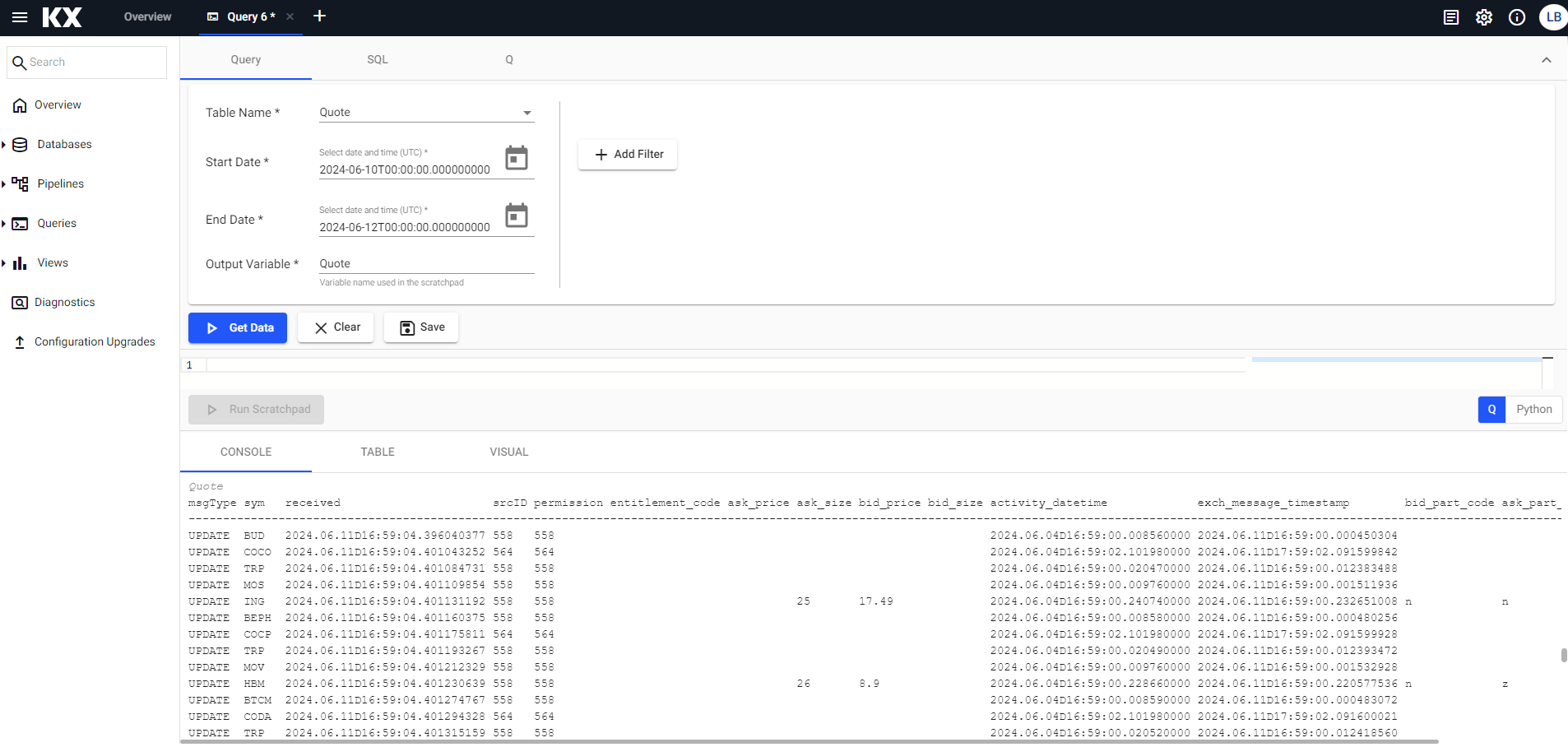
Once the bpipe-example-package and KX Bloomberg Market Data Feed Handler have been deployed successfully, navigate to the kdb Insights Enterprise UI and query the data.
View the feed handler logs
View the KX Bloomberg Market Data Feed Handler logs using kubectl:
kubectl logs rt-bpipe-pub-0 | less
Tear down the feed handler
To tear down (uninstall) the KX Bloomberg Market Data Feed Handler, run the following command:
user@demo-host:~/helm_charts/bpipe$ helm uninstall rt-bpipe-pub -n <insert namespace> release "rt-bpipe-pub" uninstalled user@demo-host:~/helm_charts/bpipe$
Tear down the example package
To teardown the bpipe-example-package, run:
kxi pm teardown bpipe-example-package/1.0.1
To delete all data associated with the package, run:
kxi pm teardown --rm-data bpipe-example-package/1.0.1
The --rm-data flag erases all data in the specified package's database. Use with caution.
B-PIPE EMRS
The B-PIPE EMRS (Entitlements Management and Reporting System) feed handler is included as part of the kdb Insights Enterprise deployment. It connects to Bloomberg's EMRS service to fetch and validate user-level entitlements, determining:
- Whether a user is valid
- What EIDs the user has access to
The system continuously monitors for changes in user entitlements. If any changes occur, the entitlement information in the snapshot is automatically updated.
The entitlement data is stored in the USERSENTITLEMENTS table, which includes the following fields:
userID: The user's identifier.IP: The user's IP address.valid: Indicates whether the user's entitlements are valid.received: The timestamp when the entitlement data was received.permissionedEIDs: A list of entitlement IDs the user is authorized for.
Once deployed, this data is accessible through the kdb Insights Enterprise UI alongside your market data tables.
Bloomberg user IDs need to be associated with your kdb user IDs. EIDs on data recorded from the B-PIPE feed can then be compared with EIDs associated with the kdb (and so Bloomberg) user, and only correctly entitled data returned to them.
kdb Insights Enterprise supports row-level entitlements natively, which can be leveraged to enforce per-user, per-EID access controls required for Bloomberg compliance. By combining the EMRS entitlement data with kdb Insights Enterprise row-level entitlements, you can restrict market data access at the row level based on each user's permissioned EIDs.