Deploy the Bloomberg Market Data Feed Handler with kdb Insights SDK
This page details how to install and run the KX Bloomberg Market Data Feed Handler using the kdb Insights SDK.
Bloomberg deployment process with Insights SDK overview
To successfully configure, deploy and query the data feed handler with kdb Insights SDK, the following tasks must be completed:
- Prerequisites
- Login to Docker registry
- Download the B-PIPE kdb Insights SDK example
- Configure the B-PIPE kdb Insights SDK example
- File permissions
- Deploy the B-PIPE kdb Insights SDK example
- Query the data
- View the logs
- Tear down the B-PIPE kdb Insights SDK example
- B-PIPE EMRS
Note
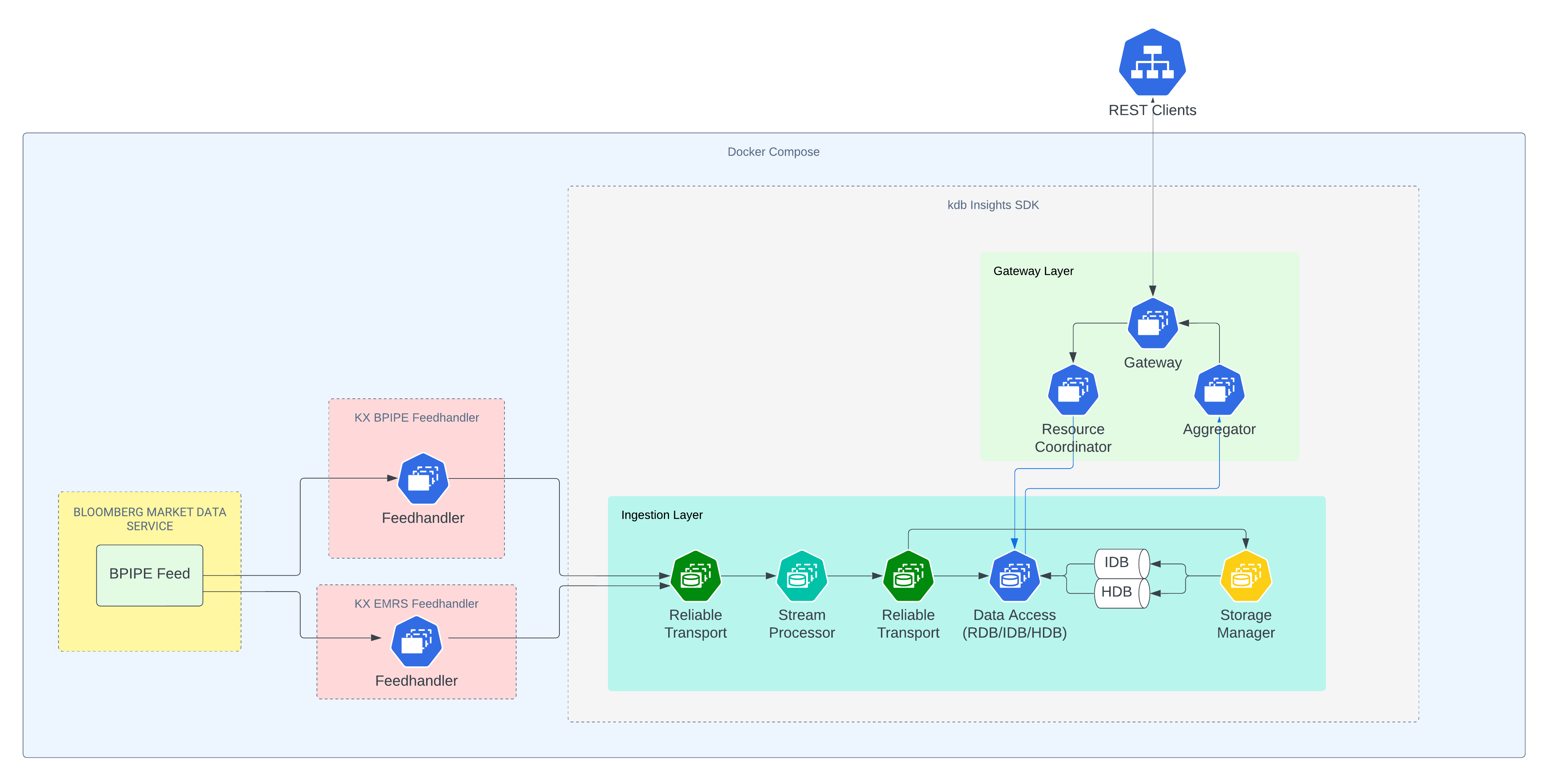
Both the BPIPE and EMRS feeds are needed for a compliant solution — BPIPE to stream market data, and the stream from EMRS to control access.
Architecture
Prerequisites
Before running the KX Bloomberg Market Data Feed Handler with the kdb Insights SDK, the following prerequisites must be met:
- docker is installed
- docker-compose is installed
- You have login credentials for the Bloomberg Market Data Feed
- You have login credentials for Docker registry at portal.dl.kx.com
- You have a kdb Insights license file (
kc.lic)
Login to Docker registry
To access the images needed for this walkthrough, log into the KX Docker registry:
docker login portal.dl.kx.com -u <insert registry username> -p <insert registry password>
Download the B-PIPE kdb Insights SDK example
To download the B-PIPE kdb Insights SDK example, run:
version=1.0.1;\
curl -L  https://portal.dl.kx.com/assets/raw/kxi-bpipe-fh/${version}/bpipe-insights-sdk-example-${version}.tar.gz -o bpipe-insights-sdk-example.tgz
Extract (untar) the files and navigate to the resulting directory:
tar -xvzf bpipe-insights-sdk-example.tgz;\
cd bpipe-insights-sdk-example
Configure the B-PIPE kdb Insights SDK example
Within the bpipe-insights-sdk-example directory, locate the docker-compose-one-node.yaml file and the env file. Update the following in the env file:
- Update the
kx_licence_dirvariable to the directory path where your kdb Insights license file is located. - Update the
KXFEED_BPIPE_HOST,KXFEED_BPIPE_PORTandKXFEED_BPIPE_APP_NAMEvariables with your B-PIPE host, port and application name.
File permissions
To avoid permission issues with containers mounting directories, run the following within the bpipe-insights-sdk-example directory. This command may require sudo access:
chmod -R 777 */
Or, use sudo if necessary:
sudo chmod -R 777 */
Deploy the B-PIPE kdb Insights SDK example
After updating the configuration, deploy the B-PIPE kdb Insights SDK example:
docker-compose --env-file env -f docker-compose-one-node.yaml up
Query the data
After deploying, open a second terminal to query the Quote data published by the B-PIPE feed using this getData REST call:
START=$(date "+%Y.%m.%dD00:00:00.000000000");\
END=$(date "+%Y.%m.%dD23:59:59.999999999");\
curl -X POST "localhost:8080/kxi/getData" -H "Content-Type: application/json" -H "Accepted: application/json" --data "{\"table\":\"Quote\",\"startTS\":\"$START\",\"endTS\":\"$END\"}"
To query the Trade data, use:
START=$(date "+%Y.%m.%dD00:00:00.000000000");\
END=$(date "+%Y.%m.%dD23:59:59.999999999");\
curl -X POST "localhost:8080/kxi/getData" -H "Content-Type: application/json" -H "Accepted: application/json" --data "{\"table\":\"Trade\",\"startTS\":\"$START\",\"endTS\":\"$END\"}"
If neither call returns any data, review the logs to check for any issues.
View the logs
To check if the services have started successfully, view the logs using the following command within the bpipe-insights-sdk-example directory:
docker-compose --env-file env -f docker-compose-one-node.yaml logs | less
If the B-PIPE feed is publishing successfully, logs from the sp worker are displayed with messages such as Received quote or Received trade.
If these messages are absent, search for ERROR and FATAL messages to identify any issues. If no errors are found, validate that it is market hours for the symbols listed in the KXFEED_BPIPE_SUBSCRIBE_SYMS setting in the env file.
Note
Logs also appear when you run docker-compose up, but they can move quickly and be difficult to read. Use docker-compose logs for easier reading and searching.
Tear down the B-PIPE kdb Insights SDK example
To tear down and delete the containers for the B-PIPE kdb Insights SDK example, run the following command within the bpipe-insights-sdk-example directory:
docker-compose --env-file env -f docker-compose-one-node.yaml down
To remove all data written to disk by the example, first delete all volumes:
docker volume rm bpipe-insights-sdk-example_rt-north-0;\
docker volume rm bpipe-insights-sdk-example_rt-north-session;\
docker volume rm bpipe-insights-sdk-example_rt-south-0;\
docker volume rm bpipe-insights-sdk-example_rt-south-session;
Then, remove all data written to mounted paths (requires sudo access):
sudo bash -c 'rm -rf db/data/db/*; rm -rf db/data/logs/*; rm -rf log/*; rm -rf sp/checkpoints/*'
B-PIPE EMRS
The B-PIPE EMRS (Entitlements Management and Reporting System) feed handler is included as part of the kdb Insights SDK deployment. It connects to Bloomberg's EMRS service to fetch and validate user-level entitlements, determining:
- Whether a user is valid
- What EIDs the user has access to
The system continuously monitors for changes in user entitlements. If any changes occur, the entitlement information in the snapshot is automatically updated.
The entitlement data is stored in the USERSENTITLEMENTS table, which includes the following fields:
userID: The user's identifier.IP: The user's IP address.valid: Indicates whether the user's entitlements are valid.received: The timestamp when the entitlement data was received.permissionedEIDs: A list of entitlement IDs the user is authorized for.
This data can be queried using the same getData REST call used for market data tables:
START=$(date "+%Y.%m.%dD00:00:00.000000000");\
END=$(date "+%Y.%m.%dD23:59:59.999999999");\
curl -X POST "localhost:8080/kxi/getData" -H "Content-Type: application/json" -H "Accepted: application/json" --data "{\"table\":\"USERSENTITLEMENTS\",\"startTS\":\"$START\",\"endTS\":\"$END\"}"
Bloomberg user IDs need to be associated with your kdb user IDs. EIDs on data recorded from the B-PIPE feed can then be compared with EIDs associated with the kdb (and so Bloomberg) user, and only correctly entitled data returned to them.
kdb Insights SDK does not include built-in data entitlements, but supports custom authorization at the IPC level. You can use the entitlement data from the EMRS feed to implement access controls suited to your deployment. For more information, see Custom IPC Authorization.