Deploy the ACTIV Market Data Feed Handler with kdb Insights Enterprise
This page details how to install the KX ACTIV Market Data Feed Handler on kdb Insights Enterprise from its Helm chart and query the data it publishes.
The ACTIV Feed Handler streams real-time market data from the ACTIV One Platform into kdb Insights Enterprise, where you can store and query it.
ACTIV deployment process with kdb Insights Enterprise overview
To configure and deploy the feed handler with kdb Insights Enterprise and query the data it publishes, complete the following tasks:
- Prerequisites
- Set up Kubernetes secrets
- Download the feed handler Helm chart
- Configure the feed handler
- Deploy a kdb Insights Enterprise app
- Deploy the feed handler
- Query the data
- View the feed handler logs
- Tear down the feed handler
- Tear down the example package
Architecture
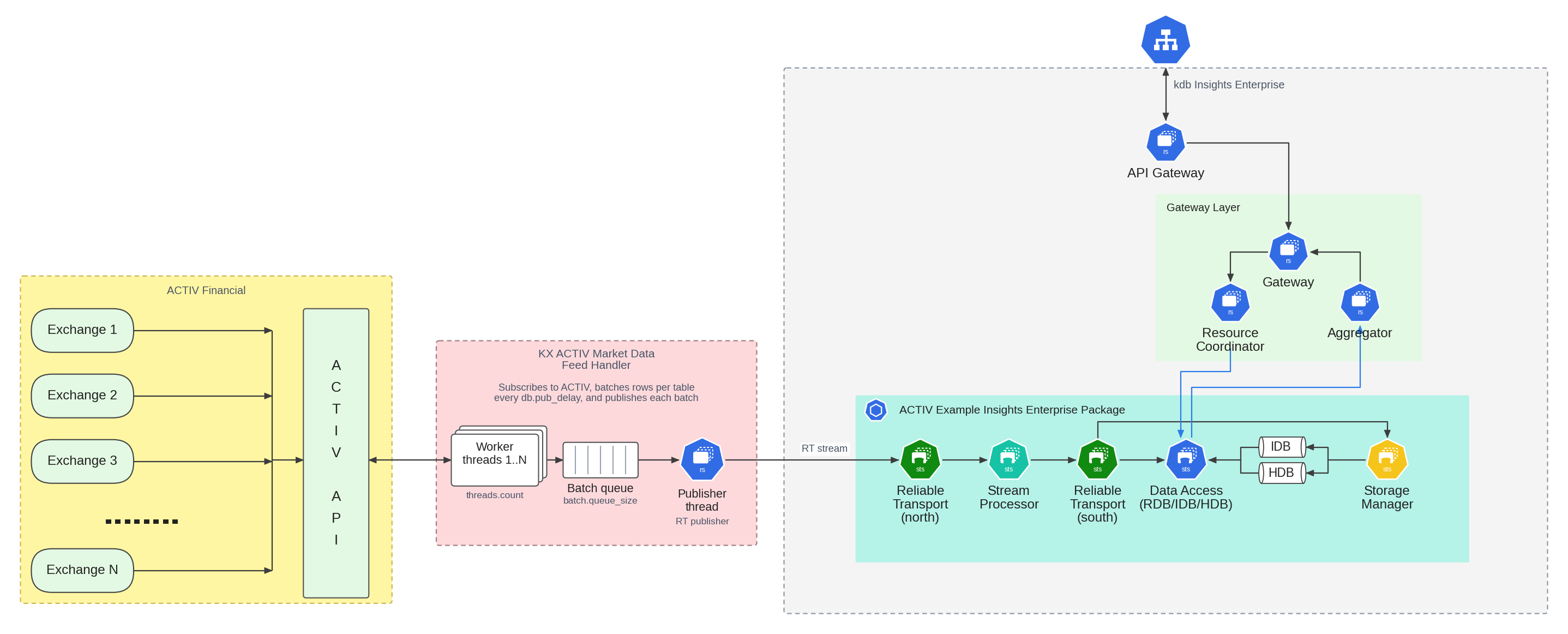
The feed handler runs as a Kubernetes StatefulSet in the same Kubernetes namespace as kdb Insights Enterprise. It publishes ACTIV updates to the ingest stream north in kdb Insights Reliable Transport (RT), the messaging layer that carries data between components. The stream processor reads from north and writes the processed data to the stream south, and the storage manager and data access services store the data from south.
The following diagram shows how the feed handler publishes to kdb Insights Enterprise:
Prerequisites
Before running the ACTIV Feed Handler on kdb Insights Enterprise, make sure you have the following:
- kdb Insights Enterprise is installed.
kxiCLI is installed.helmCLI is installed.- Command line access to the Kubernetes cluster where your kdb Insights Enterprise install is running.
- Login credentials for the ACTIV feed (host, user ID, and password).
- Login credentials for portal.dl.kx.com.
Set up Kubernetes secrets
Create a secret containing your credentials for the KX Docker registry portal.dl.kx.com:
kubectl create secret -n <insert kubernetes namespace> docker-registry regcred --docker-username=<insert registry username> --docker-password=<insert registry password> --docker-server=portal.dl.kx.com
Download the feed handler Helm chart
The Helm chart for the ACTIV Feed Handler is available on KX's public chart repository. Add this repository to your local Helm configuration by running the following:
helm repo add kx-ext https://portal.dl.kx.com/assets/helm --username <insert portal username> --password <insert portal password>
Update the repository to load the latest available charts:
helm repo update kx-ext
Use helm search to list the available versions of the ACTIV Feed Handler:
helm search repo kx-ext/rt-activ-pub
Select the latest version of the chart from the list of versions, and then download it:
helm fetch kx-ext/rt-activ-pub --version <insert latest version> --untar --devel
Note
Replace <insert latest version> with the latest version of the rt-activ-pub chart, for example 1.15.3.
This downloads and untars the rt-activ-pub chart in your current working directory.
Configure the feed handler
The default configuration for the ACTIV Feed Handler is in the values.yaml file. To modify this configuration, create a copy, as follows:
cp rt-activ-pub/values.yaml my-values.yaml
Edit my-values.yaml to configure the feed handler.
Key sections in this configuration file include:
activ
Contains the settings for configuring the ACTIV Feed Handler. For detailed information on each setting, refer to the ACTIV configuration documentation. Ensure the following settings are correct:
| Setting | Description |
|---|---|
host |
The ACTIV server hostname. |
userId |
Your ACTIV user ID. |
pass |
Your ACTIV password. |
subscription |
What to subscribe to. With enableQueries: "false", list plain symbols separated by spaces, for example "SHEL.L POW.TO". With enableQueries: "true", list ACTIV queries separated by ; with no spaces, for example "symbol=SHEL.L;symbol=POW.TO". Queries can use wildcards, for example "symbol=GOOGL*". See Subscriptions. |
enableQueries |
Set to "false" to subscribe to plain symbols. The chart default is "true", which reads each ;-separated entry as an ACTIV query. The chart default for subscription is a space-separated list of plain symbols, so change one of the two settings. |
subscriptionFile |
Set to /tmp/kxfeed_activ/symbols.txt. The startup script writes the subscription entries to symbols.txt in tmpConfigDir (/tmp/kxfeed_activ by default), but the chart default for subscriptionFile points to a different file, so subscription has no effect unless you change this setting. |
pubDelay |
The publish delay in milliseconds. The default is 100. Set to 0 to turn batching off. |
For example, to subscribe to SHEL.L and every symbol that starts with GOOGL:
activ:
  subscription:     "symbol=SHEL.L;symbol=GOOGL*"
  enableQueries:    "true"
  subscriptionFile: "/tmp/kxfeed_activ/symbols.txt"
Warning
pass is stored in my-values.yaml in plain text. Keep this file out of source control and restrict who can read it.
stream
In a kdb Insights Enterprise deployment, the ACTIV Feed Handler publishes data to an RT stream.
| Setting | Description |
|---|---|
sinkName |
Set this to the name of the RT stream for publishing. For example, set it to rt-activ-example-package-activ-north for the example package in Deploy a kdb Insights Enterprise app below. |
The chart default is rt-activ-assembly-north, which doesn't match the example package, so you must change it.
rt
The rt section configures the RT publisher inside the feed handler. For detailed information on each setting, refer to the RT settings. The defaults are suitable for most deployments.
persistence
The RT publisher stores its local log files on a Persistent Volume Claim (PVC). Set storageSize to a value that suits the volume of data you expect to ingest. See persistence.
imagePullSecrets
The imagePullSecrets section lists the names of the secrets required to pull the feed handler image. Add the secret created in Set up Kubernetes secrets:
imagePullSecrets:
  - name: regcred
Deploy a kdb Insights Enterprise app
To get started with ingesting and querying ACTIV market data, download the example kdb Insights Enterprise package by running the following:
export BEARER=<your bearer token>;\
version=1.15.3;\
curl -L -O --oauth2-bearer "$BEARER" https://portal.dl.kx.com/assets/raw/kxi-activ-fh/${version}/activ-example-package-${version}.kxi
Portal login
Downloads from the KX portal need a login. Sign in at portal.dl.kx.com, select your email address in the top right to open Token Management, and select Add New Bearer Token. Set BEARER to that token before you run the command. Use the token for downloads from your own machine only, not in a deployment.
Use this package as the base to build your own new package, or take elements from it and integrate them into an existing package.
To deploy the package, run the following commands:
kxi pm push activ-example-package-1.15.3.kxi
kxi pm deploy activ-example-package/1.15.3
In this example, the package expects the default ACTIV Feed Handler configuration. Change only the configuration fields discussed in Configure the feed handler.
Deploy the feed handler
Deploy the ACTIV Feed Handler using the my-values.yaml file created and edited in the Configure the feed handler section.
For the feed handler to publish successfully to the activ-example-package, my-values.yaml must have sinkName: rt-activ-example-package-activ-north under the stream: section.
helm install rt-activ-pub rt-activ-pub -f my-values.yaml -n <insert namespace>
Check that the feed handler is running:
kubectl get pods -n <insert namespace> | grep activ
The pod rt-activ-pub-0 shows 1/1 Running.
Query the data
After you deploy the activ-example-package and the ACTIV Feed Handler, kdb Insights Enterprise stores the data in the package's activdb database, in the following tables:
| Table | Contains |
|---|---|
quote |
Best bid and offer quotes. |
trade |
Trades. |
cancor |
Trade cancellations and corrections. This table fills only when ACTIV sends a cancellation or correction, so it is often empty. |
The columns match the published tables. The pipeline in the package also adds an updateTS column with the time each row was ingested.
Query the tables with any of the kdb Insights Enterprise query methods, for example the Preview API in the web interface with quote, trade, or cancor as the table name.
If no data appears, check that the market is open for your symbols. A subscription returns an initial snapshot at any time, but trades and quotes arrive only while the market is trading.
View the feed handler logs
View the ACTIV Feed Handler logs using kubectl:
kubectl logs rt-activ-pub-0 -n <insert namespace> | less
The feed handler also writes its own log to the path set by activ.logFile in values.yaml. The default is /tmp/kxfeed_activ.log inside the container, which isn't on the PVC, so the file is lost when the pod restarts. The RT publisher logs are separate. They are stored on the PVC under rt.logPath.
Tear down the feed handler
To tear down (uninstall) the ACTIV Feed Handler, run the following command:
helm uninstall rt-activ-pub -n <insert namespace>
Kubernetes sends the process a SIGTERM and waits for a grace period (about 30 seconds) before it stops the pod.
Tear down the example package
To tear down the activ-example-package, run:
kxi pm teardown activ-example-package/1.15.3
To delete all data associated with the package, run:
kxi pm teardown --rm-data activ-example-package/1.15.3
Warning
The --rm-data flag erases all data in the specified package's database. Use with caution.