Deploy the ACTIV Market Data Feed Handler with a ticker plant
This page details how to run the KX ACTIV Market Data Feed Handler with a kdb+ ticker plant and real-time database (RDB) in Docker Compose and query the data.
The ACTIV Feed Handler streams real-time market data from the ACTIV One Platform. In ticker plant mode, it publishes to a kdb+ ticker plant (tick.q), which logs the updates and passes them to an RDB.
ACTIV ticker plant process overview
To configure and deploy the feed handler with a ticker plant and query the data it publishes, complete the following tasks:
- Prerequisites
- Images
- Configure the example
- Deploy the example
- Query the data
- View the logs
- Tear down the example
Architecture
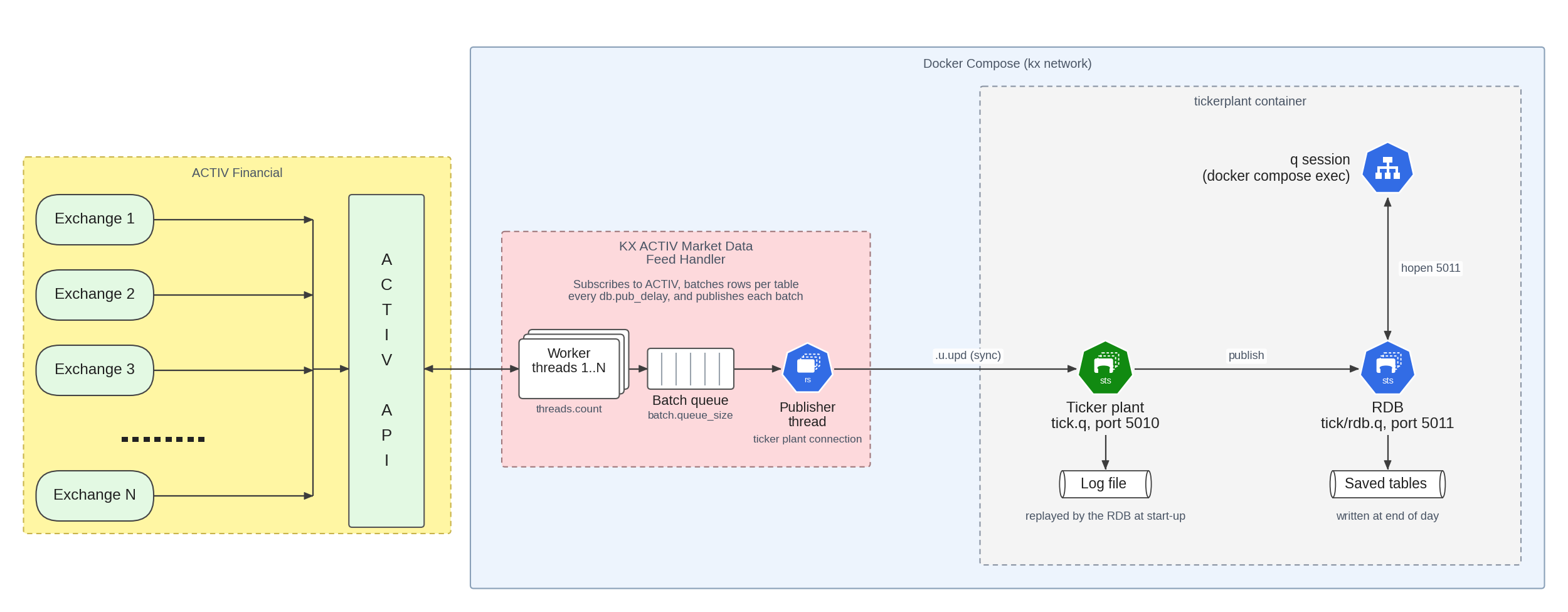
The deployment runs two containers in Docker Compose on a shared kx network:
tickerplantrunstick.qon port5010and an RDB (tick/rdb.q) on port5011.feedrunskxfeed_activ, connects to the ticker plant, and publishes updates by calling.u.upd.
The following diagram shows how the feed handler publishes through the ticker plant:
Prerequisites
Before running the ticker plant example, make sure you have the following:
- Docker is installed.
- Docker Compose is installed.
- You have login credentials for the ACTIV feed (host, user ID, and password).
- You have a kdb+ installation for Linux (64-bit), with a license file.
Images
The compose file runs two images, which the env-tickerplant file names with the DB_IMAGE and FEED_IMAGE variables. The defaults are q_img and activ_img. The compose file uses the latest tag of each image, so the images must be available locally with that tag.
| Variable | Container | Image |
|---|---|---|
FEED_IMAGE |
feed |
The ACTIV Feed Handler image. For the download location, see the release notes. |
DB_IMAGE |
tickerplant |
An image that runs bash. The container doesn't use a q installation from the image. It runs /home/insights/q/l64/q from your kdb+ installation, which the compose file mounts from q/, with the license mounted from lic/. |
Configure the example
Within the docker_compose directory, copy your kdb+ installation into q/ and your license file into lic/:
cp -r <path to your kdb+ install>/. q/
cp <path to your license file> lic/
The directory must contain the following:
| Path | Purpose |
|---|---|
docker-compose-tickerplant.yaml |
The Docker Compose file for the ticker plant and the feed handler. |
env-tickerplant |
The settings for both containers. |
cfg/kxfeed_config-tickerplant.json |
The ticker plant connection settings. |
config/SymbolAM-1.txt |
The symbols to subscribe to, separated by spaces or newlines. |
config/eventToTable.json |
The mapping of ACTIV event types to tables. |
schema.xml |
The tables published by the feed handler. |
TickerPlant/ |
The tick.q scripts and table definitions (tick/sym.q). |
q/ |
Your kdb+ installation (it must contain l64/q and q.k). |
lic/ |
Your kdb+ license file. |
Update the env-tickerplant file with the following:
- Set
KXFEED_ACTIV_AOP_HOST,KXFEED_ACTIV_AOP_USERID, andKXFEED_ACTIV_AOP_PASSWORDto your ACTIV host, user ID, and password. - Set
DB_IMAGEandFEED_IMAGEto the names of your images, as described in Images. - Add the symbols you want to subscribe to in
config/SymbolAM-1.txt, separated by spaces or newlines. To use wildcards such assymbol=GOOGL*, turn on query mode as described in Subscriptions.
Note
To enable publishing to a ticker plant, ensure "isTickerPlantConnect": 1 is set in the dbConfigFile. This setting is present in cfg/kxfeed_config-tickerplant.json, along with "tickerPlantConnectHost": "tickerplant", "tickerPlantConnectPort": 5010, and "tickerPlantFunction": ".u.upd".
Deploy the example
Load the settings and deploy the example from the docker_compose directory:
source ./env-tickerplant
docker compose -f docker-compose-tickerplant.yaml up
Query the data
The example schema.xml defines one table, g_quote, and config/eventToTable.json maps the trade, quote, correction, cancellation, open, close, and auction event types to it. Each ACTIV field in g_quote is a column named c<fid>, for example c12 for ACTIV field ID (FID) 12. The eventType column shows which kind of update each row is. The mapping file also lists quote, trade, and other tables, but the schema doesn't define them, so the feed handler doesn't publish to them and those tables in the RDB stay empty.
The compose file doesn't publish the ticker plant ports to the host, so query the RDB from inside the tickerplant container. Start a q session in the container:
docker compose -f docker-compose-tickerplant.yaml exec tickerplant /home/insights/q/l64/q
Connect to the RDB:
q)h:hopen 5011
You can then query the data by running the following:
q)h"count g_quote"
q)h"select from g_quote where sym=`SHEL.L"
q)h"select count i by eventType from g_quote"
The RDB tables are defined in TickerPlant/tick/sym.q, and the published columns in schema.xml. To publish to other tables, define them in both files with the same columns. The ticker plant adds the time column.
View the logs
The feed handler writes its log to the log/ directory. To follow the container output, run the following:
docker compose -f docker-compose-tickerplant.yaml logs -f feed
At info level, the log shows Subscribed to <symbol> for each symbol, or Query subscribed to <query> if enableQueries is true. It also shows Assigning symbol <symbol> to <thread> for each subscription, followed by Distributed <n> symbols across <m> worker threads. The env-tickerplant file in the example sets the log level to debug, which also logs REFRESH received for <symbol> for each initial snapshot.
If the tables stay empty, check that the market is open for your symbols. A subscription returns an initial snapshot at any time, but trades and quotes arrive only while the market is trading.
Replay accounts
The env-tickerplant file in the example sets KXFEED_ACTIV_AOP_HOST to an ACTIV replay environment. The data is a recorded earlier session that is replayed at the same time of day as the original, so you receive updates only during the market hours of the recorded session.
Tear down the example
To stop and remove the containers, run the following:
docker compose -f docker-compose-tickerplant.yaml down