Pipeline units
A pipeline is a directed acyclic graph (DAG) of nodes (readers, writers and operators). Within that graph, a pipeline may contain several units - independent, connected sub-graphs that can each be monitored and rolled on their own schedule. This applies to every kind of pipeline - q, Python and Web UI pipelines all compose into the same DAG structure.
What are units?
A unit is a set of nodes that are connected to one another, directly or indirectly, through joins and splits. Two nodes belong to the same unit if there is a path between them in the pipeline graph, regardless of the direction of that path.
A single pipeline can contain multiple disconnected units when it has more than one independent data flow. For example, the following pipeline has two units: one realtime unit flowing from Feed and Reference through to Subscriber, and a completely separate batch flow from Files to Database.
graph LR
    subgraph Realtime
    Feed --> Join
    Reference --> Join
    Join --> Subscriber
    end
    subgraph Batch
    Files --> Transform
    Transform --> Database
    end
    Subscriber --- Files
    linkStyle 5 stroke:none,stroke-width:0px
Because Feed, Reference, Join and Subscriber are connected, they form one unit. Files, Transform and Database form a second, disconnected unit.
Units, terms and rolls
Each unit progresses through a series of terms. A term is a period of continuous processing for a given unit: it is initiated when the unit starts or a roll occurs, and ended by the next roll.
- When a unit starts, it begins its first term.
- A roll ends the current term and starts a new one, with an incremented term ID.
- While a term is active, the nodes within the unit process data and accumulate progress (files read, offsets consumed, records processed, and so on) against that term.
- Rolling gives external clients a way to orchestrate checkpoints and flushes across a unit, for example rolling a unit once a batch of files has been fully read so that a downstream database writer flushes what it has buffered to disk.
Rolls are usually initiated by an external client through the REST API - a unit does not roll itself automatically. A node can also refuse to roll: a file reader with files still queued to process, or a writer with a pending direct write that has not yet been acknowledged, will prevent the unit from rolling until it is safe to do so. See canRoll below.
Write triggering
Write triggering predates units and is not synchronized with terms and rolling: a triggered write lands mid-term, unattributed to any term boundary. In a pipeline orchestrated through units, roll the unit instead - a roll performs the same flush at a well-defined term boundary.
States
Each node within a term reports a state, and each term has a state derived from its nodes:
| State | Meaning |
|---|---|
notStarted |
The pipeline has not started processing yet. |
running |
Processing data. |
finishing |
Rolled away from, but still completing asynchronous work - for example a direct-write database writer waiting for its write to be acknowledged. |
finished |
All work complete. |
errored |
A node failed while finishing the term. |
A term is errored if any of its nodes has errored, running while any node is still running, and finished only once every node has finished. Only previous terms can be finishing, this is a special status indicating the term is waiting for async work to complete - i.e. awaiting confirmation that a direct write session has finished ingesting data. A unit's state is that of its current term.
Progress
While a term is running, each unit surfaces the status of the nodes within it. Progress is reported per node and its shape depends on the node type, for example:
- a file reader reports the files it has processed and the files still queued
- a Kafka reader reports offsets/sequence numbers per partition
- a writer reports the number of requests or records it has processed
This progress is available through the terms API for the currently running term. The previous term for a unit will be reported, in a finished or errored state, or it may still be finishing an asynchronous task. The progress is not reported for a previous term.
Naming units
Each unit is given a name, deterministically derived from the nodes it contains, so that a client can know the unit name ahead of time without querying the pipeline:
- if the unit contains one or more reader nodes, the unit name is the name of the first reader node, alphabetically
- otherwise, the unit name is the name of the first node of any other type, alphabetically
graph LR
    subgraph left["ingest"]
    ingest["ingest (reader)"] --> join["join (operator)"]
    poll["poll (reader)"] --> join
    join --> sub["sub (writer)"]
    end
    subgraph right["filter"]
    filter["filter (operator)"] --> sink["sink (writer)"]
    end
    sub --- filter
    linkStyle 4 stroke:none,stroke-width:0px
The left unit above resolves to ingest: it has two readers, ingest and poll, and ingest sorts first alphabetically - the operator and writer are not readers, so they're not considered. The right unit has no reader nodes at all, so it falls back to the first node of any type, alphabetically: filter sorts before sink, so the unit is named filter.
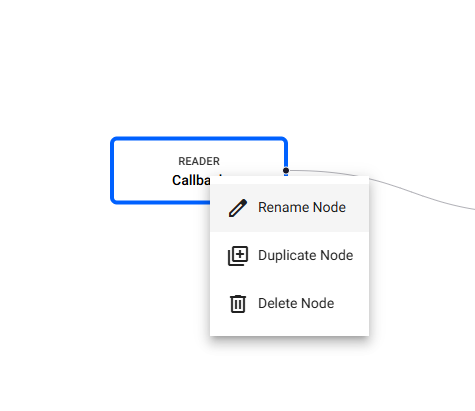
This means giving a node an explicit name is the most reliable way to give a unit a predictable name. A node can be named at the point it is added to the pipeline:
.qsp.read.fromCallback[`pub; .qsp.use enlist[`name]!enlist `callback]
sp.read.from_callback('pub', name='callback')
Right-click the node and select Rename.
q and Python APIs
Within the pipeline process itself, units can be inspected and rolled directly:
| Operation | q | Python |
|---|---|---|
| List units in the pipeline | .qsp.getUnits[] |
sp.get_units() |
| Get active terms for a unit | .qsp.getUnitTerms[unitId] |
sp.get_unit_terms(unit_id) |
| Get status for a specific term | .qsp.getUnitTerm[unitId; termId] |
sp.get_unit_term(unit_id, term_id) |
| Roll a unit | .qsp.rollUnit[unitId; termId] |
sp.roll_unit(unit_id, term_id) |
These return the same information as the REST API below. See the general API reference for signatures and examples.
REST API
Units, terms and rolls are exposed through both the SP Coordinator and, for pipelines running in kdb Insights SDK in Docker, the SP Controller. The Coordinator API is scoped by pipelineId and requires authentication; the Controller API talks directly to a single pipeline's controller.
| Operation | Controller | Coordinator |
|---|---|---|
| List units in a pipeline | GET /units |
GET /pipelines/{pipelineId}/units |
| Get active terms for a unit | GET /units/{unitId}/terms |
GET /pipelines/{pipelineId}/units/{unitId}/terms |
| Get status for a specific term | GET /units/{unitId}/terms/{termId} |
GET /pipelines/{pipelineId}/units/{unitId}/terms/{termId} |
| Roll a unit | POST /units/{unitId}/rolls |
POST /pipelines/{pipelineId}/units/{unitId}/rolls |
Full request/response schemas are available in the Controller and Coordinator OpenAPI references.
Listing units
GET /units (Controller) or GET /pipelines/{pipelineId}/units (Coordinator) returns the units in the pipeline, along with the URL to fetch each unit's terms:
[
  {
    "id": "unit-left",
    "nodes": ["A", "B", "C", "D"],
    "termsUrl": "/units/unit-left/terms"
  },
  {
    "id": "unit-right",
    "nodes": ["E", "F", "G"],
    "termsUrl": "/units/unit-right/terms"
  }
]
Getting terms for a unit
GET /units/{unitId}/terms returns the active terms for a unit. Normally a unit has a single current term. While a roll is in progress, it will also have a previous term that is finishing:
{
  "unitId": "unit-left",
  "state": "running",
  "canRoll": true,
  "currentTermId": 42,
  "previousTermId": 41,
  "workers": [
    {
      "worker": "worker-id",
      "state": "running",
      "canRoll": true,
      "currentTermId": 42,
      "previousTermId": 41,
      "terms": [
        {
          "termId": 42,
          "role": "current",
          "state": "running",
          "canRoll": true,
          "startedAt": "2026-06-25T10:15:00Z",
          "endedAt": null,
          "nodes": {
            "A": { "state": "running", "canRoll": true, "completedFiles": ["input-a-001.parquet"], "completedCount": 1, "currentFile": "", "queuedFiles": [], "queuedCount": 0 },
            "D": { "state": "running", "canRoll": true }
          }
        },
        {
          "termId": 41,
          "role": "previous",
          "state": "finishing",
          "canRoll": false,
          "startedAt": "2026-06-25T09:00:00Z",
          "endedAt": "2026-06-25T10:15:00Z",
          "nodes": {
            "A": { "state": "finished", "canRoll": false, "completedFiles": ["input-a-000.parquet"], "completedCount": 1, "currentFile": "", "queuedFiles": [], "queuedCount": 0 },
            "D": { "state": "finishing", "canRoll": false }
          }
        }
      ]
    }
  ]
}
GET /units/{unitId}/terms/{termId} returns the same shape for a single term, and is useful for polling a finishing term after a roll has been accepted without having to re-fetch the whole unit.
canRoll and when a unit can roll
Every node reports its own canRoll flag: false if the node currently refuses to roll (for example, a file reader with queued files still to process, or a database writer with a pending direct write that hasn't been acknowledged), true otherwise. Nodes that don't implement a roll check simply default to true. A node that has finished, and every node in a previous term, reports canRoll: false.
The term's canRoll flag is the AND of the canRoll of every node in that term that hasn't finished - it is true only when every live node agrees the unit is safe to roll. A finished branch doesn't block a roll of the rest of the unit, but once every reader in a unit has finished, the term reports canRoll: false, since there is no live source left to roll. The unit-level canRoll mirrors the canRoll of its current term. A term with role previous always reports canRoll: false, since only a unit's current term can be rolled.
Rolling a unit
Rolling is not just bookkeeping: the roll cascades through the unit's nodes from the readers downward, and each node acts on it. Windows flush their buffered records downstream, so they are emitted within the closing term; a direct-write database writer ends its write session, handing the staged data to the database for ingestion; readers reset their per-term progress. Progress and rolling behavior by node type lists what each node type does.
To roll a unit, call the roll API and give it the term you want to roll from:
curl -X POST http://localhost:6000/units/unit-left/rolls -d '{"fromTermId":42}'
Because the request identifies the term to roll from, rolling is idempotent - if the request is retried after the roll has already been accepted, it will not cause a second roll from an already-finishing term.
A successful roll returns a 202 immediately, without waiting for the rolled-from term to complete, along with URLs for tracking both terms:
{
  "unitId": "unit-left",
  "fromTermId": 42,
  "toTermId": 43,
  "state": "accepted",
  "message": "Roll unit signal sent to all 1 worker(s).",
  "finishingTermStatusUrl": "/units/unit-left/terms/42",
  "currentTermStatusUrl": "/units/unit-left/terms/43",
  "unitTermsStatusUrl": "/units/unit-left/terms"
}
The returned URLs are relative to the API being called: the Controller returns /units/... paths as above, while the Coordinator prefixes them with /pipelines/{pipelineId}. Prepend the base URL of the service - in kdb Insights Enterprise, https://<hostname>/streamprocessor.
The response's state is always accepted: the roll is signalled to the pipeline's workers, and its outcome is observed by polling the returned term URLs. In most cases every node completes the rolled-from term immediately and it reaches finished; a node may instead need to wait for an external event or condition - for example a direct-write database writer waiting on a completion callback - leaving the term finishing until that work completes. Once a roll is accepted:
- the term that was rolled from (
fromTermId) stops accepting new work and remainsfinishinguntil its asynchronous work completes - a new term (
toTermId) is created immediately and becomes the unit's current term, ready to accept new work - while the previous term is
finishing, the unit cannot be rolled again - its current term reportscanRoll: false
A refused roll returns a 409 with the reason: the given term is not the unit's current term, or the unit cannot currently roll - a node refused via its roll check, the previous term is still finishing, or every reader in the unit has finished.
Forcing a roll
Eventually a finishing term should reach a terminal finished or errored state. If it never can - for example a direct write whose completion callback was lost across a restart - the unit would otherwise be stuck. Pass force to roll anyway:
curl -X POST http://localhost:6000/units/unit-left/rolls -d '{"fromTermId":42, "force":true}'
Forcing overrides only that one gate: the stuck term is abandoned and its nodes' outstanding work is discarded, so only use it when the term can never drain on its own. All other rejections still apply. See Roll Unit for the full force documentation.
Progress and rolling behavior by node type
Different node types report different progress fields alongside the common state and canRoll. The tables below list every node type with unit-specific behavior, by category; a node not listed reports only its state, never refuses a roll, and does nothing when its unit rolls.
Readers
| Reader | Progress | Rolling behavior |
|---|---|---|
| File, Amazon S3, Google Cloud Storage, Microsoft Azure Storage, Parquet (v1 and v2) | completedFiles, completedCount, currentFile, queuedFiles, queuedCount |
Refuses while a file is being read or files are queued. Completed files reset on roll. |
| Database | lastRead, requestsRun, records, inFlightRequests |
Refuses while a query is in flight. Counters reset on roll. |
| Expression | lastRead, requestsRun, records |
Counters reset on roll. |
| HTTP | lastRead, requestsRun, totalPayloadLength, lastUrl, lastStatus, inFlightRequests |
Refuses while a request is in flight. Counters reset on roll. |
| HTTP upload | lastRead, numUploads, totalPayloadLength |
Counters reset on roll. |
| Kafka | offsets (per partition) |
Offsets are absolute stream positions, so they are not reset on roll. |
| PostgreSQL, SQL Server | lastRead, requestsRun, records |
Counters reset on roll. |
| Stream (v1 and v2) | lastMessageTime, position |
Positions are absolute stream offsets, so they are not reset on roll. |
Writers
| Writer | Progress | Rolling behavior |
|---|---|---|
| Database (streaming) | lastSequenceNumber |
Sequence numbers are absolute, so they are not reset on roll. |
| Database (direct write, v2) | lastSequenceNumber, sessionID, directory, partitions, tables |
On roll, closes the current write session and remains finishing until the database has ingested it. While finishing, the unit cannot be rolled again (without forcing). |
| Amazon S3 | paths: per destination path, partsUploaded, bytesWritten, objectsCompleted, lastWrite, open |
Counters reset on roll; idle destination paths are dropped. |
| Stream (v1 and v2) | lastSequenceNumber |
Sequence numbers are absolute, so they are not reset on roll. |
| Subscriber | lastPublish, publishCount, records |
Counters reset on roll. |
Operators
| Operator | Progress | Rolling behavior |
|---|---|---|
| Apply | activeTasks |
Refuses while asynchronous tasks are in progress. |
| Merge | leftBuffered, rightBuffered, leftReceived, rightReceived, lastLeftReceived, lastRightReceived, lastMerge |
Buffered counts and timestamps are not reset on roll. |
Windows
| Window | Progress | Rolling behavior |
|---|---|---|
| Count, global, sliding, timer, tumbling | bufferedRecords |
Buffered records are flushed downstream as the unit rolls, so they are emitted within the rolled-from term. |
File readers and idleness
All of the file readers report the same progress fields:
completedFiles- the files fully read in the current termcurrentFile- the file currently being read, or empty when the reader is idlequeuedFiles- the files waiting to be readcompletedCountandqueuedCount- the total completed and queued files
To bound the payload size, the completedFiles and queuedFiles lists are capped at KXI_SP_QUEUE_REPORT_LIMIT paths (default 10, see configuration); the counts are never capped.
A file reader refuses to roll while it has a current file or a non-empty queue. An idle reader - empty currentFile and a queuedCount of 0 - has drained every file it has seen, so for a watching reader this together with canRoll: true is the signal that a batch has been fully read and the unit can be rolled.
See also
- Pipeline units walkthrough - an end-to-end demo rolling a unit made up of an S3 reader and a direct-write database writer