Pipeline Units
This page walks through rolling a pipeline unit end-to-end, using the weather sample package's Amazon S3 reader and direct-write database writer.
For background on what units, terms and rolls are, and the full REST API reference, see Pipeline units.
Deploy the weather sample package and drive its two units - ingest (an S3 reader direct-writing into a database) and query (a database reader direct-writing a downstream table) - directly through the units REST API.
The example assumes the following prerequisites:
- access to the KX Downloads Portal
- a username and bearer token for the portal saved in your terminal session as
$KX_USERand$KX_DL_BEARERrespectively - a running kdb Insights Enterprise system with the hostname URL stored as
$KX_HOSTNAME - the relevant version of the sample from here saved as
$KX_VERSION - you have the CLI configured for your deployment with authentication credentials
For more information on the CLI:
Downloading the sample
You can download the sample with the command below.
export KX_PKG=weather
curl -s --fail-with-body -D /dev/stderr -u ${KX_USER}:${KX_DL_BEARER} -L -OJ https://portal.dl.kx.com/assets/raw/package-samples/${KX_VERSION}/${KX_PKG}-${KX_VERSION}.kxi
View the unpacked package.
kxi package unpack $KX_PKG-$KX_VERSION.kxi
The pipeline spec is written in q and is located under weather/src/ingest.q in the unpacked package.
The pipeline
The weather package's ingest pipeline is made up of two disconnected units:
ingest: .qsp.v2.read.fromAmazonS3[SOURCE; REGION;
        .qsp.use `mode`chunking`watch`name!(`binary; `auto; 1b; `ingest)]
    .qsp.decode.csv[SCHEMA; .qsp.use `schemaType`header!(`schema; `first)]
    .qsp.transform.schema[SCHEMA; .qsp.use enlist[`schemaType]!enlist `schema]
    .qsp.v2.write.toDatabase[`weather; DB; .qsp.use enlist[`directWrite]!enlist 1b];

query: .qsp.read.fromDatabase[.qsp.use `uda`trigger`name!(
        (`.demo.WeatherRange; `startTS`endTS!(2016.04.21D09:35:00; 2026.04.21D09:41:00)); `api; `query)]
    .qsp.map[ma5]
    .qsp.v2.write.toDatabase[`ma5; DB; .qsp.use enlist[`directWrite]!enlist 1b];

.qsp.run (ingest; query);
Because neither unit's nodes are connected to the other's, they roll independently:
ingestwatches an S3 prefix, decodes and schemas each CSV file, and direct-writes rows into theweathertable. It has no automatic trigger to end a batch - a client must roll the unit once the expected files have landed.queryonly reads on demand (triggered by REST API) by calling the.demo.WeatherRangeUDA, then writes the result into database'sma5schema. A client must trigger its read, wait for the read to complete, and roll the unit so the writer flushes.
graph LR
    subgraph pipeline["Weather"]
        subgraph left["ingest"]
            ingest["ingest (S3 reader)"] --> transform["Transform"]
            transform --> write1["Database (weather)"]
        end
        subgraph right["query"]
            query["query (database reader)"]
            query --> map["Map"]
            map --> write2["Database (ma5)"]
        end
        write1 --- query
    end

    linkStyle 4 stroke:none,stroke-width:0px
The walkthrough below drives both units through this sequence:
sequenceDiagram
    participant Client
    participant Ingest as ingest unit
    participant DB as Database
    participant Query as query unit

    Ingest->>Ingest: read, decode and transform S3 files
    Ingest->>DB: direct-write rows (weather)
    Client->>Ingest: roll unit
    Ingest->>DB: end write session
    DB->>DB: ingest weather data

    Client->>Query: trigger read
    Query->>DB: call .demo.WeatherRange UDA
    DB->>Query: weather data
    Query->>Query: map to ma5
    Query->>DB: direct-write rows (ma5)
    Client->>Query: roll unit
    Query->>DB: end write session
DB->>DB: ingest ma5 dataDeploying
Authenticate with kdb Insights Enterprise and deploy the sample package.
Cleaning up resources
Make sure to teardown any previously installed version of the package and clean up resources before deploying a new version.
kxi auth login
kxi pm push $KX_PKG
kxi pm deploy $KX_PKG
Monitoring and rolling the ingest unit
Obtain the token generated when you authenticated against the system.
export KX_TOKEN=$(kxi auth print-token)
export KX_PIPELINE_ID=weather-ingest
Note
If this token expires, you can regenerate it by running kxi auth login again and restoring with the command above.
List the pipeline's units and confirm ingest is present:
curl -H "Authorization: Bearer $KX_TOKEN" \
  "${KX_HOSTNAME}/streamprocessor/pipelines/${KX_PIPELINE_ID}/units"
Poll the unit's current term until it has processed at least one file and reports canRoll: true:
curl -H "Authorization: Bearer $KX_TOKEN" \
  "${KX_HOSTNAME}/streamprocessor/pipelines/${KX_PIPELINE_ID}/units/ingest/terms"
Once files have been processed, roll the unit off its current term - identify the term to roll from with currentTermId from the response above:
curl -H "Authorization: Bearer $KX_TOKEN" -X POST \
  "${KX_HOSTNAME}/streamprocessor/pipelines/${KX_PIPELINE_ID}/units/ingest/rolls" \
  --header "Content-Type: application/json" \
  -d '{"fromTermId": 0}'
Poll the rolled-from term until it reaches finished - this is when the direct write to the weather table has completed:
curl -H "Authorization: Bearer $KX_TOKEN" \
  "${KX_HOSTNAME}/streamprocessor/pipelines/${KX_PIPELINE_ID}/units/ingest/terms/0"
Triggering and rolling the query unit
The query unit only reads when triggered. Trigger its reader:
curl -H "Authorization: Bearer $KX_TOKEN" -X POST \
  "${KX_HOSTNAME}/streamprocessor/pipeline/${KX_PIPELINE_ID}/admin/triggerRead?opIDs=query"
Poll the unit's current term until requestsRun has incremented and no request is in flight:
curl -H "Authorization: Bearer $KX_TOKEN" \
  "${KX_HOSTNAME}/streamprocessor/pipelines/${KX_PIPELINE_ID}/units/query/terms"
Roll the unit so the write to ma5 is flushed, then poll the rolled-from term until it is finished, exactly as with ingest above:
curl -H "Authorization: Bearer $KX_TOKEN" -X POST \
  "${KX_HOSTNAME}/streamprocessor/pipelines/${KX_PIPELINE_ID}/units/query/rolls" \
  --header "Content-Type: application/json" \
  -d '{"fromTermId": 0}'
Automating with Apache Airflow
Instead of driving the two units by hand as in the two sections above, the package ships a pair of Airflow DAGs (dags/ in the unpacked package) that poll progress and roll each unit automatically, with Apache Airflow standing in for a REST API client.
Start from a clean deployment
If this package - or the manual walkthrough above - has already been run against this deployment, tear it down and redeploy before running the DAGs. The ingest unit's file watcher and both units' terms will already have advanced, and the DAGs expect to start from a unit's first term.
Requires Python 3.10-3.14, Apache Airflow 3.x (standard provider) plus requests, and a kxi-authenticated CLI on the Airflow host.
export AIRFLOW_HOME=~/airflow
mkdir -p ${AIRFLOW_HOME}/dags
cp ${KX_PKG}/dags/*.py ${AIRFLOW_HOME}/dags/
airflow standalone     # Web Interface on http://localhost:8080
Open the Web Interface on http://localhost:8080. The login credentials will be stored in ${AIRFLOW_HOME}/simple_auth_manager_passwords.json.generated.
The two DAGs:
| DAG | Role |
|---|---|
sp_file_reader_orchestration |
wait for files → roll ingest unit → wait for drain → trigger sp_uda_orchestration |
sp_uda_orchestration |
trigger the query unit's read → wait for it → roll its term → wait for drain |
DAG parameters
Each parameter can be set per-run in the trigger form, or defaulted via an Airflow Variable (the environment variable included in the grid below shows how to set that Variable at deploy time):
| Parameter | Default | Airflow Variable | Environment variable |
|---|---|---|---|
insights_url |
(none, required) | sp_insights_url |
AIRFLOW_VAR_SP_INSIGHTS_URL |
pipeline_id |
weather-ingest |
sp_pipeline_id |
AIRFLOW_VAR_SP_PIPELINE_ID |
unit_id (sp_file_reader_orchestration) |
ingest |
sp_unit_id |
AIRFLOW_VAR_SP_UNIT_ID |
uda_unit_id (sp_uda_orchestration) |
query |
sp_unit_id |
AIRFLOW_VAR_SP_UNIT_ID |
insights_url has no default - export AIRFLOW_VAR_SP_INSIGHTS_URL on the Airflow host (or set the sp_insights_url Variable in the UI) before triggering either DAG, otherwise require_insights_url fails the run. Use ${KX_HOSTNAME}/streamprocessor, the same base URL used in the curl commands above.
In the Airflow UI, unpause both DAGs and trigger sp_file_reader_orchestration:
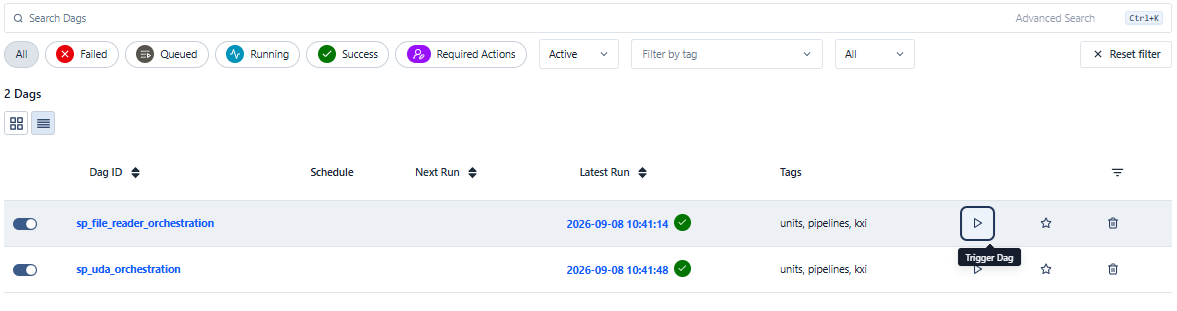
Clicking trigger opens the run form, where the parameters above can be set for the run:
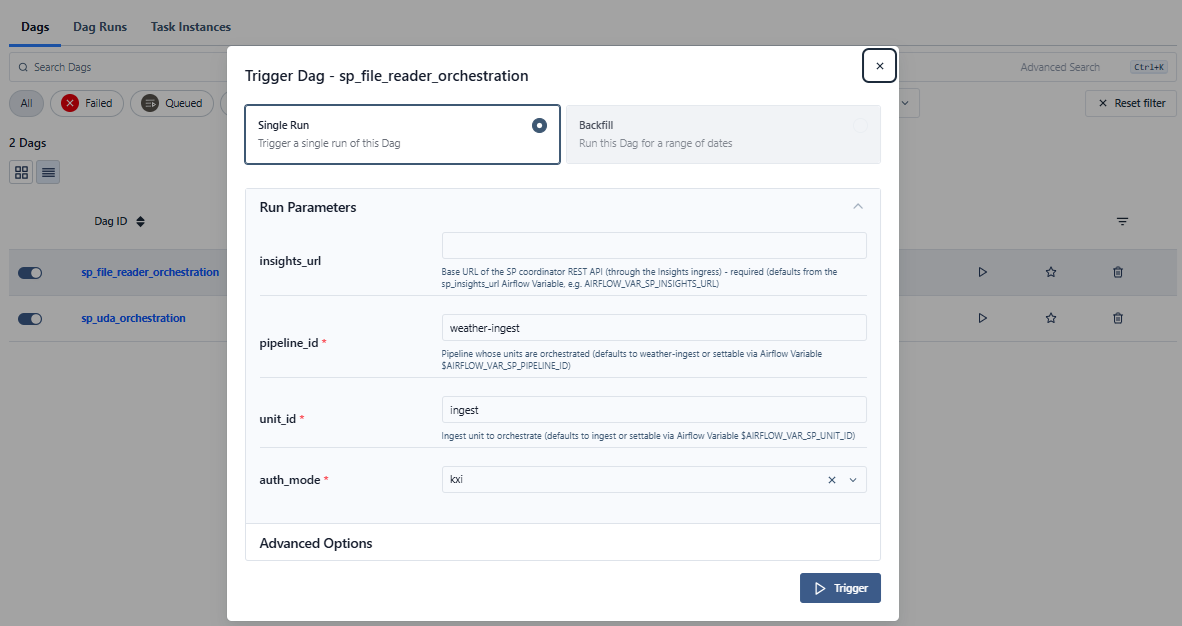
The DAG polls the ingest unit's progress, rolls its term once files have landed, then hands off to sp_uda_orchestration, which drives the query unit and lands rows in ma5 - the same end result as the manual steps above.
Querying the results
Once both units have rolled, query the ma5 table to retrieve the persisted data.
curl -H "Authorization: Bearer $KX_TOKEN" -X POST "${KX_HOSTNAME}/servicegateway/data" \
  --header "Content-Type: application/json" \
  --header "Accepted: application/json" \
  -d '{table: "ma5", startTS: "2022-07-28T00:00:00.0", endTS: "2022-07-29T00:00:00.0"}' | jq .
For more information on querying data, refer to Database Query Interface.
Teardown
Tear down the package and data using the command below.
kxi pm teardown --rm-data $KX_PKG
Further Reading
- Pipeline units - what units, terms and rolls are, and the full units REST API
- Stream Processor APIs