getRef
Reference Data Services: Get static reference data
Syntax: getRef parms
Where parms is a dictionary of parameters, returns static reference data from in the security master, which is updated daily with data from various sources.
applyFilter Custom filtering calendarType Timing corAxType Corporate actions type dataType R Data type endDate End date identifier R Date set startDate Start date symList R Specific columns systemDate System date
Parameters
List of instruments
Key         **symList**     _required_
Value       current instrument ID as symbol atom or vector

Examples    \`VOD.L
            \`VOD.L\`6758.T
The instrument ID/s must correspond to the identifier (see below) or no data is returned. For example, setting symList to XLON and identifier to instrument will return no data.
Identifier
Key         **identifier**     _required_
Value       data set as a symbol atom
Valid       instrument  exchange

Example     \`instrument
The target data set for the query. Set identifier to exchange when setting datatype to calendar.
Start and end dates
The date column used depends on the type of reference data being requested:
table           date column used
--------------------------------
refData         date
coraxDividends  exDate
coraxCapChange  exDate
MICInfo         date
calendarRef     date
Data type
Key         **dataType**     _required_
Value       data type as a symbol atom
Valid       refData  corAx  calendar

Example     \`corAx`
Specifies the data subtype of the asset class to return.
The data types for getRef differ from those used with the other API functions.
refData    detailed information on the instrument
corAx      corporate actions the instrument has undertaken
calendar   dates and hours of trading venues
Start and end dates are required when the data type is corAx or calendar.
For calendar data:
- Set identifier to
exchangewhen data type iscalendar. - If data type is
calendarbutcalendarTypeis omitted, thenstartDateandendDateparameters are ignored and all raw calendar data are returned.
Apply filter
Key          **applyFilter**          optional
Value        list of operator/column/value tuples:
               operator: <> < > = >= <= within in and or ~ not
               column: column name as a symbol
               value: numerical, symbol or char atom or vector

Example      ((<;\`col1;42);(within;\`col2;50 100))

Default      no filtering
This parameter can also be used to apply custom filtering to getTicksand getStats.
Corporate actions type
Key         **corAxType**     _required_ if data type is corAx
Value       corporate actions type as a symbol atom
Valid       capChange  dividend

Example     \`capChange
Default     none
This parameter is required for data type corAx.
It indicates which type of corporate actions data to query.
System date
Key         **systemDate**     optional
Value       date atom

Example     2020.03.21
Default     .z.D
This parameter sets an ‘as of’ date for the query. Reference data is returned in the state that it was in as of that date: getRef ignores any subsequent data. The query first adds a filter for the system date, then adds a filter for any start and end dates set. If not set, it is assumed that you want the current reference data; i.e. as of the most recent date in the HDB.
Calendar type
Key         **calendarType**     optional
            **timing**           (alternative name)
Value       calendar type/s as a symbol atom or list
Valid       isOpen  openClose  nextDay  prevDay

Examples    \`nextDay
            \`prevDay\`nextDay
Default     none
Calendar type (also called the timing parameter) indicates which type of query to run against calendar reference data. Calendar type is only useful with a data type of calendar; if omitted, the raw calendar data will be returned.
Calendar type specifies:
isOpen     status of the venue
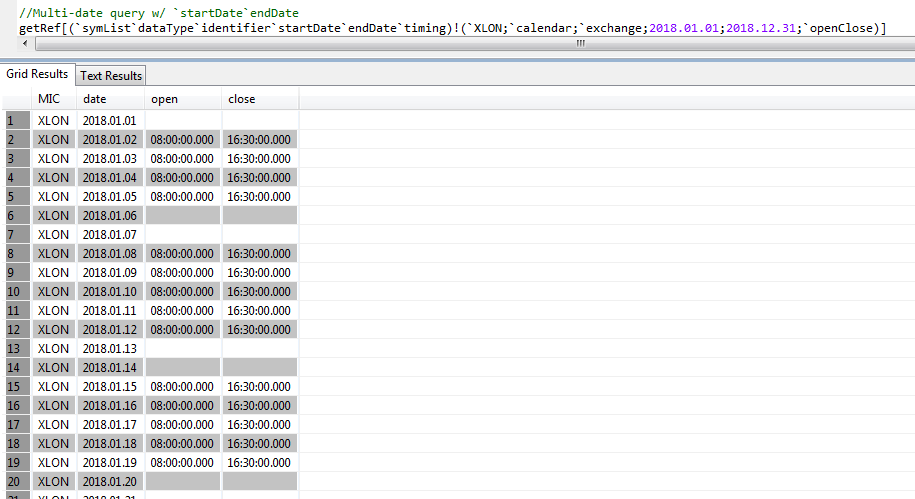
openClose  open and close times of the venue
nextDay    next date on which the venue is open
prevDay    the first date previous on which the venue is open
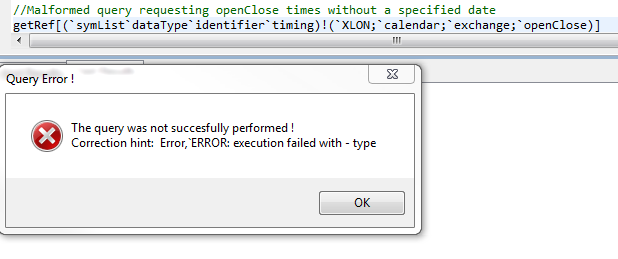
Multiple values may be set to retrieve any combination of the above. If calendar type is set, a date or date range must be specified; otherwise the system will signal an error. Dates can be specified as a single date or as a date range.
Calendar examples
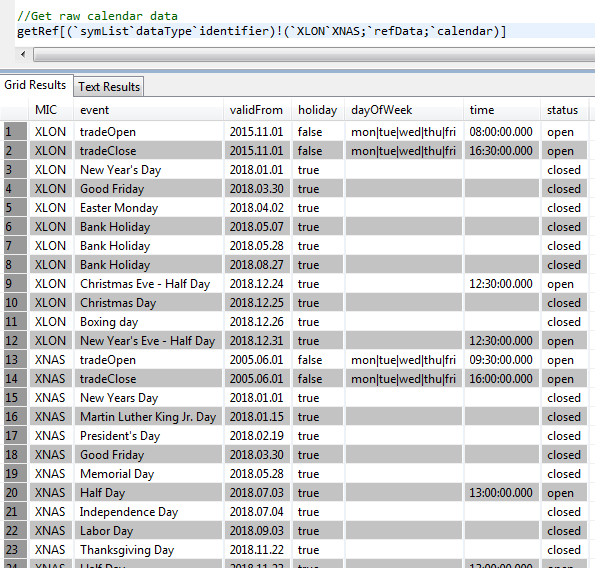
Raw calendar data for XLON and XNAS:
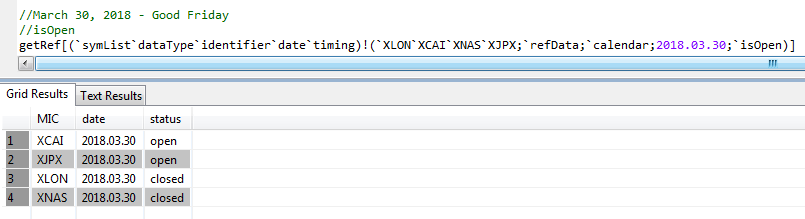
Open/closed status on Good Friday 2018:
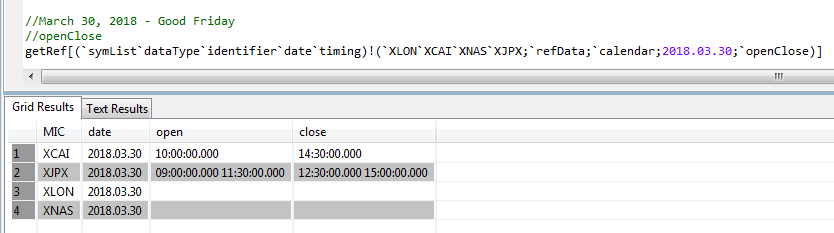
Open/close times. If the venue is closed, the values will be nulls:
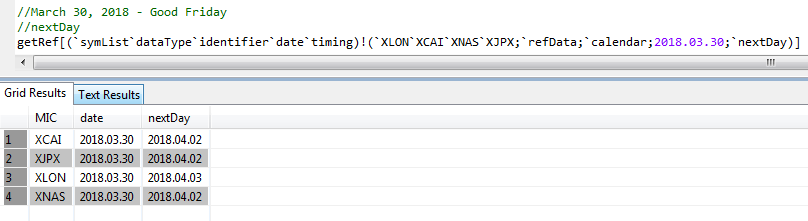
Next open day. The following Monday is a holiday for XLON.
Previous open day:
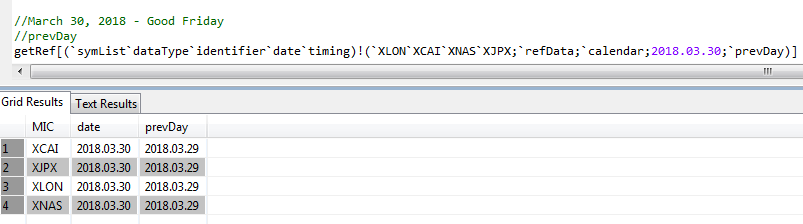
Multiple results with a list of timing values:

Multiple days using start and end dates:
Query failure when attempting to access open and close times without specifying a date or date range:
Examples
getRef[`identifier`dataType`symList!(`instrument;`refData;`VOD.L)]
Returns all reference data for VOD.L.
getRef[`identifier`dataType`symList`systemDate!(`instrument;`refData;`VOD.L;.z.d-2)]
Returns reference data for VOD.L as of two days ago.
getRef .[!]flip(
    (`identifier;`instrument);
    (`dataType  ;`refData);
    (`symList   ;`);
    (`systemDate;2020.03.29);
    (`sortCols  ;`asc`currency)
  )
Returns all of the reference data as of two days ago sorted by currency.
getRef .[!]flip(
    (`dataType  ;`corAx);
    (`identifier;`instrument);
    (`symList   ;`VOD.L);
    (`corAxType ;`dividend);
    (`startDate ;2015.01.01);
    (`endDate   ;2020.03.31)
  )
Returns Corporate Action Dividend data for VOD.L between the first of January 2015 and now.
getRef .[!]flip(
    (`dataType  ;`corAx);
    (`identifier;`instrument);
    (`symList   ;`VOD.L);
    (`corAxType ;`capChange);
    (`startDate ;2015.01.01);
    (`endDate   ;2020.03.31)
  )
Returns Corporate Action Capital Change data for VOD.L between 1st of January 2015 and today.
getRef[`identifier`dataType`symList!(`exchange;`refData;`XLON)]
Returns reference data for the XLON exchange
getRef .[!]flip(
    (`identifier  ;`exchange);
    (`dataType    ;`calendar);
    (`symList     ;`XLON);
    (`startDate   ;2018.01.01);
    (`endDate     ;2020.03.31);
    (`calendarType;`prevDay`openClose`nextDay)
  )
Returns calendar data for XLON between 1st of January 2018 and today.