Video
This page describes how to set up and configure the Video component, a container for video content.
Set Up Video
To set up a Video component, click-and-drag the component into the workspace and configure the following:
- Define the location of the .mp4 file in Video Source.
- If the video is to play on dashboard load, set Playing to
0.
Refer to Video properties described in the next section for details on additional properties.
Video Properties
The following sections provides details on how to configure the properties of the Video component.
Settings
Open the Settings properties on the right and configure the properties described in the following table.
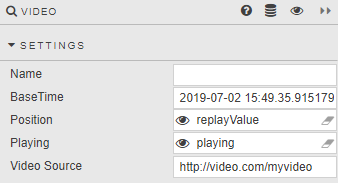
| Field | Description |
|---|---|
| Name | Enter a name for the component. |
| BaseTime | Date and time of first video frame. |
| Position | A timestamp of the current video frame mapped to a view state parameter. |
| Playing | Define for playback: 0 is static, 1 plays forward, -1 plays backwards. Multiples, e.g. 4, play at that speed multiplier. |
| Video Source | URL for video .mp4 file. |
Style, Margins, Format
Refer to Style for common settings.