Server Status
KX Dashboards Platform
This page applies to KX Dashboards on Platform and is not applicable to KX Dashboards Direct deployments.
This page describes how to set up and configure the Server Status component.
This is a small component which displays the connectivity status of a server, as shown here.

Server Status Properties
The following sections provides details on how to configure the properties of the Server Status component.
Basics
Open the Basics properties on the right and configure the properties described in the following table.
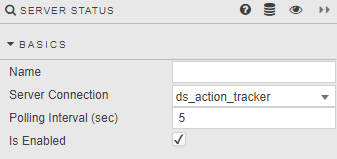
| Field | Description |
|---|---|
| Name | Enter a name for the component. |
| Server Connection | The connection to be monitored. |
| Polling Interval (sec) | Frequency of server updates. This is represented in the clock updates. |
| Polling Interval (readonly) | Display of the Polling Interval. |
| Is Enabled | When checked, the connection is monitored. |
Style
Refer to Style for common settings.